People can see me but mic crossed out, no sound with iSight in Face Time

Hi.

I have tried to use my iSight with Face Time for a while now. The mic crossed out, no sound with iSight in Face Time!

people can see me but can't hear me. iSight is selected in preferences and I see it reponding when I talk.

Please help.

W.W.

MAC PRO4.1 2x2.26 MHz, Mac OS X (10.7.1), 6 GB RAM

Posted on Sep 23, 2011 2:08 PM

Reply
29 replies

Sep 24, 2011 11:50 AM in response to Walter Wedler

You're welcome, W.W.


I am surpriseed if your iSight shows in FaceTime's "Microphone" menu section. If it does show there, I would think that your iSight's mic should work with your FaceTime.


(As noted in my earlier post: "Your available choices may be different depending on your system configuration.")


If none of the available mics you have work or sound good enough for your needs, you will need to consider a different mic when you want to use the current version of the FaceTime app.


I have successfully tested my Logitech USB Desktop Microphone with my FaceTime. As shown in the image below, it shows in FaceTime's "Microphone" section as "AK5370":


    User uploaded file


These mics are available for less than $30 USD from many suppliers, including the Apple Store:

http://store.apple.com/us/product/T6831LL/A


For this money, it is obviously not studio quality, but I have long used this desktop mic for good quality iMovie voiceovers. Part of the mic's sound improvement may result from the ability to position farther from computer fans and drive noises than built-in mics. The Logitech also offers good off-axis noise rejection. Unless you need a more expensive mic that offers higher quality audio, the Logitech USB mic may be worth considering.

Sep 23, 2011 3:44 PM in response to Walter Wedler

FaceTime for Lion (my current version is Version 1.1 (258)) does not recognize external iSights' Firewire mics.


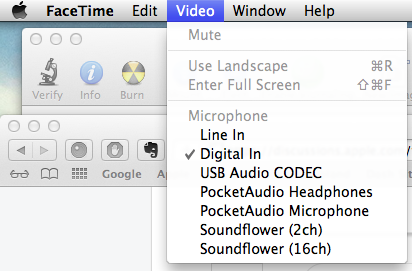
You will need to use a different mic connected via one of the methods that is recognized in your FaceTime's "Video" menu choices.


As an example ONLY, mine looks like the image below:


    User uploaded file


The "Line In" mic that I use is the USB mic that is built into my

MacPro's  LED Cinema Display.


Your available choices may be different depending on your system configuration. If you need help, your Apple retailer can help you select a mic that will work properly given your available system choices.

Sep 27, 2011 12:34 PM in response to donbo

I'd just like to add my voice to the discussion and state that we here are not guilty of complaining or niggling or nitpicking this issue. We are pointing out the obvious!


When the last OS version works...


User uploaded file


...and the current one does not...


User uploaded file


...and the most current advertising tells us it does...
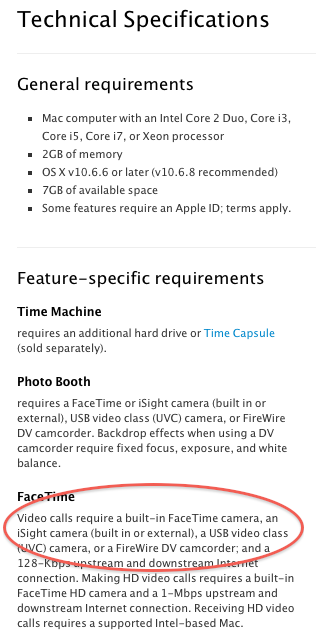

User uploaded file

...then it's not us who have screwed up!


We bought Apple products which Apple said would work together. In this case they don't.


Some understanding, humility and patience is admirable for all of us to practice, but this Lion grief just keeps on coming, doesn't it?


Now that Apple (which used to call itself "Apple Computer", remember?) has added millions of customers accustomed to IOS, they have chosen to hobble the computer side of their line with this new rushed-to-market operating system.


So, we discuss the problems here and offer solutions amongst ourselves. We submit reports to Apple (we've all done that, right?) to alert them of oversights and errors. We even buy products made by other manufacturers which seem to solve this Apple problem.


I appreciate how patient and understanding correspondents to this group are trying to be, but let's all remember that there was a time when Apple was not a music giant or telecom equipment maker.


The company I've given my custom for the last three decades was known for proudly and meticulously supporting the equipment and software they put their name on.


What I have seen from the company this summer has just made it harder and harder for guys like me to "evangelize" for the Apple computer. Maybe I should just become a little more like a Windows-using buyer of a shiny iPad and just demand that my purchase work like it's supposed to?


Not, it seems, that they will listen.

Feb 3, 2012 6:57 AM in response to Walter Wedler

Although not specifically mentioned in the About the OS X Lion v10.7.3 Update

article, Mac OS X 10.7.3 includes a new FaceTime Version 1.1.1 (301) that

allows use of external iSight mic.


Users of FaceTime 1.1.1 (301) can now select external iSight mic

in the FaceTime > Video command menu as shown here:


User uploaded file


Earlier versions' menus like that shown in the image at

http://discussions.apple.com/thread/3342985?answerId=16216615022#16216615022

did not include external iSight's Firewire mic in their "Microphone" lists.


Message was edited by: EZ Jim


Mac OSX 10.7.3               External iSights

Sep 26, 2011 6:26 PM in response to EZ Jim

EZ Jim:


Thanks for your reply and the Roaringapps link. While Face Time is listed there as having "some problems," ironically the referenced Apple OS X Lion "Website:"

http://www.apple.com/macosx/apps/

is headlined: "Apps that are ready for anything. So you are too." "Making video calls" is listed as a feature, and Face Time's icon is one of the seven app icons pictured.


You are right of course about "growing pains." With all the possible combinations of hardware and software, it's amazing that our devices work even half as well as they do - especially after major upgrades. Those of us with external iSight cameras are a very minor subset of Mac users and we still have another Apple-provided (and supported) video chat application to use while we wait for a possible software update. I promise to stop complaining.


Don

Dec 20, 2011 9:09 AM in response to Greenmanyyz

No toes harmed! 😉 I certainly did not intend to imply such.


I merely wanted to clarify (for all readers) the route Apple has provided for your direct input of comments and suggestions versus the user help provided per Apple Discussions Terms of Use.


I am sure you are right that some Apple people look at some posts here some of the time. However, although you get no direct response, by using the feedback link you can be certain that the responsible Apple people will see your input for consideration in FaceTime product development.


We will watch for your future posts. Shared experiences makes for valuable shared knowledge for all of us users. Thanks again.


Best regards,

EZ Jim


Message was edited by: EZ Jim

Sep 23, 2011 3:37 PM in response to Walter Wedler

Hi,

Can you confirm this is an External iSight ?

IF so what Adapter are you using ?


EZ Jim may follow this up due to Time Zone differences


User uploaded file
11:37 PM Friday; September 23, 2011

Please, if posting Logs, do not post any Log info after the line "Binary Images for iChat"


 G4/1GhzDual MDD (Leopard 10.5.8)
 MacBookPro 2Gb( 10.6.8)
 Mac OS X (10.6.8),
"Limit the Logs to the Bits above Binary Images."  No, Seriously

Sep 25, 2011 5:38 AM in response to EZ Jim

Hi and thank you for your patience EZ Jim!

(I go side-tracked with work.)


You were absolutely right with your clear info.

In FaceTime, Video under Microphone select the external USB Microphone

and you can do FaceTime with iSight including audio.


Instead of looking for my USB mic in FaceTime, Video, Microphone I opened

System, sound preferences where I usually select all things audio. My mistake.

W.W.

Sep 25, 2011 12:12 PM in response to Walter Wedler

Hi,


I see in the rest of this thread that EZ Jim sorted you in the right direction.


It is true that Volume in System Preferences > Sound > Input (Plus device choice) is as important ans selecting the Mic in the relevant app and generally speaking you need to set both.


It is true that iChat has improved in this area so that once Volume is set in System Preferences > Sound > Input for one device and that has been chosen in iChat the device in System Preferences can be changed to something else (iChat Remembers the Volume Setting for that "mic"). In earlier versions it do not do this.
As Face Time is a relatively new app I would guess it's Mic choices may not be that sophisticated yet (I only have one mic available to the MacBoo Pro I use and that is it's Internal Mic so I have not been able to test.)


Mics with 3.5 mm jacks tend not to work. These mics are what are called Lo Line In devices and don't produce enough "oomphh" for a Mac. (Mac's sound input requires a Hi Line In Device).

You could consider Hi Line In devices to be "Preamped" - a bit of a simplistic view that should get the point across.


User uploaded file
8:12 PM Sunday; September 25, 2011

Please, if posting Logs, do not post any Log info after the line "Binary Images for iChat"


 G4/1GhzDual MDD (Leopard 10.5.8)
 MacBookPro 2Gb( 10.6.8)
 Mac OS X (10.6.8),
"Limit the Logs to the Bits above Binary Images."  No, Seriously

Sep 25, 2011 6:34 PM in response to EZ Jim

I am back and I think I jumpt the gun!


My friend, I am trying to FaceTime with is away for the weekend. When I jus clicked his address in Face Time I saw that the mic on the bottom is still crossed out! That means he still can't hear me right?

I will post back after I try my friend tomorrow.


In the meantime I tried Ralph's suggestion of "Line In devices and don't produce enough "oomphh" for a Mac".

I pluged in my favorite pro high impedance Shure mic 565S I use for life performances. Same crossed out mic.😟

W.W.

Sep 26, 2011 7:54 AM in response to Walter Wedler

Walter Wedler wrote: ... Face Time ... mic on the bottom is still crossed out! ...😟...


Re-read the earlier suggestions, then check the following:


(0) Is your mic "muted" in >System Prefernces > Sound > Input? (lights should flicker when you talk)


(1) Is your FaceTime turned "On" in FaceTime > Preferneces?


(2) Is the Mic you want to use visible and selected with a ✓ in FaceTime's Video "Microphone" menu section?


(3 If your external mic has separate switch(es), check to see if it is switched off or to "standby"?


(4) Have you clicked the "crossed out" FaceTime mic iCon to be sure FaceTime is not muting your mic?


  Info in 's http://tinyurl.com/3kyays8


(5) If none of the above work, see your Retailer for help selecting a mic that works with FaceTime.

Sep 26, 2011 11:05 AM in response to EZ Jim

EZ Jim:


Thanks to you and Ralph for all the info. I have a mid-2010 Mac mini (OS 10.7.1) with an external iSight camera plugged into one of the Firewire ports on the rear of my A1081 Apple Display. My Face Time 1.1 (258) video works great but I don't show ANY mics in the "Video" menu, so of course I cannot transmit. The iSight mic, however, shows up and checks out fine in Lion's Sys. Prefs. and works normally when I do video chats with either Skype or iChat.


It seems to me that Apple is needlessly punishing Mac Pro and Mac mini Lion upgraders. I'm not a techie, but if the external iSight mic works under Lion with other applications, couldn't Apple update FT software to enable it to work with Face Time? I ordered the recommended Logitech USB mic ($22 at Amazon), but am not happy at having to do so. I realize that Firewire is on the way out and that external iSight cameras haven't been sold by Apple since 2006, but Mactracker shows that these cameras are still "supported."


Don

This thread has been closed by the system or the community team. You may vote for any posts you find helpful, or search the Community for additional answers.

People can see me but mic crossed out, no sound with iSight in Face Time

Welcome to Apple Support Community
A forum where Apple customers help each other with their products. Get started with your Apple Account.