
iMessage and FaceTime Activation process. Use your Phone number to send Message and Call FaceTime
I request you to go through the steps 4.1, 4.2, 4.3 & 4.4 again (the order is very important).
- If you get an error when trying to activate iMessage or FaceTime
- To use iMessage or FaceTime, you need to activate them on your iPhone, iPad, or iPod touch. If you see an error message during activation, follow these steps.
- When activating iMessage or FaceTime, you might see one of these messages:
- Waiting for activation
- Activation unsuccessful
- An error occurred during activation
- Could not sign in, please check your network connection
- Check your device settings
- Make sure that you’re connected to a cellular data or Wi-Fi network. If you're using an iPhone, you need SMS messaging to activate your phone number with iMessage and FaceTime. Depending on your carrier, you might be charged for this SMS.
- Go to Settings > General > Date & Time and make sure that your time zone is set correctly.
- Turn off and restart iMessage and FaceTime
- Go to Settings > Messages and turn off iMessage.
- Go to Settings > FaceTime and turn off FaceTime.
- Restart your device.
- Turn iMessage and FaceTime back on.
- Still not activated after a day?
- It might take up to 24 hours to activate iMessage and FaceTime. If the issue continues after 24 hours, follow these steps:
- Make sure that your device has the latest version of iOS.
- If you're using an iPhone, contact your carrier to make sure that you can receive SMS messages.
- Contact Apple Support.
Wait for some time for it to get it activated. You must have a SMS enabled cellular Plan to activate iMessage.
Watch the GIF below.
You should see as shown in the pic below
.
Once Activated you can activate FaceTime with the same Phone number
If you get an error when trying to activate iMessage or FaceTime ...
https://support.apple.com/en-us/HT201422
Turn on FaceTime
Open the FaceTime app and sign in with your Apple ID. You can also do this from Settings > FaceTime.
If you're using an iPhone, FaceTime automatically registers your phone number. To also register your email address on your iPhone, go to Settings > FaceTime > Use your Apple ID for FaceTime, and sign in with your Apple ID.
If you're using an iPad or iPod touch, register your email address by tapping Settings > FaceTime > Use your Apple ID for FaceTime, and sign in with your Apple ID.
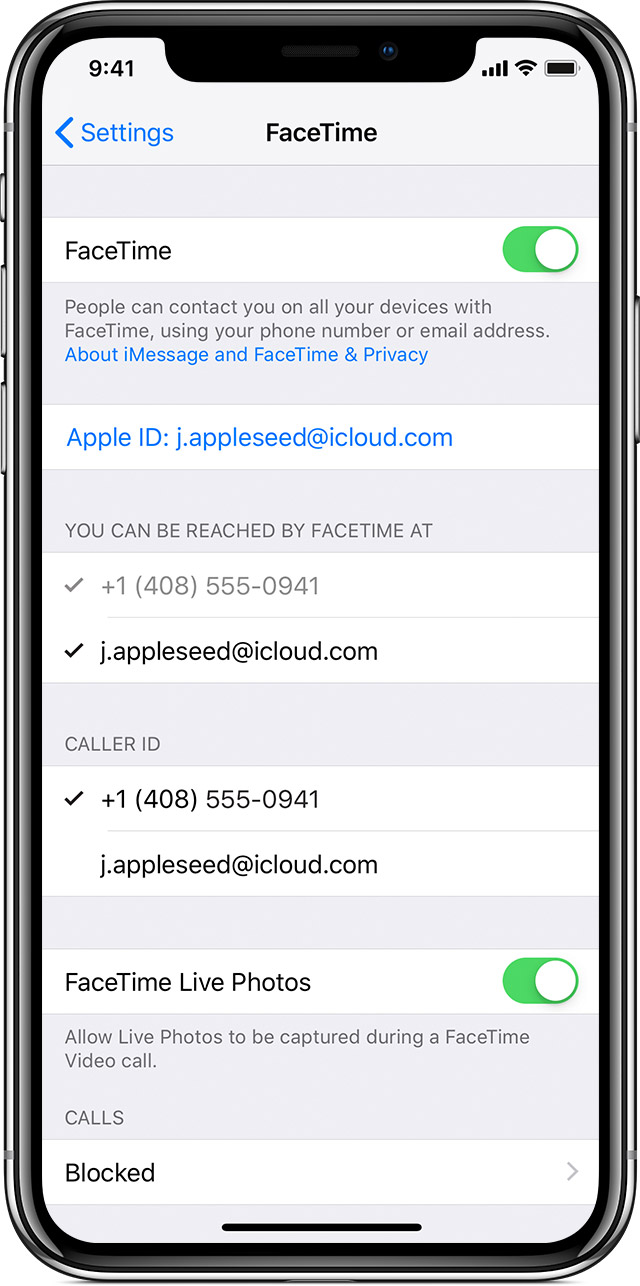
Then next step is 5.3
- If you're using an iPhone, contact your carrier to make sure that you can receive SMS messages.
That's it.
Use FaceTime with your iPhone, iPad, or iPod touch - Apple Support
https://support.apple.com/en-in/HT204380