
Photos on Catalina: If the Photos View vanishes from the Sidebar, check if the Mac is in Safe Mode
Several users reported in these forums, that the Photos album is missing from the sidebar in Catalina. I finally could reproduce the problem and could make the Photos View vanish on my Mac too. On my Mac the "Photos" View vanishes from the Library section of the sidebars, whenever I restart the MacBook Pro (13-inch, 2017) in Safe Boot Mode. Restarting the Mac in normal mode will bring the Photos View back.
If you restart the Mac and are seeing a red message about "Safe boot" on the login screen, the Mac has started in safe mode (Use safe mode to isolate issues with your Mac - Apple Support).
And when I then open my Photos Library, the Photos album is missing.
Restarting in Normal Mode will bring the Photos album back.
Sometimes it can happen, that a Mac is starting accidentally in Safe Mode, without us being aware of it. I am not sure, if it still possible in Catalina, but it can happen, if the Mac is starting up, before a bluetooth keyboard has been turned on.
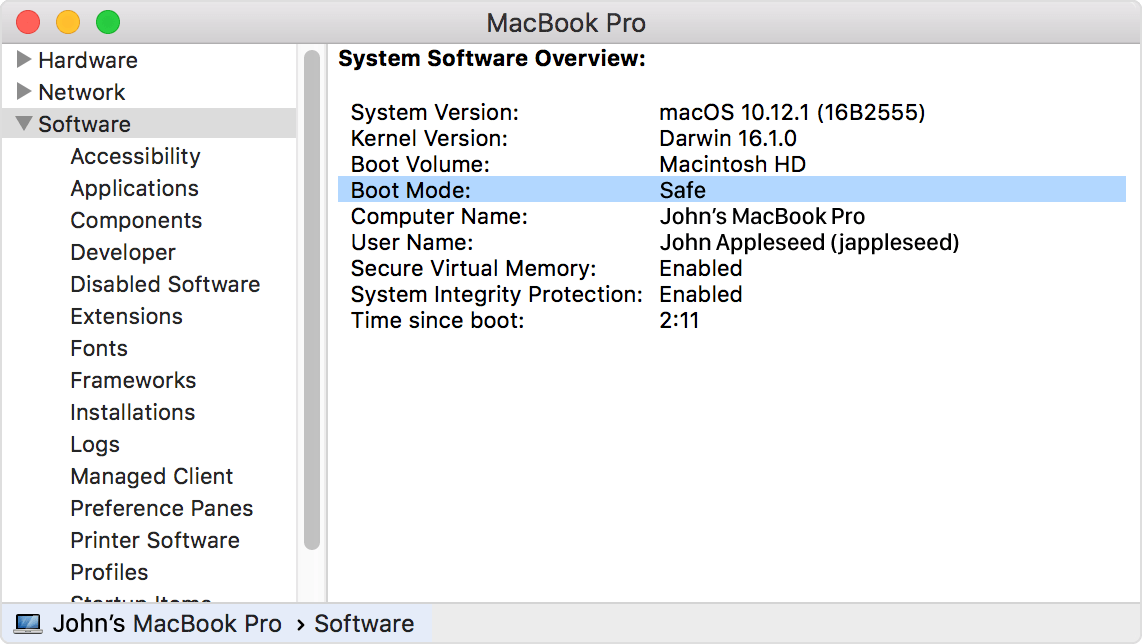
If you're not sure that your Mac is started in safe mode, you can use System Information to check. The Software section of System Information lists Boot Mode as "Safe" instead of "Normal" when you're started in safe mode. (https://support.apple.com/en-us/HT201262)
If the Mac is not in Safe Mode, but the Photos item is still missing, try to reset the NVRAM. It helped in a similar case as pointed out by user travellerva:
https://discussions.apple.com/thread/251542025?answerId=252980934022#252980934022
How to reset the NVRAM: Reset NVRAM or PRAM on your Mac – Apple Support