
New Itunes put my movies into the music category

Hi all.
I update the version of itunes. Since i have this new version, i have 2 problems:
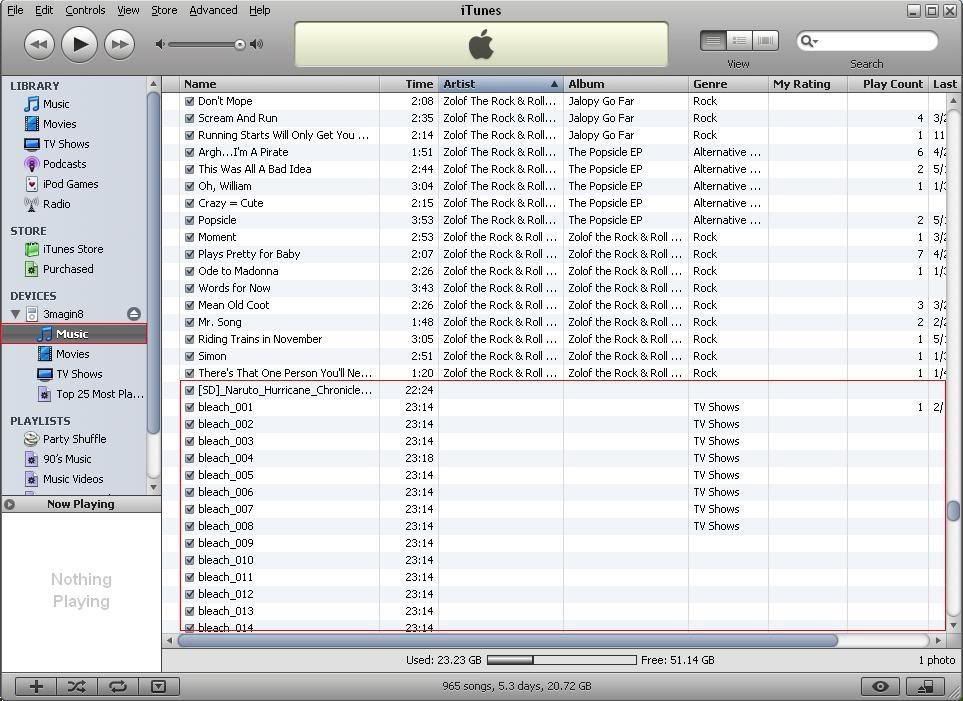
1) When i light my ipod, there is no movie into the "movie category". Instead they are into the "Music category" and i can't read them. How can i change that and put the film into the "Movie category", as before ?

2) When i add a new song into my Itunes library, it's good, i can read it, but after when i want to syncronize my ipod, the program tells me something like" Are you sure to syncronize that ? If you do, Itunes will delete your Ipod and update it with your Itunes library". As i don't want to maybe loose my songs, i cn't add new songs to my ipod! And it's the same problem with the photos and the movies !

Your help is required !
Thanks

P.S: sorry for my english, but I'm french so... 😀

Windows Xp, Windows XP
Posted on Jun 20, 2007 3:26 PM

Reply
13 replies

Jun 20, 2007 4:08 PM in response to Jose M

I'm going to tell you how do i do to put a movie on my ipod, it is the easiest.
I have to chage the format of the movie to put it on the ipod. For that, i use the program named "Videora Ipod Converter, that, when the file is converted, automatcly add it to my itunes library. After this conversion, the new format of the movies is MPEG-4.

But i think you didn't understood my problem. Before the update of itnues, i could watch my movies on my ipod. But maybe i cliced something where i haven't to, and now the movies are with the music, ad i can't watch them. It's my 1) problem.

Jun 20, 2007 4:35 PM in response to Frenchy_

I have this same problem:
http://discussions.apple.com/thread.jspa?threadID=1005153&tstart=0

Question:
Here what it looks like:
http://img.photobucket.com/albums/v519/CloudStrif3/ipodhlp.jpg

I tried to change it using "Get Info" but iTunes views it as a music file while in the music section and there's no way to change the video type because of that.

Please help me out!
I don't want to lose my videos.
Thanks.

Jun 20, 2007 4:38 PM in response to Jose M

First of all, thanks for your help 🙂
I'm going to try the link you gave me in French 😀
Then, you said "unless there is music/videos from other computers". It isn't the case, but if it was, how could i do to keep the musics/movies on my ipod ?

It's like when i put some photos on my ipod: i choose one file, the photos of that file go on the ipod, but when i want to add another file, it delete all the others files -_-.

On these questions, i go to bed, because in France it's 1h42 Am 🙂

Jun 20, 2007 6:47 PM in response to Frenchy_

First of all, thanks for your help 🙂
I'm going to try the link you gave me in French 😀
Then, you said "unless there is music/videos from
other computers". It isn't the case, but if it was,
how could i do to keep the musics/movies on my ipod
?

It's like when i put some photos on my ipod: i choose
one file, the photos of that file go on the ipod, but
when i want to add another file, it delete all the
others files -_-.

On these questions, i go to bed, because in France
it's 1h42 Am 🙂


hi this is really easily fixed .
open itunes,
click on the movies -tv programs u want to move
so they are highlighted
left click to 'get info'
click on video
click the down arrow in video kind: and select the catagory.
(Movie ,music video,Tv Show.

hope this helps......


Jun 21, 2007 3:47 AM in response to cloudstrif3

I had the same problem. Sounds like a bug to me. This is how I fixed mine;

Connect your IPod
Cick on the device name and you should see a Summary page
Click on the Music tab near the top of the screen
Click the button that says "Include music videos"
If you had the same problem with movies, click on that tab
Select "Sync movies"

Hope that helped.

This thread has been closed by the system or the community team. You may vote for any posts you find helpful, or search the Community for additional answers.

New Itunes put my movies into the music category

Welcome to Apple Support Community
A forum where Apple customers help each other with their products. Get started with your Apple Account.