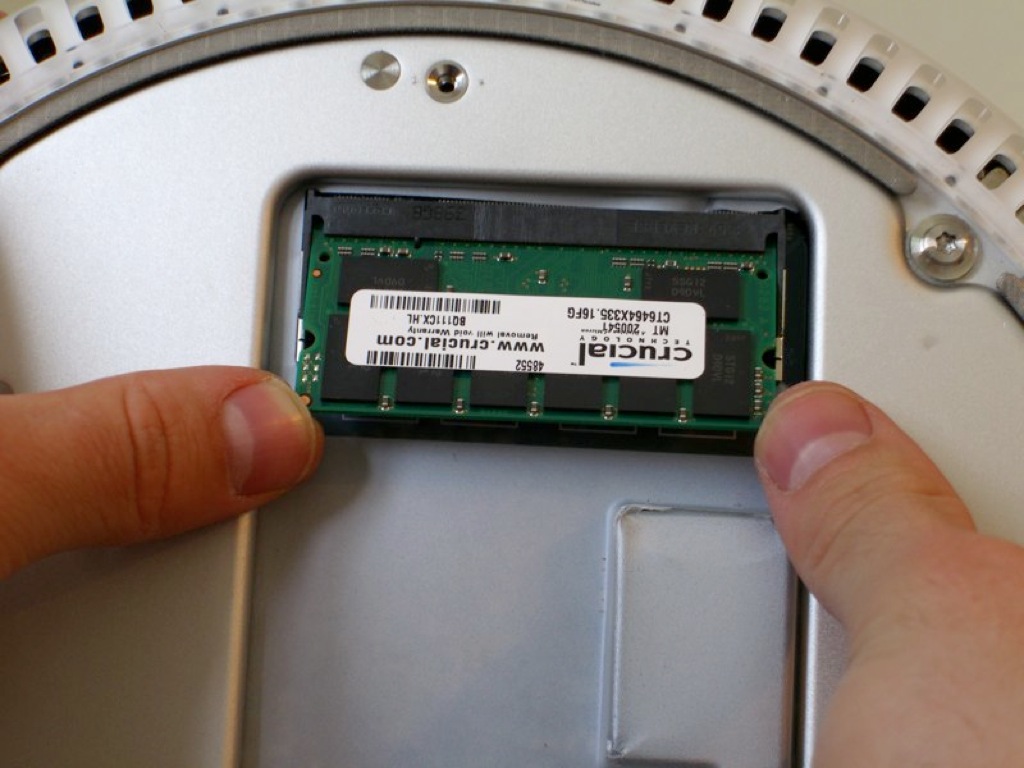
Upgrade my memory on IMac G4 17"

I am looking to upgrade my memory in my IMac G4 17" flat panel
I currently have 256. I have been getting different answers as to what I can do. I understand that there are two slots.! that is factory installed and I can not touch that, I assume that is where my 256 is. And another slot that I can upgrade, I belive this slot is empty.Can I put 1G in there ? Or is the max 512 ? Any help is greatly appreciated. My current information is below.

Thanks

DIMM0/J22:

Size: Empty
Type: Empty
Speed: Empty
Status: Empty

DIMM1/J20:

Size: 256 MB
Type: DDR SDRAM
Speed: PC2700U-25330
Status: OK

IMac G4 1.25 17" Flat, Mac OS X (10.4.10)

Posted on Sep 24, 2007 11:53 AM

Reply
31 replies

Sep 25, 2007 12:57 PM in response to AJDONN

Go for the 1GB. It works. I've had 1.5GB installed since September 2005.

User uploaded file

User uploaded file

Click to enlarge.


Some retailers are pedantic about sticking to Apple's specifications. Apple's specifications for the iMac G4 were written before 1GB DIMMs/SODIMMs were available. This situation applies to numerous Macs. For example, the iBook 466MHz listed in Duane's profile has a theoretical maximum of 320MB however the maximum is actually 576MB. The maximum for the iMac G4 17" 1.25GHz is 2GB.


cheers

mrtotes

Sep 25, 2007 2:13 PM in response to mrtotes

I see that you have the 20" model. On all the memory sites that I have been on, they distinguish between the 17" and the 20". Is there a difference when it comes to memory ? I will compare your screenshot to my specs when I get home tonight. I would love to go with the 1Gig if it will work. The rep that I was talking to at Crucial really did not help too much.Maybe I will try a "Mac Specialist"

Thanks for the help !!!!
I will do some more research when I get home, I bet there are a lot of people screaming at me right now ...."JUST BY THE MEMORY STUPID "
I just want to get the right stuff.

Sep 25, 2007 10:12 PM in response to AJDONN

Actually your 1.25GHz iMac and my 1.25GHz iMac are about as close as they come between difference iMac G4 models. I think only the LCD panel and the power-supply differ. The RAM is certainly the same.

I have the 1GB in my DIMM and the 512MB in my SODIMM slot, yours would be vice versa but it makes no odds. At the time I upgraded 1GB SODIMMs were unreasonably expensive in the UK.

mrtotes

Sep 28, 2007 1:52 PM in response to mrtotes

I found this on the crucial site.... this should work fine right ?


1GB, 200-pin SODIMM, DDR PC2700 memory module
CT12864X335
US $91.99
* Currency converter
* Module Size: 1GB
* Package: 200-pin SODIMM
* Feature: DDR PC2700
* Specs: DDR PC2700 • CL=2.5 • Unbuffered • NON-ECC • DDR333 • 2.5V • 128Meg x 64

Sep 28, 2007 2:29 PM in response to AJDONN

The 1024MB (1GB) RAM chip you seek is essentially the same hardware upgrade
chip used in the last models of the G4 iBook. I have the iBook G4 1.33 12" and
put a 1GB Samsung RAM chip inside. The same chip will work in my iMac G4 1.25.

The company I bought mine through, who shipped to my post office box (preferred)
has a variety of parts; not all of them show under "apple memory" but are correct.
Mine was the official Samsung/Apple chip part, last one shown here:
http://www.oempcworld.com/Merchant2/merchant.mvc?Screen=CTGY&Category_Code=PC270 0-SODIMM

(I tried hiding the URL, but it didn't work for some reason. Sorry if I broke forum rules in posting this!)

Sep 28, 2007 6:45 PM in response to K Shaffer

I put a Kingston 1 GB in. I do see a differenc in performance but when I look at the specs of my Imac Now it shows as below.It only shows 768
Does this matter ?


Machine Name: iMac
Machine Model: PowerMac6,1
CPU Type: PowerPC G4 (3.3)
Number Of CPUs: 1
CPU Speed: 1.25 GHz
L2 Cache (per CPU): 256 KB
Memory: 768 MB
Bus Speed: 167 MHz
Boot ROM Version: 4.6.8f4

Sep 28, 2007 11:33 PM in response to AJDONN

Well, there may be a problem in one or another areas; either the actual RAM capacity
of the original installed part in the non-user accessible slot is not fully working, or
the lower RAM slot you were able to access beneath the metal plate in the bottom
may have a pin or other defect that could be affecting the ability of the machine to read
the full capacity of the new 1GB chip you just installed.

For a time, this may not be a problem; but errors can occur in bizarre ways when you
start using a machine with memory errors. Sometimes, you can also get data errors
if the chips corrupt dataflow to and from the hard disk drive as it goes through the bus.

Under a load, when the computer starts stressing and uses hard drive free space in
as virtual memory, addition to the physical chip RAM the computer has in it, a RAM
defect may cause a phenomena known as a 'kernal panic' which may be a real problem
should this be related to some logicboard connection where the chip plugs into the board.

You may need to see if the Apple Hardware Test (a bootable test on an original iMac
disc which came with the computer) shows error messages and write them down for
reference. This may come in handy when talking to a repair shop about estimates or
before taking it in for a tech to further troubleshoot this mystery. If you no longer have
this bootable AHT disc - (it may be on a bootable partition of the original OS X installer
disc #1, not a physically separate CD or DVD; & requiring different boot method than a
startup with disc in the optical drive and holding the C key down) - ask the shop to do it.

This thread has been closed by the system or the community team. You may vote for any posts you find helpful, or search the Community for additional answers.

Upgrade my memory on IMac G4 17"

Welcome to Apple Support Community
A forum where Apple customers help each other with their products. Get started with your Apple Account.