RF Static on nearby devices

Anyone getting more RF static on nearby speakers and land-line phones with the update to boost the output volume?

I can barely keep my phone near my desk anywhere now without it doing the static pulse shimmy in a variety of speaker devices. It even comes through the land-line handset microphone and ear piece at a distance of 24+ inches away. The other party can hear the static and many have complained. I say "oh, its just my Apple iPhone". What else can you say.

It seems as if it has gotten worse. Cheers and thanks for any feedback (not static) you can provide.

Dell, Windows XP

Posted on Oct 16, 2007 3:24 PM

Reply
14 replies

Oct 16, 2007 3:48 PM in response to NorCal_Gadget

Thanks gents. Yeah, I have experienced this with other phones before at some level too. The iPhone (in my opinion) has the worst RF frequency noise yet. It is very strong.

Of course it is hard to move your phone 20 feet away from your active working desk. Hum, maybe a remote mini-screen that allows you to keep your phone yards away, use your bluetooth and still see who is calling! NOT!

Thanks again for validating the concern. I was afraid it was a bad phone.

Oct 16, 2007 4:25 PM in response to Woggledog

Good point. But gain is good when I am tripping down the road and need to get my call. Gain is not good when I am on my landline phone with a client and it has turned my conversation into what amounts to background chainsaw running while it pings the Edge connection and BT devices.

Again, this is not just an iPhone problem. I can say that it is the worst out of all of my GSM phones/PDAs. Some manage this better than others. I am just trying to work through it.

Thanks again for the info.

G'day.

Oct 16, 2007 4:39 PM in response to NorCal_Gadget

I very rarely notice any interference. I have a laptop and haven't noticed any thing, and at work I use two lcd displays, and never hear anything, and I keep my iPhone on my desk right next to my computer.

The only time I notice interference, is when I place the iPhone in the dock, and plug external speakers into the back. I have to put the phone in airplane mode to get the speakers to stop making noise. Other than that, it doesn't bother me on a daily basis.

Oct 16, 2007 5:15 PM in response to fitchnw

Interesting. I wonder if this is something that is localized to my phone or possibly the devices that are picking it up do not have the proper shielding or RF noise suppression. One is a PolyCom phone and the other is a PBX handset. S/B good. It is pretty bad though.

The other thing I am going to test is switching over to WiFi vs. keeping it sitting on the Edge. It seems like when it checks for new mail it does it. Wondering if WiFi would be better (or worse).

Thanks for the hope.

Oct 16, 2007 6:38 PM in response to NorCal_Gadget

This really has nothing to do with EDGE or WiFi. It's strictly a GSM thing.

This is not the perfect workaround, but when you are on your landline, you could always switch to "Airplane Mode". That will temporarily shut off the GSM.

Another trick would be to dock the iPhone with a non-certified device and answer "Yes" to switch to Airplane Mode. The advantage to that is that when your land call is over, you could simply remove the iPhone from the device and it would automatically switch out of Airplane Mode.

Hope this helps.

Regards,
-Peter

Dec 31, 2007 1:54 AM in response to NorCal_Gadget

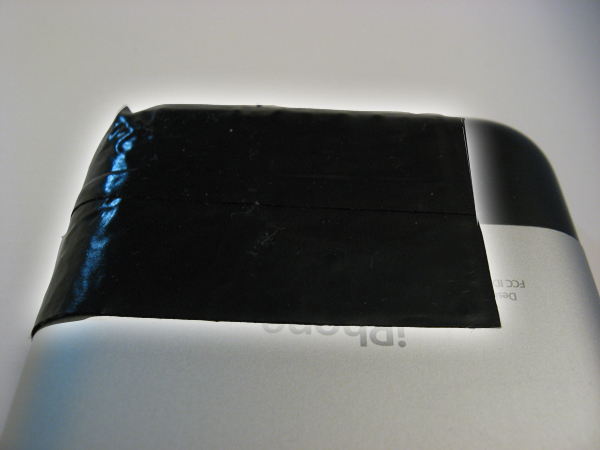
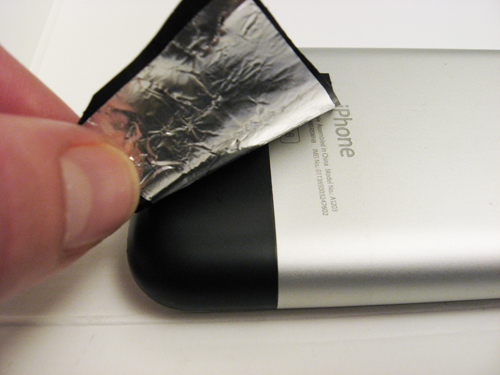
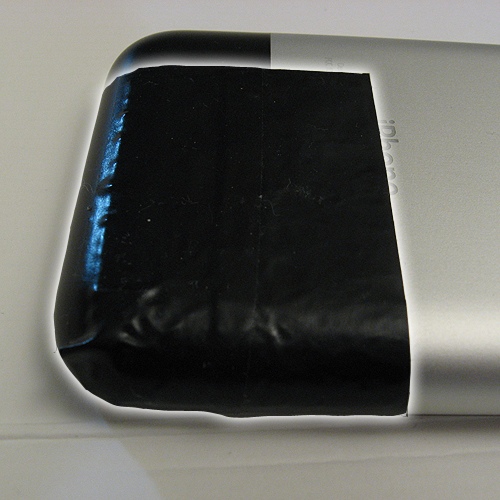
Found a solution!! I set out to find a solution today and to make a long story short, here's what I settled on: taping two small pieces of aluminum foil on the back of the iPhone in a specific location (pic 1):

1) Cut out a 2" x 3" piece of aluminum foil.
2) Fold foil in half horizontally (foil is now 2" x 1.5").
3) Tape foil from the bottom right corner (on the back of the phone) up to the middle of the text "iPhone" (pic 2, pic 3).
4) No more buzz/static/popping sounds coming out of your speakers!

Another solution, to avoid using tape (although electrical tape leave no residue what-so-ever on the iPhone), is simply placing the iphone on a sheet of aluminum foil. This might be a better idea for people experiencing this problem in a static environment rather than a car (i.e. iPhone on office desk with nearby computer speakers). After discovering this solution, I also saw another potential solution online, using aluminum foil wrapped around the audio cable coming out of the phone. I haven't tested that method, but it looks much more obtrusive.

For me, other materials didn't work (at least not perfectly). I also tried various sizes of aluminum foil in various locations - you could probably get by with a smaller amount of foil, but this amount works 100% (so far at least).

I guess it should also be noted this solution could potentially work for other GSM phones with this issue (i.e. blackberries, sidekicks) - you'll just have to experiment with the size of the foil and its location.

Hope this helps!
Brian Cometa

Dec 31, 2007 8:16 AM in response to bcometa

Every solution has it's consequences. That black area of the phone is the location of the antenna for the phone and bluetooth communications. Your solution works to keep the buzz out of local devices and may also keep your phone from connecting to the cell-phone network by blocking the transmit and receive function of your phone.

Using 'airplane mode' results in the same objective, but gives the added benefit of increasing battery life, not overall, but to next recharge. Admittedly in 'airplane mode' no phone calls received or automatic email checking and that little corner not covered might allow phone operations that 'airplane mode' would not.

Message was edited by: MAC20MIC

Dec 31, 2007 11:37 AM in response to MAC20MIC

MAC20MIC wrote:
Every solution has it's consequences. That black area of the phone is the location of the antenna for the phone and bluetooth communications. Your solution works to keep the buzz out of local devices and may also keep your phone from connecting to the cell-phone network by blocking the transmit and receive function of your phone.


The antenna connects underneath the black area, but goes all the way to the top of the phone. This solution keeps out the buzz and has no negative impact on reception or functionality (just yesterday I was on the phone from deep within Frys - a large metal heavy store - and my reception was fine).

Using 'airplane mode' results in the same objective, but gives the added benefit of increasing battery life, not overall, but to next recharge. Admittedly in 'airplane mode' no phone calls received or automatic email checking and that little corner not covered might allow phone operations that 'airplane mode' would not.


For me, Airplane mode is not a solution to this problem, it's a bad "work around." While listening to music in my car I still need my phone/mail/texting to work. My solution allows everything to keep working, just without the gsm interference. As far as battery life, my solution obviously has no impact.

Message was edited by: MAC20MIC

Dec 31, 2007 12:45 PM in response to bcometa

Brian,

I was attempting to be constructive about your solution and it's limits. I can see your point now that I understand you are in your car, only means of communication and on car charger.

From the bottom of the phone to the top connection is a coaxial cable under the metal back of the phone and not part of the radiating antenna system. Reduction in interference to external devices by covering part of the antenna is reducing the phone's ability to communication with the cell tower too. For others not on a charger frequently or towers more widely spaced, not as workable -maybe?

I was only trying to educate from my background and experience and may be not very well.

mike

This thread has been closed by the system or the community team. You may vote for any posts you find helpful, or search the Community for additional answers.

RF Static on nearby devices

Welcome to Apple Support Community
A forum where Apple customers help each other with their products. Get started with your Apple Account.