Compound COUNTIF()?

After much searching and trying of different means I'm at a loss, what's the correct way to express a compount COUNTIF() in which I only want to count the number of rows where Condition A and Condition B are both met?

I've tried this (and many variants):

=COUNTIF((Result Table :: 'Start Pos.',"="& $A2) & (Result Table :: End Pos., ">", 10))

The table that this resides in has an index column of values from 1 to n that define the $A values.

Does this make sense the way I'm asking it?

Regards
Chris

MacBook, Mac OS X (10.5.1)

Posted on Nov 29, 2007 5:09 PM

Reply
17 replies

Nov 30, 2007 4:45 AM in response to Chris©

I think the "members" of this forum have convinced themselves that with the current facilities available in Numbers, adding a column is the only solution. Remember, though, this doesn't need to be visible; the column can be hidden or squirreled away in a separate table on another sheet.

The second argument to COUNTIF() is not "rich"; it needs to be an expression that evaluates, oddly, to a string complying to a restricted syntax. All the major spreadsheets, Excel included, I've used have this same restriction (in fact, I suspect Numbers COUNTIF() functionality is taken directly from Excel for compatibility reasons). Excel does, though, provide an additional feature, arrays, that is often used to work around this deficiency in COUNTIF(), but that is not available in Numbers.

Nov 30, 2007 1:50 PM in response to Chris©

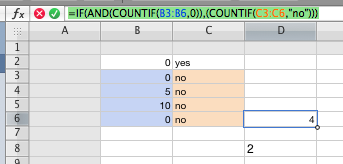
Hi, like the idea presented above by WWJD. However it seems you may be able to do it without needing the extra line of data ( or even a hidden one) I may not be right, but I tried it out and it worked for me.
=IF(AND(COUNTIF(B3:B5,"yes")),(COUNTIF(C3:C5,"no")))

With this formula you can see how many rows contain BOTH a 'yes' in column B AND a 'no' in column C.

Could someone explain how to import a screen shot? It would make showing this a lot easier!

Hope this is what you need!

Nov 30, 2007 6:24 PM in response to KEANDAU

KEANDAU wrote:
...
=IF(AND(COUNTIF(B3:B5,"yes")),(COUNTIF(C3:C5,"no")))


I don't think this is going to get you anywhere. Here is a paraphrase of this formula:

If there are 1 or more "yes"s in the range B3:B5, then the result is the number of "no"s in the range C3:C5 else the result is "FALSE".

If this appears to be working, it is only because of the nature of the test data you are using.

Dec 1, 2007 5:16 AM in response to Chris©

Hi Chris,
Yeah that original post I made only worked because of the supplied data not because the formula was right. I did some research on "Excel" and found this:

{=SUM(IF($D$53:$D$56="YES",IF($E$53:$E$56="NO",1,0),0))}

I had two columns of data D53:D56 (Yes) and E53:E56 (No). I used the formula wizard to do a 'Conditional Sum'. THIS WORKED PERFECTLY IN EVERY SCENARIO (even using a combination of text and integers). The { } on the outside of the formula indicate that this is a 'conditional equation'.

Don't get too excited. I could not, in any way, make an adjustment to the formula by clicking in the formula bar. If I copy and paste this formula in another cell it does not work either! The only way to get the thing to work is by using the wizard in Excel. This does not work at all in Numbers.

I tried saving the Excel file and then converting it to Numbers but Numbers said it could not recognize the formula.
Perhaps if you have Excel (or someone else reading this) you could give it a try or build on this knowledge. To access the wizard in Excel go to Tools/Wizard/Conditional Sum.

Sorry Chris thats the best that I have. Too little experience 😟

Kevin B.

This thread has been closed by the system or the community team. You may vote for any posts you find helpful, or search the Community for additional answers.

Compound COUNTIF()?

Welcome to Apple Support Community
A forum where Apple customers help each other with their products. Get started with your Apple Account.