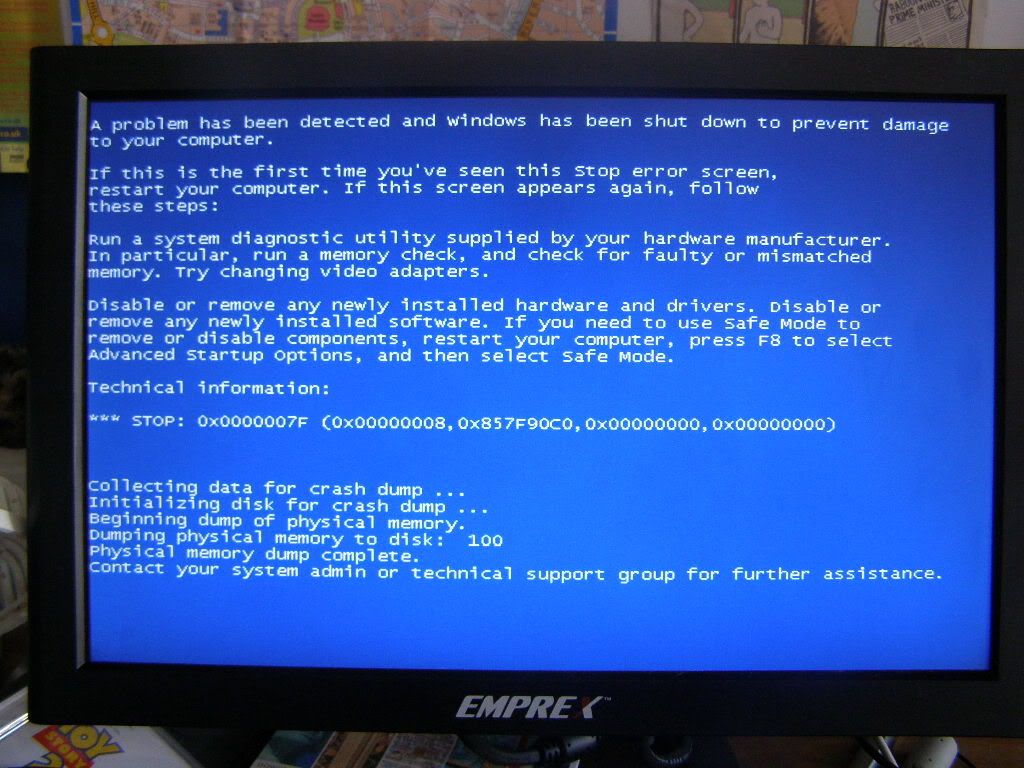
BSOD when iPod is connected

I use Windows Vista and the latest version of iTunes. I have a 30gb iPod 5th gen.

I have always used Winamp to sync music onto my iPod but on my old PC I had to install iTunes, after this it told me to restore my iPod, so I did, and then everytime I plugged it in I would restore, then it would ask me to restore again. This was on XP. I have since bought a new Vista PC and plugged in my iPod, I formatted it through Windows and when it came up in iTunes I restored it. Now whenever I plug it into the USB port I get the BSOD and an "0x00000007f" error.

Help is much appreciated.

Windows Vista, iPod 5th Gen

Posted on May 30, 2008 12:36 AM

Reply
10 replies

May 30, 2008 11:48 AM in response to Norfolkadam

The most likely cause for this is an incorrect/wrongly installed USB driver.

The only way I know to fix this is by uninstalling your usb ports and reinstalling them. HOWEVER this will also remove all other drivers for devices you have installed on the ports. This is usually not a problem as windows will generally install drivers automatically when you plug the devices in. However this can be an inconvenience when the drivers have come from a CD or the internet, this means you have to put the CD in again or re-download the driver.

To reinstall you must bring up the device manager:

Go to your system properties (In WinXP this is by right clicking 'My Computer' and clicking properties)
Go to 'Hardware' tab
Start the device manager

Go down to Universal Serial Bus controllers
Right click every USB hub and click uninstall.

After you are done, press F5 or go to Actions>Scan for hardware changes

Windows should then automatically install your hubs again.

This should fix the problem, it worked for me with my iPod.

Jun 16, 2008 3:44 PM in response to Norfolkadam

Thank you kindly, adam. Although it didn't give us a name of a component, that screen indicated that the PC has been collecting dumps of the crashes, which indicates a way forward.

First we'd better check to see if the PC has been collecting minidumps (rather than other forms of memory dump.

Go Start and click "Computer".

Doubleclick "Local Disk" (Usually it's your C: drive.)
Doubleclick "Windows".

Is there a folder called "Minidump" in there? If so, doubleclick on that.

Are there files in there called "Mini(number-numbers).dmp"?

(If you have "Hide filename extensions for known file types" enabled on the PC, the ".dmp" extension may not appear on the dump files. The numbers in the file name will be different for each minidump, if minidumps are present.)

If you can track down where the minidumps are being located, next we'll use WinDbg (Windows Debugging tools) to interrogate the minidumps to see if that turns up the name of a component (or components).

1. Download and install the Windows debugging tools from here (If you've got a 64-bit Vista, use the 64-bit version of the tools):
http://www.microsoft.com/whdc/devtools/debugging/installx86.mspx

2. Go to Start, All Programs, Debugging Tools For Windows, Windbg
Once you open Windbg, you will presented with a blank screen.

3. Click on "File > Symbol File Path". Here you will enter the symbols
path. Symbols are needed to effectively debug.
The path will be:
SRV c:symbols http://msdl.microsoft.com/download/symbols

4. Enter in this path and click OK. Now, go to "File > Save Workspace"
so that your symbols path is saved for future use.

5. Go to "File > Open Crash Dump" and load the file.

(An "Open Crash Dump" screen will appear ... doubleclick "Computer", doubleclick "Local Disk", doubleclick "Windows", doubleclick "Minidump", and doubleclick on one of the minidumps in there.)

*If you get a dialog at this point saying you don't have permission to open the file, try this:* OK out of the permission warning dialog. Right-click on the minidump file (In the "Open Crash Dump" screen), and select "Properties". Click the "Security" tab. Click the "Advanced" button. Click "Continue". Check the "Include inheritable permissions from this object's parent" checkbox, and click OK. Click Yes when the Windows security box comes up. Close the "properties" screens at this point, and go back to "Open Crash Dump", and try doubleclicking on the minidump again.

You will/should get a message to save base workspace information. Choose no.

Now you will get a debugging screen. It takes a little bit to run it,
as the symbols have to be downloaded as they are needed.

After the "bugcheck analysis" part of the screen comes up, look for the component that seems to be causing the crash. (It'll say "Probably caused by" ...)

Let us know the precise name of the component. (Include any file name extensions like .dll or .sys.)

If you can, have a look at several of your minidumps for iPod-connection-related-crashes (fingers crossed, the date-and-time-created for the minidump files, or the numbers in the filename of the minidumps which indicate the date of the crash, might be able to allow you to identify the ones associated with plugging in the iPod). Are all the crashes being caused by the same component? If not, could you let us know the names of the various components being cited in the various crash dumps?


Jun 19, 2008 3:15 PM in response to Norfolkadam

Okay. Let's see if we can generate minidumps, then.

I haven't got a Vista box in front of me, but I've got an old set of instructions in my email archive. Fingers crossed, these will still work.

In "Start" Computer, select Properties. Select "Advanced System
Properties". In the dialog that comes up, click the
"Settings" button in the "Startup and Recovery" section. In the "Startup
and Recovery" dialog that comes up, make sure the popup that selects what
to write out is set to minidump.

If you can make that settings change, does a minidump appear if you provoke the crash again?

If so, are you able to analyse it using WinDbg as per the previous set of instructions?

(EDIT: away for the weekend to see parents and won't be available here at Discussions for a few days ... will try to check back in again on the thread on Tuesday NZ time.)

Jul 11, 2008 7:01 PM in response to b noir

I'm having a very similar problem. When I plug in my 5th gen ipod (30 gig) into my laptop it crashes and repeatedly brings up the bsod until I unplug the usb cord. This started happening after I attempted to install the driver for a new camera (the same thing happens when I plug in the camera).

This is the error signature:

BCCode : fc BCP1 : F7A288EC BCP2 : 06C60963 BCP3 : F7A2884C
BCP4 : 00000001 OSVer : 5 12600 SP : 2_0 Product : 256_1

Jul 13, 2008 5:59 PM in response to Norfolkadam

I replaced my old iPod nano (gen2?) with newest iPod Nano 8GB. (purchased from the local Mac store (Mad Dog) 2 weeks ago).

First - Windows XP would not recognize the iPod when plugged into the USB port. But it did recognize and work fine with the old iPod.

Second - Upgraded to iTunes 7.7. Now, when I connect the iPod (after XP has finished booting) I get BSOD. No specific file / driver is listed. Just a memory address.

Since then, I have updated to SP3, updated the Dell bios to A10, updated other drivers. Same problem. The iPod crashes Windows when connected.

Jul 13, 2008 6:35 PM in response to raptor.2009

I fixed this by unloading all my USB Hub drivers, and letting Windows XP reload them - this happens automatically.

To do this - do to the device manager. Expand the category for Universal Serial Bus Controllers. You should see a list of USB Root Hub devices. I uninstalled each of these, closed the device manager and then restarted Windows.

The new iPod is now working fine with Itunes 7.7.

By the way, I did see someone mention elsewhere that you may have to reload your peripheral specific USB drivers against (from CD or the internet) for things like specialty camera USB drivers, etc.

(to get to the device manager:
Start->My Computer (right click)
Choose "Manage"
Choose "Device Manager" in the tree view.

This thread has been closed by the system or the community team. You may vote for any posts you find helpful, or search the Community for additional answers.

BSOD when iPod is connected

Welcome to Apple Support Community
A forum where Apple customers help each other with their products. Get started with your Apple Account.