remove transitions

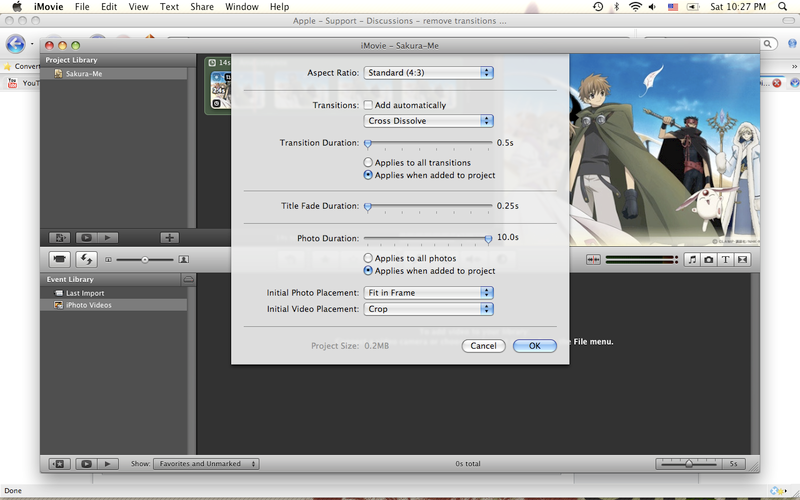
Hey guys, I'm completely new to iMovie, so I'm gonna ask stupid questions 😀 So how do I remove a transition? when I go to file>project properties, I can either choose to add transitions manually, or I can change the transition duration (which doesn't go to 0). How do I completely get rid of all transitions?

Mac OS X (10.4.7)

Posted on Aug 30, 2008 5:35 PM

Reply
10 replies

Aug 30, 2008 8:18 PM in response to aerialdreams

http://img.photobucket.com/albums/v173/Lildreamer08/Picture2.png
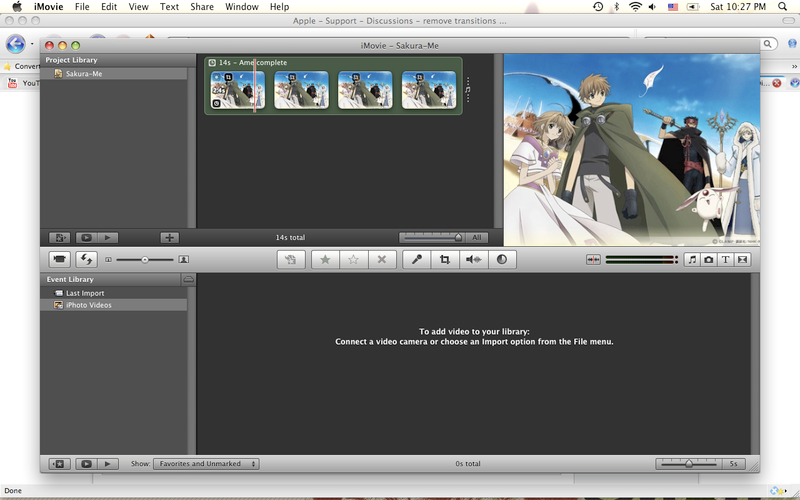
If this is the project from which you wish to remove transitions, then be advised that there are no transitions present to remove. All I can see is background music. If you want to remove the music, click on the green area and when it is outlined in yellow, press the "Delete" key. If you have a different project with transitions in it, then you must first select that project to access that project's preference options.

Also, when I deselect automatic transition and click ok, no other box pops up...
Here is what you should see if there were transitions present to be removed:
User uploaded file

User uploaded file

Aug 31, 2008 5:59 AM in response to AppleMan1958

For transitions that you added manually, you may need to delete them manually, as I described in my post above.
In the case of manually added transitions, you simply turn on the "Add Automatically" option first. This will add/convert all transitions to the default transition. Once added/converted using this option, you can proceed as described above to remove all transitions. While manual addition/deletion is fine for a dozen or so segments/photos, it quickly becomes tedious when you are dealing with 50, 100, or 200 photo/clip transitions. (Basic strategy/rule of logic here is to simply reduce the new problem to one that has already been solved.)

User uploaded file

Aug 31, 2008 7:16 PM in response to aerialdreams

Thank you for all of our help!
I realized my problem might not be the transitions; it might be the title fade duration? Can I turn that off somehow? I'm basically trying to have just one picture in my "video" along with music, but I can't make one picture last 2 minutes, so I paste several copies of the same picture, but when it plays, the pictures zoom out repeatedly, making the video very rough. I want one stable view of the picture throughout the music. Is that possible?

Sep 1, 2008 4:00 AM in response to aerialdreams

I'm basically trying to have just one picture in my "video" along with music, but I can't make one picture last 2 minutes, so I paste several copies of the same picture, but when it plays, the pictures zoom out repeatedly, making the video very rough. I want one stable view of the picture throughout the music. Is that possible?
Yes. Just turn off the Ken Burns effect for each clip by selecting the "Fit" option. (You could also select the "crop" option but then you would have to ensure the image sequences match properly.)

User uploaded file

This thread has been closed by the system or the community team. You may vote for any posts you find helpful, or search the Community for additional answers.

remove transitions

Welcome to Apple Support Community
A forum where Apple customers help each other with their products. Get started with your Apple Account.