Yellow colour cast on all photos help!

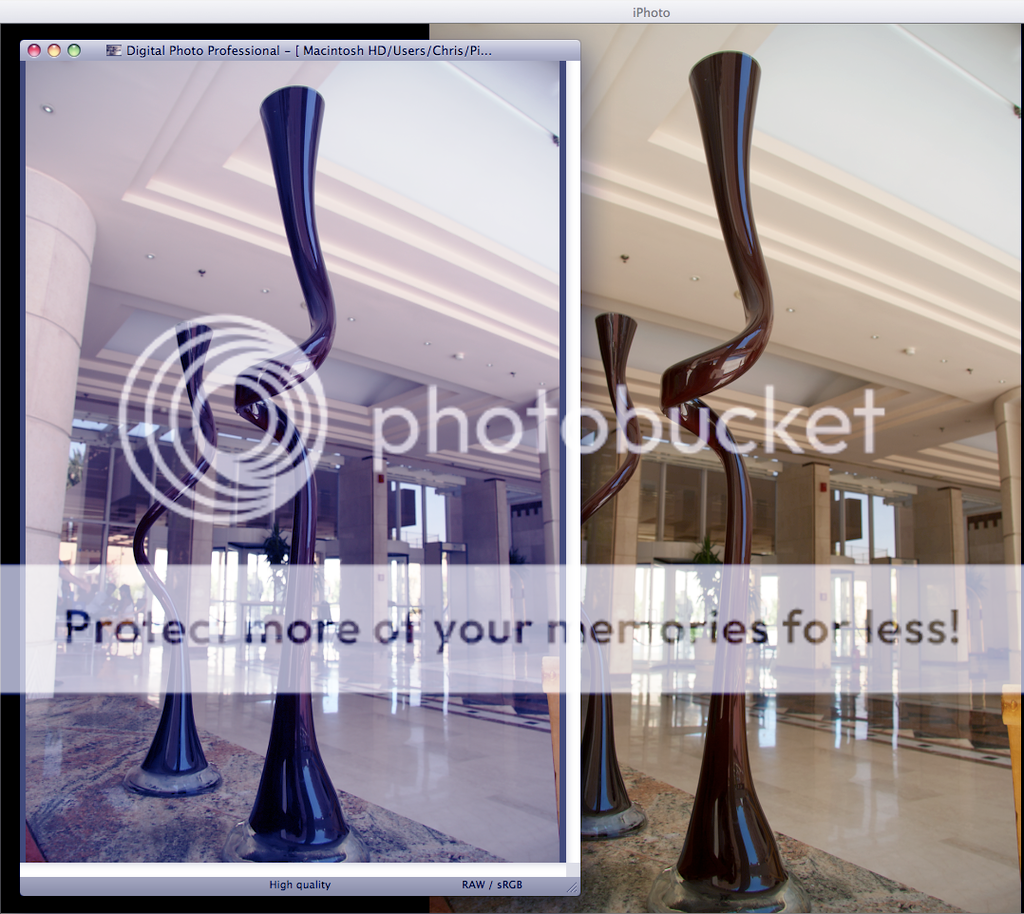
I have photo taken with a canon 400d with sRGB colour profile set in the camera. However when these or any other photos from any camera have a yellow colour cast. I have the canon Digital Photo Professional software installed as well and when i view these photos in DPP they look exactly as the scene that i captured. Example below.

http://i401.photobucket.com/albums/pp97/cxxchan/Picture12.png

Can anyone tell how to fix this and have iPhoto show the pictures correctly?

Thanks

Message was edited by: Christoff

White MacBook 2Ghz â–ª 1GB RAM â–ª 80Gb HD â–ª Wireless Mighty Mouse â–ª AppleCare, Mac OS X (10.5.4), Switched Permenantly!!

Posted on Aug 31, 2008 11:16 AM

Reply
11 replies

Sep 1, 2008 5:07 AM in response to Christoff

I have photos taken with a canon 400d with sRGB colour profile set in the camera. However when these or any other photos from any camera are viewed in iPhoto they have a yellow colour cast. I also have the canon Digital Photo Professional software installed and when i view these photos in DPP they look exactly as the scene that i captured. Example below.

http://i401.photobucket.com/albums/pp97/cxxchan/Picture12.png

Can anyone tell how to fix this and have iPhoto show the pictures correctly without the colour cast?

Thanks

Christoff

Couldn't edit previous question.

Sep 1, 2008 10:11 AM in response to Christoff

I do not understand your question - in looking at the example you posted my opinion would be that the iPhoto version shows the picture you took and canon DPP version shows one that has been modified - the iPhoto version looks like a real room as a human and the camera would see it - the CDPP version looks like either an edited one or one with the white balance way off - I see a strong blue cast to the CDPP version and a natural looking photo in the iPhoto version

Sorry that I don't get it -that is why I haven't replied - may be the same for others

LN

Sep 10, 2008 6:16 AM in response to LarryHN

Neither photo has been modified. On my computer the iphoto example looks way off, but the DPP software shows the photo correctly i.e. it looks the same as when i view it on my camera and computer. Could there be something wrong with coloursync on my computer or something like that, because other things have a really strong yellow colour like widgets etc.

Basically I want to have iphoto show all my photos with the correct white balance, because all photos in my library have a strong yellow cast.

Sep 10, 2008 11:08 AM in response to Christoff

Christoff:

The photo on the left is the correct color rendition, i.e. the bluish version, right? Do other applications, i.e. Preview, Safari display the photos correctly on your computer?


User uploaded file

TIP: For insurance against the iPhoto database corruption that many users have experienced I recommend making a backup copy of the Library6.iPhoto (iPhoto.Library for iPhoto 5 and earlier) database file and keep it current. If problems crop up where iPhoto suddenly can't see any photos or thinks there are no photos in the library, replacing the working Library6.iPhoto file with the backup will often get the library back. By keeping it current I mean backup after each import and/or any serious editing or work on books, slideshows, calendars, cards, etc. That insures that if a problem pops up and you do need to replace the database file, you'll retain all those efforts. It doesn't take long to make the backup and it's good insurance.
I've created an Automator workflow application (requires Tiger or later), iPhoto dB File Backup, that will copy the selected Library6.iPhoto file from your iPhoto Library folder to the Pictures folder, replacing any previous version of it. It's compatible with iPhoto 6 and 7 libraries and Tiger and Leopard. Just put the application in the Dock and click on it whenever you want to backup the dB file. iPhoto does not have to be closed to run the application, just idle. You can download it at Toad's Cellar. Be sure to read the Read Me pdf file.


Note: There's now an Automator backup application for iPhoto 5 that will work with Tiger or Leopard.

Sep 10, 2008 2:22 PM in response to Old Toad

The photo on the left is the correct one as I see it on my computer. It is the version that has the correct white balance, but does not look blueish to me. It is the the photo on the right that looks overly yellow.

Other apps do not show this photo correctly, i.e. they show the photos with the very bad yellow cast, I've have looked at photos in preview, quickview, iPhoto and Safari.

I also see the yellow cast on the widgets and I did used to see it on the trash can but not anymore.

Sep 10, 2008 2:30 PM in response to Christoff

It must be my monitor then as the left photo looks very cold and bluish. The one on the right looks warm and more "normal" (but what is normal these days?). Very strange. Open the photo with Quicktime Player ColorSync Utility and see how it's displayed there. I believe Most of the Apple applications use Quicktime to render the images and that would be a good test. With ColorSync Utility you can assign/apply different color profiles and might see where the issue lies.

You can compare the camera's color profile with some of the others with ColorSync Utility and see if there's a significant difference. I've found that most all sRGB profiles are very close except, of course, for Adobe's RGB. But then it's not an sRGB profile is it?

Sep 10, 2008 5:45 PM in response to Old Toad

Its his monitor - I see the back/right iPhoto version as correct and the front/left CDPP version as being very blue

in looking at the example you posted my opinion would be that the iPhoto version shows the picture you took and canon DPP version shows one that has been modified - the iPhoto version looks like a real room as a human and the camera would see it - the CDPP version looks like either an edited one or one with the white balance way off - I see a strong blue cast to the CDPP version and a natural looking photo in the iPhoto version


LN

Sep 11, 2008 4:48 AM in response to Old Toad

Ok well I've had a play around with colour profiles, and applied sRGB to both my macbook monitor and my external monitor. Well with the current colour profile, the photos in both iPhoto and DPP look the same and correctly white balanced on my monitors. Below is a screen shot of the same picture below with my current colour profiles.

http://i401.photobucket.com/albums/pp97/cxxchan/Picture1.png

How does this look to every one?

This thread has been closed by the system or the community team. You may vote for any posts you find helpful, or search the Community for additional answers.

Yellow colour cast on all photos help!

Welcome to Apple Support Community
A forum where Apple customers help each other with their products. Get started with your Apple Account.