FireWire & my eMac.....

I'm pretty sure my hard drive is going out on my eMac. In order to limp it along for another year or so until I can get a new Mac, I bought an external (Seagate Free Agent) drive - thinking I could load Leopard on there, and boot from that going forward.
I got the drive a couple of days ago, and after several unsuccessful attempts to load Leopard on it, I came to the Apple boards to figure out what's going on. The helpful posters have clued me in that my eMac will only boot from a device hooked up via FireWire - not the USB port I'm using.
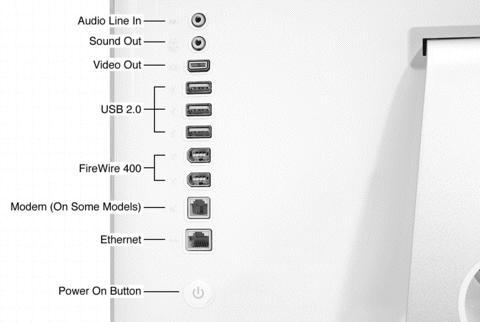
Which brings me to my question here. Where/what are the FireWire ports on my eMac? I've got 3 USB connections, a phone (modem) port, and an Ethernet port on the side. Does FireWire use the same ports as USB connections? If so, is it possible to get an adapter, so that I could plug my USB 2.0 brand new hard drive into a "FireWire convertor" adapter/cable/something, and THEN into the USB port in order to get it to work?
If that's not an option, would I be better off buying a new INTERNAL drive instead? If so - are they hard to put in? (Back 5 - 10 years ago I've replaced probably 50 hard drives in IIcx's, IIci's, G3's, etc., but I haven't done that for about 6 years or so - and I've never cracked the case on my eMac, so I have no idea what it looks like in there. I wouldn't be afraid to try - but I just don't want to buy ANOTHER drive, open the case, and discover it's a whole new world in there now!) 😉

Thanks in advacn for any help/advice,

Tim

eMac, Mac OS X (10.5.5)

Posted on Nov 12, 2008 8:08 AM

Reply
11 replies

Nov 12, 2008 9:16 AM in response to Mac User For Life

Hey Mac User,
Which brings me to my question here. Where/what are the FireWire ports on my eMac? I've got 3 USB connections, a phone (modem) port, and an Ethernet port on the side

Hmm which eMac do you have? It should look pretty much like this. (even tho' this is for a iMac G5 the eMac 700 MHz I have here looks pretty much the same except the video spigot is on the end )
http://km.support.apple.com/library/APPLE/APPLECAREALLGEOS/HT2832/868131.gif
If yours doesn't look like this post a picture of the i/o ports and the machine itself esp the label behind the CD door.
adapter/cable/something, and THEN into the USB port in order to get it to work?

If that's not an option, would I be better off buying a new INTERNAL drive instead? If so - are they hard to put in?
There are definite "gotchas" in taking apart an eMac. The first is the power lead from the power button when you remove the case be sure not to rip it out of the logic board. Then the fan has to come out and the mass store cage.
I've got 3 external FireWire cases here mostly used as caseless that I picked up for not more than $20 each. (eBay, clients and Craig's)
Richard

Message was edited by: spudnuty

Nov 12, 2008 10:14 AM in response to spudnuty

Thanks Richard. I was going on memory, as the computer is at home - but now that I see that config I think I DO remember seeing the odd shaped FireWire ports - just didn't recall since we don't use them.
I think I'll take your suggestion and just drop over to eBay and see what's out there for FireWire externals. If I can get something to boot from that'll get me by another year or so that'd be great - because I'm hoping to upgrade to a new machine at that point.
Thanks for the help/advice.....
Tim

Nov 12, 2008 3:39 PM in response to kastl

Hi kastl,

For about the last 6 - 8 months ( a pretty close correlation to when my 4 kids all got Facebook/MySpace accounts, and started spending time at gaming sites) it's been freezing on an intermitent basis. Thinking it may have picked up some kind of Mac "bug", I went to the Genius Bar last week to see if I should waste some money on a Norton product - or if they had any other suggestions. He said the chances were good it WASN'T a bug - especially when I told him I had done a re-install of 10.5.3 from CD, and then upgraded it (again) to 10.5.5.
He suggested either hard drive, or logic board problem. I figured that since I could always use more space, I'd just get a new external drive, partition it up, and boot off of that. If it stopped freezing, I had fixed the drive problem. If it didn't, I knew I probably needed a new logic board, and would decide what to do from there. Worst case - I've got extra storage for a new machine.
Problem is that I didn't know it wouldn't boot if the external drive has a USB connection, and not a FireWire one. Since the box is open and the drive has been partitioned, I'm not sure that Amazon would take it back, just because I should have ordered a FireWire drive. Besides, if I know my wife, the box it came in is proabably long gone by now (I got it two whole days ago!). 😉

So, I'm just trying to get my 4 or 5 year old eMac to limp along for another year or so before I replace it. (FYI - on the freezing - it may go 4 or 5 hours, with multiple applications in use, before it hangs up, or it may freeze immediately after a hard re-boot 3 times in a row - and then run for hours. It doesn't seem to be particular to an application or an amount of time.)

Nov 12, 2008 6:56 PM in response to Mac User For Life

Hey Mac User,
Alan makes a very good point. I was going on your original post. Unfortunately the repair extension site has been taken down. However the affected serial #s are here:
http://www.happymacshop.com/Service/REPs.html
and they are:
"eMac Serial number range:
G8412 -G8520 or
YM412 -YM520 or
VM414 -VM518"
You can see two caps in the user access port. See if they look damaged or leaky.

I should have ordered a FireWire drive.

You could save money by ordering a firewire enclosure without a drive in it.
Richard

Nov 12, 2008 8:23 PM in response to Mac User For Life

Tim,
Does that mean Apple will fix it for free - even if it's 4+ years old?!?!

Well the short answer to that is probably not. It is possible to find a supervisor that will allow that to happen but basically they've cut it off I guess since they were only covering eMacs out to 3 years after date of manufacture.
Repairing would mean replacing caps is they're found to be bad.
Richard

Nov 12, 2008 11:43 PM in response to Mac User For Life

Thanks Mac User For Life.

So the symptoms are that it "freez[es] on an intermitent basis." I asked because I am new to eMac and I am interested learning about it. Please post when you solved the problem.

You were considering whether you should waste some money on a Norton product because at the Genius Bar you were told that the media of the HD may be defective. Norton or similar products may be available free for a limited time. Also, for testing the media any cheaply available old product would be sufficient as long as it boots your eMac (OS 9 time).

Jan 28, 2009 10:58 AM in response to Mac User For Life

Hi there.

Not much help to you but my 1.25Ghz eMac has suffered similar freezes. I took it to my local repairer and they got it to start first time then run for about 3 days non-stop on a test cycle. At one point I had it freezing at every single change of screen (grey, blue, login) so they did well.

They then tried my preferred method of failure - launching a couple of apps - and it performed as expected, freezing all over the place. Logic board can be replaced but it only comes with a 3 month warranty and if anything else is damaged........

It'll cost me approx £300 to repair it or I can struggle on with restart after restart until it breaks completely. I've no idea how long it might survive, but unfortunately taking it back and putting the money towards a new iMac and letting the eMac RIP is the best option.

This thread has been closed by the system or the community team. You may vote for any posts you find helpful, or search the Community for additional answers.

FireWire & my eMac.....

Welcome to Apple Support Community
A forum where Apple customers help each other with their products. Get started with your Apple Account.