How Home/End to go all the way to top or bottom of a page?

I'm new to Mac (have a new MacBook Pro) and running VMWare Fusion so I can have Windows running well. In Windows, I figured out how to Page Up (Function + Up Arrow) and Page Down (Function + Down Arrow).

However, many times I want to scroll all the way to the top or bottom of the page without hitting page up or down several times. In Windows, I think I would press a key + the Home key. Nut on my MBP there is no Home or End key. So, how do I do this please?

Thanks.

MacBook Pro, Mac OS X (10.5.2)

Posted on Jan 22, 2009 8:49 PM

Reply
5 replies

Jan 23, 2009 4:57 AM in response to rcook349

I don't know how this would work in the windows environment on the mac, but in the mac environment there are home and end keys for the MBP. You get them by using the function key in combination with the right (end) and left (home) arrows. It's just not printed on the keys in the new MBP. (Similarly, function-up (down) arrow is page up (down).)

charlie

Jan 23, 2009 12:36 AM in response to rcook349

Hello,

"All you need to do is use two fingers on the touchpad instead of one while moving them up or down. Using two fingers on the touchpad will scroll if necessary in any active window or while in safari. This is especially helpful when navigating blogs or web sites where you need to scroll up or down. As far as I know, this is a fairly new feature that works on MacBooks that are a few years old."

The above information is from: http://bigpcgeek.com/blog/2008/01/25/scrolling-with-touchpad-using-macbook-or-ma cbook-pro/


Carolyn 🙂

Jan 23, 2009 3:48 AM in response to rcook349

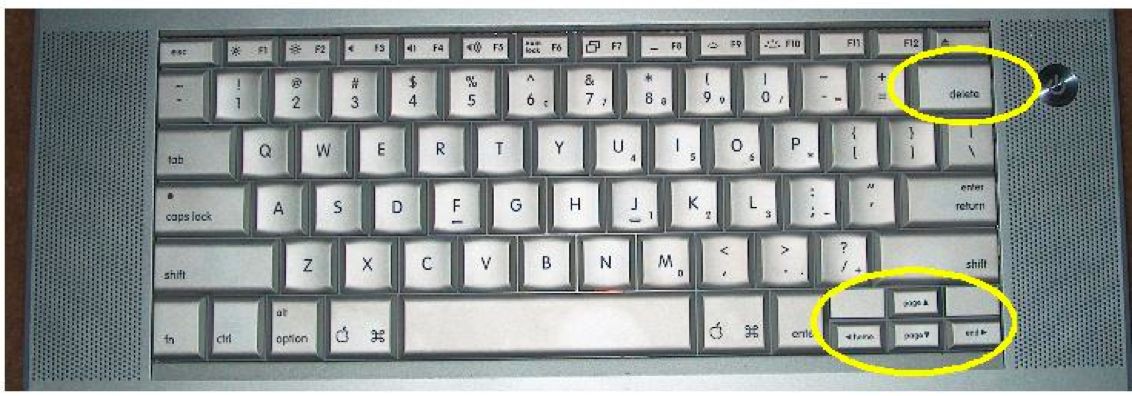
Hi. Doesn't the MBP have the 'Home' & 'End' keys either side of the 'Up' & 'Down' keys?

See the lower yellow ring here: http://www.os2voice.org/VNL/past_issues/VNL1007H/keyboard.jpg

I know it's from an older MBP but AFAIK Mac portable keyboards are all pretty much alike.

The fn key should work with 'Home' & 'End' to rapid-scroll to top & bottom of the page.

The 'Space' bar should also work as an 'End'.

Enjoy your new MBP!

Adrian

This thread has been closed by the system or the community team. You may vote for any posts you find helpful, or search the Community for additional answers.

How Home/End to go all the way to top or bottom of a page?

Welcome to Apple Support Community
A forum where Apple customers help each other with their products. Get started with your Apple Account.