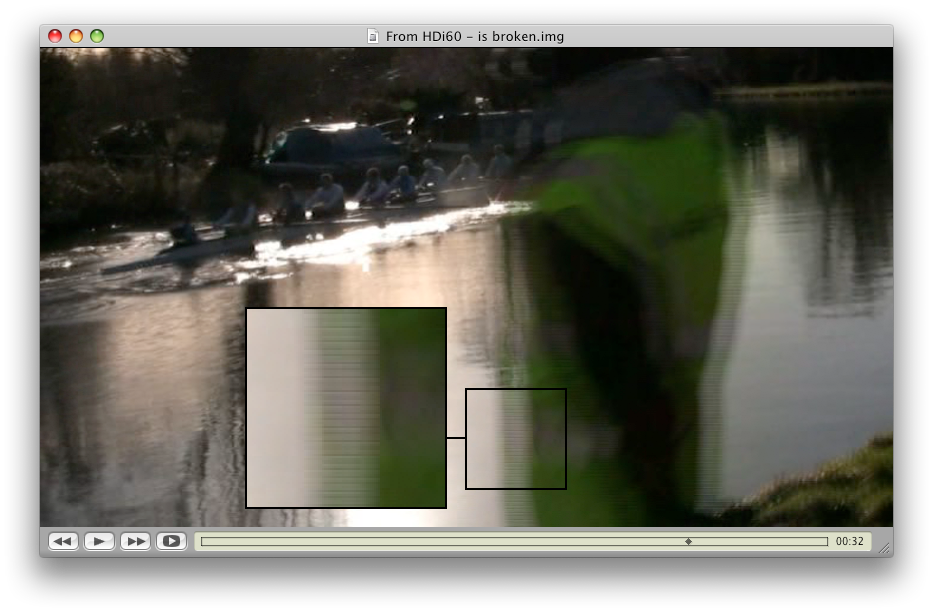
deinterlaced output is not deinterlaced

my source feed is 1080i, and when i export in 1280x720 the video still shows as interlaced footage... any ideas?

MacBook Pro 2.4Ghz, Mac OS X (10.5.6)

Posted on Jan 28, 2009 6:55 PM

Reply
300 replies

Feb 4, 2009 11:11 PM in response to Winston Churchill

Spent about 3 hours using iM09 today.

The good:

1) Unlike 08, 09 will import my 720p30 h.264/AVC files my camera records. There is NO conversion to AIC.

2) Unlike 08, 09 will import my 1080i60 h.264/AVC files my camera records. There is NO conversion to AIC.

3) Therefore, if I need h.264 exports -- they will be only second generation! I'm thinking of getting a $100 WD Media Player that plays h.264 from a usb thumbdrive via hdmi to an hdtv. iM09 will support this nicely.

3) Stabilzation really helps, but even at only 102% zoom, the pix is softer.

4) I suppose the other features may be useful.

The bad:

There is a bug in the "full-screen" playback function on an iMac with 1920x1080. If, when working with 720p, you select Actual Pixels you get a 4:3 window!!! If you select "Full Screen" the zoom really degrades the 720p.

The Ugly:

1) Looking at my 1080i60 via QT -- it has aliasing that is not there when I play the camcorder via hdmi to my hdtv. It looks like the Apple h.264 is inherently compromised with interlace video. (This is not found with AVCHD.)

2) This aliasing is passed thru iM09 into an UPPER 1080i export.

3) Exporting to 720p -- there are two types of crap: (a) the aliasing and (b) on fast motion, clearly 2 fields each of which has combing. Were the motion less fast, the two fields would be aligned and the result would be alternating 2-pixel high mice teeth. This occurs even if exporting to 8bit uncompressed.

Bottom-line -- FOR ME and others shooting 720p30 -- iM09 is an OK upgrade. Were I shooting any type of 1080i -- I would not upgrade unless I were content to accept quarter rez. HD.

Feb 5, 2009 1:49 AM in response to Pond

You are right. I exported an earlier 1080i source to AIC and then encoded using JES Deinterlacer:

Original iM 08 export
http://sanjeevandlisa.smugmug.com/photos/465409379_eQs7v-X2.png

iM 09 export:
http://sanjeevandlisa.smugmug.com/photos/465409433_C5Zna-X2.png

exported to 1920x1080 AIC and encoded in JES Deinterlacer:
http://sanjeevandlisa.smugmug.com/photos/467990678_xpgqo-X2.png

The JES AIC exported JES deinterlaced seems pretty good. I like the iM 08 contrast better.

Message was edited by: sanjeevdas Removed photo embedding because they are big.

Feb 5, 2009 7:48 PM in response to spyd4r

Well now here's a strange twist...

I strung together some clips shot at 60i, 30p, and 24p. Exporting my clips to QT using the standard H.264, 1920x1280 HD settings yielded the "shutter" effect on the 60i and 24p sections but the 30p section looks fine. This has been widely reported.

However, taking the QT movie and burning it to DVD using Toast 10 Titanium Pro yielded a PERFECTLY GOOD LOOKING MOVIE on ALL settings! No shutter effect at all! And here's more weirdness...Toast reports the movie as 1920x1080 in the clip list (prior to burning).

By the way, the results of burning to standard DVD and playing back on a BD player are quite nice looking. The AVCHD clips especially look beautiful and my TV is only 1080i.

Any thoughts? I know this thread is watched by a lot of people so I'm hoping someone can shed some light on this for me.

--David

Feb 5, 2009 9:07 PM in response to David Wellerstein

" And here's more weirdness...Toast reports the movie as 1920x1080 in the clip list (prior to burning)."

If you used the UPPER 1080i option, why wouldn't Toast report 1080i?

I wouldn't expect you could export 24p from 60i. No way to get 60i to 24p in QT.

VERY interesting -- if Toast can burn 1080i to a BD without the crap showing in the BD -- then FULL AVCHD becomes useable. This needs to be checked.

Getting 1080p30 is interesting as it suggests the problem going to 720p30 is a SCALING issue. (This needs to be confirmed.)

So the issue with 1080i is how to export 1080i60 to 720p30 for the internet -- without losing a generation going thru JES. IF your video sharing service will accept 1080p30, then it might be scaled to 720p30 when they compress to Flash. Also needs to be checked.

It would be nice to not depend Apple to "fix" anything because they may have zero interest in supporting BD and internet streaming.

PS: What happens if you import 1080i60 into iDVD. Will it make a clean downscale to NTSC? No Chapters but I can't see any reason for Chapters when iDVD gives you buttons.

Feb 5, 2009 9:13 PM in response to Steve Mullen

You're right...scratch that "more weirdness" comment. Duh. I was thinking 1280 height. Too many numbers!!!

I will try the import to iDVD and downscale. As I said, with my setup the results are nothing short of great. And the cost of DVD+R media is so reasonable compared to BD. Now I can shoot at 60i knowing that I can get good results somewhere!

Let's not let this go!!!

Feb 5, 2009 9:41 PM in response to Steve Mullen

Well, no shutter effect on the 60i portion of the transfer to iDVD but the quality is certainly nowhere near the output of the Toast HD DVD (as to be expected).

So there you have it. Now I don't know what to record in? I suppose the safest would be to shoot in 30p, import at full HD and work with that. Hopefully a fix will come that will enable me to shoot in whatever frame rate I want without fear of ugly quicktime exports.

Very happy with the Toast results (as long as everyone has a BD player).

--D

Feb 6, 2009 4:00 AM in response to Steve Mullen

Steve Mullen wrote:
PS: What happens if you import 1080i60 into iDVD. Will it make a clean downscale to NTSC? No Chapters but I can't see any reason for Chapters when iDVD gives you buttons.


Already tried that with iDVD in iLife '08 and QuickTime 7.5.x; see Direct Import (iv) for details, or view the relevant image directly:

http://pond.org.uk/misc/imovieandhd/workflow.html
http://pond.org.uk/misc/imovieand_hd/fullsize/14_idvd_hd_tosd.png

I can't try exactly the same test with QT 7.6 because iDVD today reports a multiplexing error whenever I try and build a DVD with the same test clip which I used successfully before. Gaaah! Too many bugs!

Trouble is I might have seen broken behaviour in QT 7.5.x because the clip I used was missing some vital "I'm interlaced" flag in its metadata, which iDVD required, while another clip I tried did have this flag set. The results from QT 7.6 were better - proper deinterlacing rather than the scaled combing effect shown in the screenshot above - but this is meaningless given I was forced to use a different test video clip. I'm not prepared to try and downgrade QT to re-test; I've wasted too much time on this already.

Sigh.

You'd think Apple would have automated tests and verification for this kind of architecture, but we seem to be faced with something of an ad hoc mess.

Feb 6, 2009 5:15 AM in response to Pond

If 7.6 is working -- doesn't that conflict with Winston's problems with 7.6? And, I suspect I used 7.6 at best Buy.

And, I'm wondering burning an NTSC DVD should be so different in quality between iDVD and Toast since it only requires encoding to MPEG-2?

So I too am wondering were the Toast discs burned to BD or to NTSC DVDs.

Amazing FCP users are find, as I did when I used DVCPRO HD -- now 10-years old (?) -- that frame-size varies randomly. I wish Apple would put some attention on the Mac instead of courting kids with the iPhone and iPod. My Treo 650 does everything a PDA needs to do. Music and video on a phone? Bah Humbug!

Feb 6, 2009 5:44 AM in response to Steve Mullen

Steve Mullen wrote:
If 7.6 is working -- doesn't that conflict with Winston's problems with 7.6? And, I suspect I used 7.6 at best Buy.


As I said, we can draw no conclusions as I am unable to persuade iDVD to encode the same test clip that it encoded last time. I'm comparing two different test clips produced in two rather different ways, but without downgrading back to 7.5.x I have no other option. Maybe I need to reboot, who knows; I've spent too much time on this!

And, I'm wondering burning an NTSC DVD should be so different in quality between iDVD and Toast since it only requires encoding to MPEG-2?


In the test I did this morning, iDVD took "raw" AIC 1080i60 footage from the iMovie '08 events folder and produced what appeared to be a deinterlaced NTSC DVD. That's fine if you're not worried about motion, but in my case deinterlacing is bad - motion becomes juddery. I wanted the interlacing preserved - 60i HD to 60i SD. The article I posted above shows how I managed to achieve that, but I had to jump through quite a few hoops.

As a side-note, I'm not sure it's quite so clear-cut; the Apple DVD Player application had a bizarre playback issue with the DVD which VLC presented cleanly. It looked almost as if it was showing line-doubled fields but at normal frame rate. I've not seen that before and it implies yet another issue in the media subsystem. Since Apple in their wisdom decided to disable screen capture when DVD Player is running, I can't give examples. I can only get screen captures when non-Apple DVD software is running. My computer, my camcorder, my DVD, my footage, my I.P., my copyright, in the UK - but the MPAA's rules. That was pretty much the point where I decided I'd spent enough time on Apple's bugs.

I have a workflow which is good for me, I've published it online for others to read and it sort-of works for iMovie '09. The bottom line is that if you give iMovie '08 or '09 interlaced input, you must export identical resolution interlaced movies. You need an external encoder, a shedload of disc space and a great deal of patience. +Every single one+ of the other iMovie export options is broken (no matter how subtle the breakage may be) and therefore IMHO useless. Transitions and titles will always be broken since they are not applied in an interlaced fashion and there's absolutely nothing you can do about it, but by and large the error will be subtle enough to get away with it.

And we haven't even got started on the black level errors introduced by using AIC (not so lossless after all) or the gamma curve jumping problems suffered by iMovie '08 during cross fades.

A very sorry state of affairs all round.

Feb 6, 2009 6:49 AM in response to David Wellerstein

David Wellerstein wrote:


However, taking the QT movie and burning it to DVD using Toast 10 Titanium Pro yielded a PERFECTLY GOOD LOOKING MOVIE on ALL settings! No shutter effect at all! And here's more weirdness...Toast reports the movie as 1920x1080 in the clip list (prior to burning).

By the way, the results of burning to standard DVD and playing back on a BD player are quite nice looking. The AVCHD clips especially look beautiful and my TV is only 1080i.


I did this same thing, David, with the same results, burned a DVD with Toast 10 using the Blu-Ray Video option. That's good, but what I really want to do is move my content to a WD TV but I can't -- because until I make the disk via Toast the shutter effect is there.

This thread has been closed by the system or the community team. You may vote for any posts you find helpful, or search the Community for additional answers.

deinterlaced output is not deinterlaced

Welcome to Apple Support Community
A forum where Apple customers help each other with their products. Get started with your Apple Account.