Best way to accomplish a signature animation in Motion 4?

I am brand new to Motion, and would like to create a animation where a signature (person's handwriting) which is a Vector file or PNG file grows (where it looks like its signing on the screen). I have multiple signatures of clients that would like this kind of effect, what is the best way to go about doing this?

09 Macbook Pro 17", Mac OS X (10.5.8), Various iPods, iPhone 3GS, iPhone 3G, iMac 24 (2009)

Posted on Aug 19, 2009 7:44 PM

Reply
19 replies

Aug 20, 2009 4:39 AM in response to Mark Spencer4

Have no idea what you just said but I will look it up and see what I can do... LOL Really Brand new, as in installed the software less than 8 hours ago... and have never worked in it before...

But in my business likeany I guess, I gota get up to speed as quickly as possible to start turning this software into a money printing machine... LOL

I was going to order some Ripple Training Tutorials, but I might wait for the Motion 4 versions to come out... I assume you are the same Mark Spenccer that is the "Instructor and Motion Pro Guru" I have heard about?

Thanks for the quick reply, and with any luck I can learn this program and be able to do some really nice things with it...

Aug 20, 2009 5:50 AM in response to  Certified

I don't disagree, however the manual is not exactly "informative" a much as I would like... General descriptions and such of what does what... Plus not being in PDF form that I can find it's a little harder to read when there is no Internet connection at times, or We are on the road.

We are looking at it, just more Visual, than anything, hence the reason we are looking at video tutorials.

Plus it looked easy enough on the website to accomplish things, but again not disagreeing.

Aug 20, 2009 8:15 AM in response to NASCAR3D

Have been playing blind in Motion, and have created a 3D scene with walls and floor and object with a camera move... not to shabby...

Also played with our Cintiq12UX tablet with the paint tool and write on behavior... VERY COOL... though I noticed that when you lift the pen (as most do when doing a signature) it creates a new stroke animation as well, is there a way to have it record the entire signature even though you lift the pen and have it play as 1 stroke?

Still playing with it, but it does seem to be a very powerful tool, now we just have to harness it and figure out all the little tips and tricks and magic behind it...

Thanks for the assistance and guidance and sorry for the NEWBIE questions...

Aug 22, 2009 9:49 AM in response to NASCAR3D

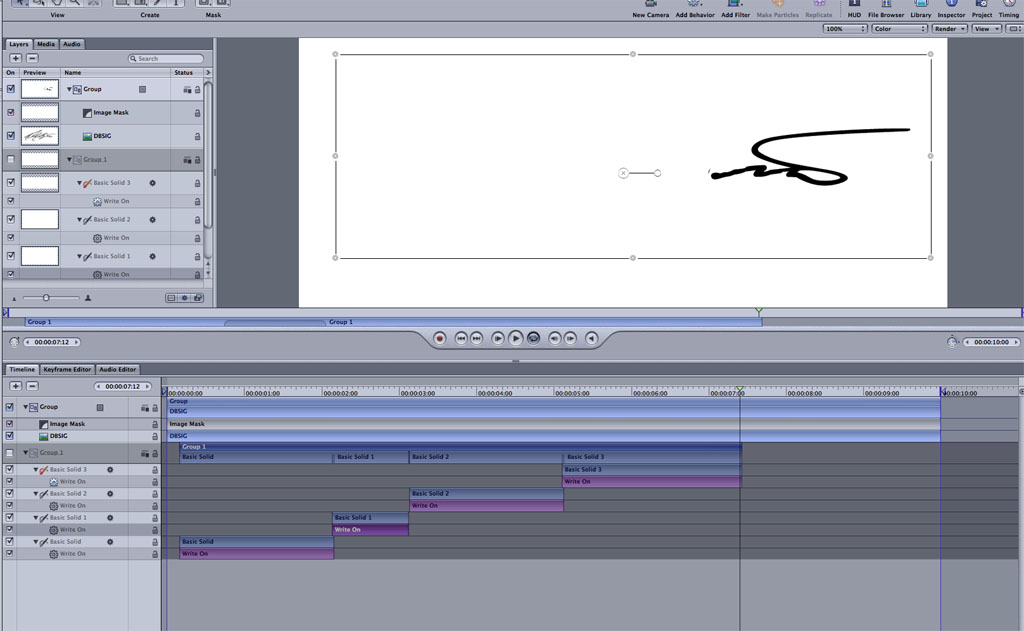
Ok, I have the Vector Signature in 1 group (Bottom) Its a Black Signature.

I have use the Paintbrush with "Write On" behavior in White and with masks added to each stroke. This Group of strokes is above the bottom Group.

When I play the clip you can see the write on paintbrush strokes being applied, but it doesn't reveal the signature underneath, it just writes on top of them...

At first I thought well that is because the Vector Signature is below the mask, but that is where it should be right? So the mask draw on and reveal what is below?

Right now when I play back I only see the paintbrush write on strokes...

The object is to have the Vector signature (Black) appear as if its growing or being written on the screen...

I have the basic concept I think, there is just some settings that are off... Also, I already realized that I need to time each paintstroke to reveal parts of the signature one at a time, otherwise it reveals all the parts at different times for instance his name is Daniel, So the D is revealed first, then the a, and so on...

The background is "Black" and will be for the final video, so I will change the actual signature color once I get this down to a science...

Aug 22, 2009 5:25 PM in response to NASCAR3D

Here is what I have so far:

http://www.rpm3dinc.com/MOTION/

I still need to figure out a good way to adjust the timing so that it writes out correctly instead of all coming in a once. Currently everything has an IN point of 1 and Duration of 109 of 300 frames. I would assume I only need to adjust the write on in and out points and sequence them somehow so that the first letter D writes on then the rest in sequential order.

Not bad for only doing this for a few days, learning quickly, but still have much to learn!

Aug 22, 2009 9:03 PM in response to Mark Spencer4

Thanks Mark, BTW, I pre-ordered your Motion 4 book, so hopefully that will help get me a bit more accustom to the program.

One thing I noticed when I dragged in the time and got everything where its looking correct is that the after it does a section of the signature it disappears and does the next section of signature... How do I keep the pieces it is revealing "revealed" after its done with that section and moves on to the next while still keeping the timing right?

Here is a screenshot of my timeline: http://www.rpm3dinc.com/MOTION/Timeline.jpg

I am sure its something simple I am missing, its late and I have been on the computer way to long today for my "weekend off", and I am probably just overlooking it...

At first I thought it was the duration of each layer with the paint-strokes, but adjusting that makes the strokes take longer to reveal the signature underneath.

Another question is this: Currently I am playing with a Black Signature .png file on a white background, but the final should actually be a White Signature on a Black background, so what settings do I need to adjust to accomplish that once I have everything setup? Can I simply color the .png like a "Color Overlay" blend mode in Motion? or do I need to physically import a white.png file and redo everything again?

Thanks again for the help! I hope all my questions are assisting others as well... Also assuming this method is exactly how you accomplish a "Floral/Swirl Pattern" growing in Motion as well? I see more of that effect in AE than I do in motion, but regardless its a cool effect.

My plan is once I have this all completed is to take the MOV file, import it into Flash to export as a SWF then load into a website on the homepage and have it loop.

This thread has been closed by the system or the community team. You may vote for any posts you find helpful, or search the Community for additional answers.

Best way to accomplish a signature animation in Motion 4?

Welcome to Apple Support Community
A forum where Apple customers help each other with their products. Get started with your Apple Account.