Bug with Transform>Crescendo -- workaround please?

This is a clarification of a previous post.

I believe that the Crescendo preset in the Transform Window does not work. I found this in Logic 9.0.1, but I found the same in Logic 8, owned by a friend. Try this:

Create a MIDI region and plunk down a handful of notes in it. I entered 10 notes.
Select the notes.

Double-click any note to open the list window so you can see the velocities of the notes - they should all be = 80, or at least all the same value.

Perform "Functions>Set locators by events"

Perform "Functions>Transform>Crescendo"

Now look at the Transform window:

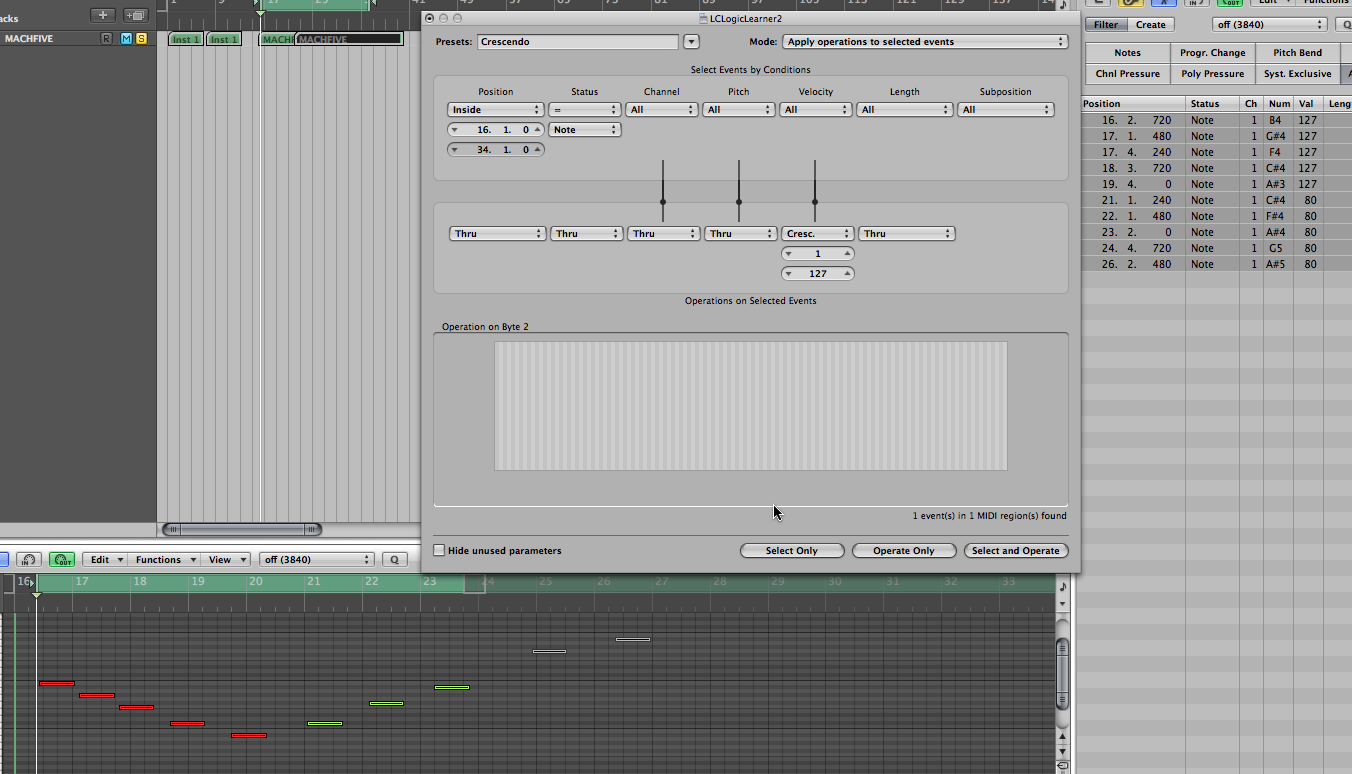
Notice: Selection Criteria start = 1.1.0, end = 5.1.0, unrelated to the selection.

Notice: Velocity operation = Cresc., start = 1 end =127

Notice above the 3 buttons at the bottom of the window: no message about number of events selected.

Now there are different things to try, and I don't know if there's an interaction depending on the order.

First, try "Select and operate"
In my Transform window the previously blank message just above the 3 buttons at the bottom now says "5 events in one MIDI region found"
BUT I entered and selected 10 events. Only the first five are now selected; the rest have been deselected.

In the events window the velocities of the first five notes have been set to 127, the remaining 5 notes are still at 80.

So I didn't get a crescendo, and not all the selected notes were even processed.

Try other combinations, such as:
manually adjusting the position start and end to match the locator limits for the events,

changing the Cresc. start and end values - try flipping for example

clicking "Select only", then "Operate only"

In none of these case could I get a crescendo. The outcome, always wrong, varies with different attempts.

What do you think? Is there a workaround? Is it a bug? How could it be a bug both in Logic 8 and 9?

Mac Pro, Mac OS X (10.5.8)

Posted on Oct 11, 2009 8:26 AM

Reply
6 replies

Oct 11, 2009 4:01 PM in response to ObserverLou

I too have always had problems with this function. Unless I'm also doing something wrong, I'm pretty sure it doesn't behave as it should. I think I can sometimes get it to work and sometimes I can get a crescendo but in totally random places with seemingly incorrect velocity values. I basically think it's buggy and has never been ironed out properly. Add that to the list!

A workaround... well it depends what you're doing, but a simple way is to use the hyper editor and use the + tool and draw your crescendo in by hand. There's probably other ways too but that will work.

Oct 12, 2009 3:18 AM in response to jdredge

I have to "disappoint" everyone here, the Crescendo function works as expected. I've encountered all the above scenario's, and they all were pilot error/inexperience. The most common mistake is that the region gets deselected, while the events in the Piano Roll still are selected. Counterintuitively, it then doesn't work anymore.
A few things are imperative: the MIDI region must be selected, the events you want to affect must be selected, and the values of the Inside points in the *Transform Window* are vital. The low velocity value should be in the top valuebox, the highest in the bottom box. When all that is good, the function works as expected.
Make a small testregion to play with it and see how it works.

The crescendo is evenly applied over the set range, reducing the selected notes that are before the startpoint to the lowest value.
Before (how it looks here, it won't work, region is not selected):
!http://farm3.static.flickr.com/2466/4003820393 149b8f5b86o.png!
After:
!http://farm3.static.flickr.com/2584/4004583224 bd093f3ef5o.png!


regards, Erik.

Oct 12, 2009 4:38 AM in response to Eriksimon

Hi, Eric,

Thanks so much for your thoughtful answer.

However, as I look at the images you posted, I think that the crescendo did NOT work as expected. I can't see the list window, where you would see the actual velocity values. But I can see the colors of the notes. Since the velocity range in the Transform window is from 1 to 127, I would expect the velocities in the transformed notes to increase from 1 to 127. The colors of the notes should therefore go from blue to red. In your 2nd image, the rightmost color is yellow, and the a handful of the leftmost notes appear to be all the same color blue.

Please check the numerical values in the List window and let me know what you see.

I agree with your comment about the importance of the start and finish values of the INSIDE range. The manual is quite clear about this. And in one or two instances when I set these values manually I did get a real crescendo from 1 to 127.

The problem may be how to set those values. From the user guide I think they have to be relative to the start of the region, not the start of the project. Therefore, if the region happens to be at the start of the project, you can find these values (in the transport bar) and type or paste them into the Transform window.

But if the region is in the middle of the music, how do you know what the relative start and end of the selected notes is?

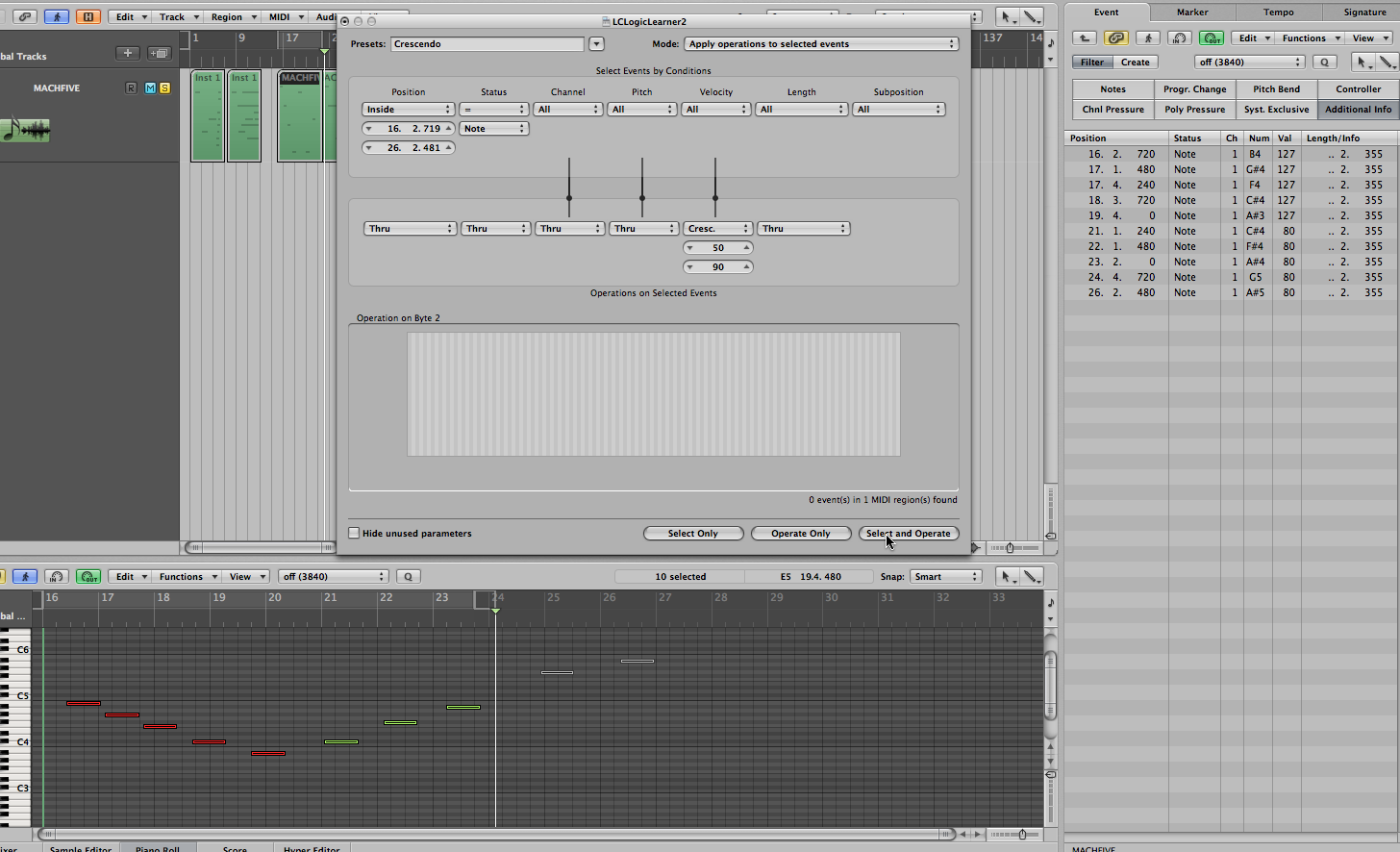
Finally, I've posted an image of how things look after I click "Select and operate" If you can see a bad setting please let me know.

http://www.jolc.net/lcpublic/appleforum/appleforum02.png

-Lou

Oct 12, 2009 7:20 AM in response to ObserverLou

ObserverLou wrote:
Hi, Eric,

Thanks so much for your thoughtful answer.

However, as I look at the images you posted, I think that the crescendo did NOT work as expected.


Yes it did.

I can't see the list window, where you would see the actual velocity values.


You'll get the list windows:
!http://farm3.static.flickr.com/2607/4005019134 ebe95a8d9fo.png!

!http://farm3.static.flickr.com/2489/4004254567 1358203680o.png!

But I can see the colors of the notes. Since the velocity range in the Transform window is from 1 to 127, I would expect the velocities in the transformed notes to increase from 1 to 127. The colors of the notes should therefore go from blue to red. In your 2nd image, the rightmost color is yellow, and the a handful of the leftmost notes appear to be all the same color blue.


That is because the starting point of the last note is stil 1/16 before the end of the set Range.

You'ld have to set it like so:
!http://farm3.static.flickr.com/2467/4004254447 3080aaf46eo.png!

!http://farm3.static.flickr.com/2641/4005018732 6be5999a5ao.png!

Please check the numerical values in the List window and let me know what you see.


That it works exactly as expected.

I agree with your comment about the importance of the start and finish values of the INSIDE range. The manual is quite clear about this. And in one or two instances when I set these values manually I did get a real crescendo from 1 to 127.

The problem may be how to set those values. From the user guide I think they have to be relative to the start of the region, not the start of the project.


No, the values apply to the inside range, and are spread evenly over that range. The starting point of the region is irrelevant

Therefore, if the region happens to be at the start of the project, you can find these values (in the transport bar) and type or paste them into the Transform window.


The starting point of the region is irrelevant, only two things count: the Inside values and the note selection. +Unselected notes are not affected.+

Finally, I've posted an image of how things look after I click "Select and operate" If you can see a bad setting please let me know.

!http://www.jolc.net/lcpublic/appleforum/appleforum02.png!

Yes, your inside values are incorrect. Set them from 16.2.719 to 26.2.481 for a perfect 1-127 result.

regards, Erik.

Oct 13, 2009 5:05 AM in response to Eriksimon

Hi again, Erik,

I looked carefully at your last post, and noticed a few details I had missed earlier. Most important was my interpretation of "Inside" which was not as precise as yours. Therefore I adjusted the limits of the range as you suggested. Actually this was difficult to do. In a few cases after I typed in my desired values and hit return, the value in the start or end field reverted to its original value. I tried pasting from the List Window, I tried selecting values and dragging the mouse up and down but failed several times. I finally did manage to get the correct values to stay in the fields.

Having accomplished that, I noticed that the notes I had selected had become deselected, so I drag-selected them again. I double-checked that the appropriate region was selected in Arrange Window.

At this point I looked at the message near the bottom of the Transform Window -- it showed that no events had been selected. And yet I think I selected these events in every way I could think of -- drag selecting in the Piano Roll window, clicking the Region in the Arrange window, and checking that the notes were greyed in the List Window. I decided to go to the next step anyway, since I couldn't think of any other way to get the Transform Window to find these events.

I clicked "Select and Operate". The message in the Transform Window still said no events had been selected, and no items were operated on. I took a screen shot which you can see at:

http://www.jolc.net/lcpublic/appleforum/appleforum03.png

So I'm wondering about the methods that I'm using for selecting the notes. I'm very new to Logic, so perhaps I'm using selection methods from my past which don't apply in this case.

Also, I'm wondering if something is different in your environment versus mine. I noticed that you are running a G4; I'm using a brand new Mac Pro (quad-core.) I running OSX 10.5.8 and Logic 9.0.1. Are your versions the same?

Many thanks for your patience and help. I can only assume I still have a blind spot and perhaps you will help me figure out what it is.

best,
Lou

This thread has been closed by the system or the community team. You may vote for any posts you find helpful, or search the Community for additional answers.

Bug with Transform>Crescendo -- workaround please?

Welcome to Apple Support Community
A forum where Apple customers help each other with their products. Get started with your Apple Account.