All of these fonts already exist in the /System/Library/Fonts/ folder. But installing these duplicates, you created fonts conflicts with every one.
Well, very technically, they don't conflict. Using SF Compact Display Black as an example, the actual system font's internal names look like this:
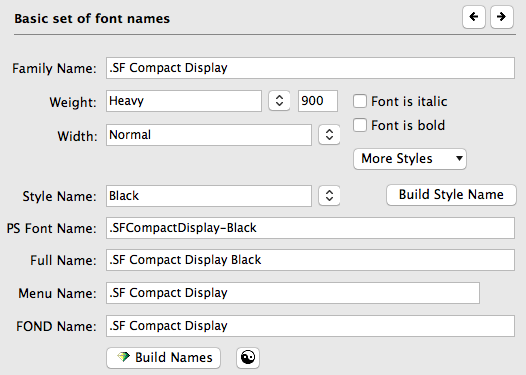
The downloaded fonts from the developer site have had all of the periods removed:
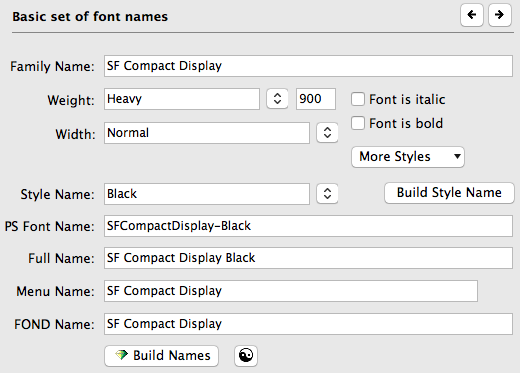
All the period does is make the included system fonts invisible to all applications you would use. Apple doesn't intend for the user to be able to use these fonts wherever they want.
The rights usage in the real font is pretty short:
Copyright © 2015-2017 Apple Inc. All rights reserved. Your use of the San Francisco font is subject to the terms of the applicable iOS Software License Agreement.
The developer fonts are quite a bit longer:
This San Francisco Font (the “Apple Font”) is licensed to you by Apple Inc. (“Apple”) in consideration of your agreement to the following terms and the terms of the License Agreement for the Apple San Francisco Font that was presented upon the downloading of the Apple Font. If you do not agree with these terms and the terms of the License Agreement for the Apple San Francisco Font, do not use the Apple Font.
You may use the Apple Font solely for creating mock-ups of user interfaces to be used in software products running on Apple’s iOS or OS X operating systems, as applicable. The foregoing right includes the right to show the Apple Font in screen shots, images, mock-ups or other depictions, digital and/or print, of such software products running solely on iOS or macOS/OS X.
The grants set forth in this License do not permit you to, and you agree not to, install, use or run the Apple Font for the purpose of creating mock-ups of user interfaces to be used in software products running on any non-Apple operating system or to enable others to do so. You may not embed the Apple Font in any software programs or other products. Except as expressly provided for herein, you may not use the Apple Font to, create, develop, display or otherwise distribute any documentation, artwork, website content or any other work product.
You may use the Apple Font: (i) only for the purposes described in this License and the License Agreement for the Apple San Francisco Font; and (ii) only if you are a Registered Apple Developer and an eligible paid Apple Developer Program member, or as otherwise expressly permitted by Apple in writing.
The . in the names of the real fonts may not be enough to consider them unique fonts, thus causing all of them to cause conflicts with the developer versions. I haven't tested it yet on my end to see what would happen.


