My Apple Music won’t work

I just got Apple Music and every Time I download a song to my library it won’t play??

iPhone XS

Posted on Jan 18, 2019 4:55 AM

Reply
1 reply

Jan 18, 2019 5:08 AM in response to anderson130

Disable Music’s Cellular or Mobile Data

  • Go to Settings > Music > Cellular Data and toggle that off. If you don’t want to do that, try toggling off High-Quality Streaming instead and see if that works

Try turning iCloud Music Library Off and then back ON. On your iPhone, iPad, or iPod touch

  1. Go to Settings > Music then tap iCloud Music Library to turn it off
  2. Close Settings by double pressing Home or swiping up the Home Gesture Bar and swiping up on the Settings App Preview
  3. Return to Settings > Music and tap iCloud Music Library to turn it back on
  4. Then launch Apple Music and see if it works 

Go to Settings or Control Center and turn on Airplane Mode 
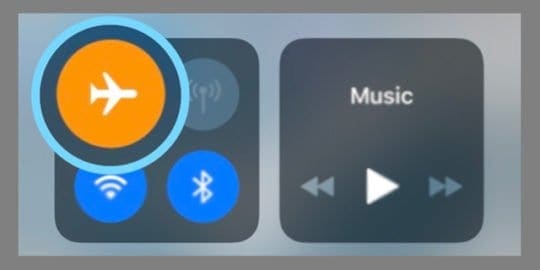
  • Wait for a few seconds and turn back off again. If this does not work, do this after a forced restart (reboot)

Restart your Music app

  • Press the home button twice or swipe up the Home Gesture Bar, then swipe up on the Music app to close it. After this, relaunch the app


This thread has been closed by the system or the community team. You may vote for any posts you find helpful, or search the Community for additional answers.

My Apple Music won’t work

Welcome to Apple Support Community
A forum where Apple customers help each other with their products. Get started with your Apple Account.
