1- read this user tip: Effective defenses against malware and ot… - Apple Community
2 - never install or run any "cleaning", "optimizing", "speed-up" or antivirus apps. They are not necessary.k
3 - Have two accounts on your Mac, one administrative and one not. Use the one that's not for web surfing, downloading files, etc.
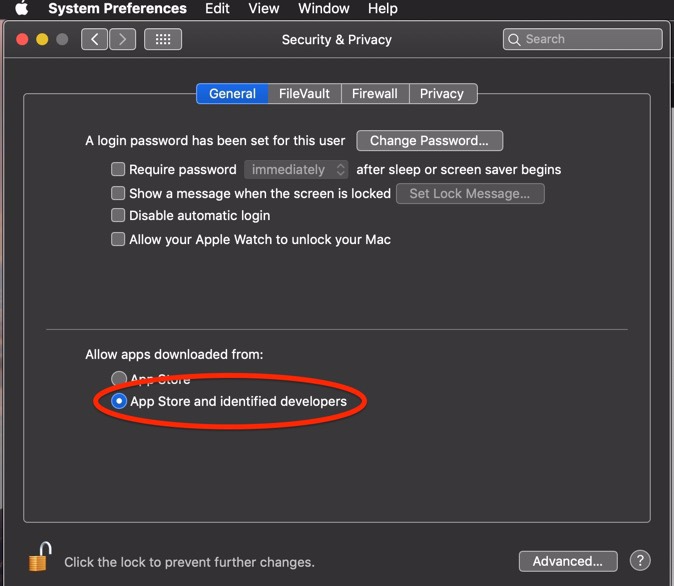
4 - have Gatekeeper set to App Store and identified developers.
5 - never disable SIP, System Integrity Protection.
6 - whenever you think you might have some adware or malware on your Mac download and run Malwarebytes.
7 - Always keep a minimum of 25GB of free space on your boot drive to facilitate optimum system and application performance.
To make a long story short, uninstall AVG according to the developer's instructions. If you'd like you can download and run Etrecheck and we can check to see if there is any questionable software on your Mac. Copy and paste the results into your reply. Etrecheck is a diagnostic tool that was developed by one of the most respected users here in the ASC and recommended by Apple Support to provide a snapshot of the system and help identify the more obvious culprits that can adversely affect a Mac's performance.
Use the Add Text button to include the report in your reply:

Also assign Full Disk Access to Etrecheck so that it can get more information for the report:




