
I can’t remove my card info so I can update 𝙵𝚁𝙴𝙴 apps
I need to updates but can’t until I remove credit card info and I can’t figure out how to do it
iPhone 8 Plus, 12
I need to updates but can’t until I remove credit card info and I can’t figure out how to do it
iPhone 8 Plus, 12
You can check what the outstanding bill on App Store purchase outstanding balance by doing the following:
1. Open the “Settings” app in iOS, then go to ‘iTunes & App Store’ and then select your Apple ID
2. Choose “View Apple ID” to access the Account Settings page
3. In the Account Settings section, go to “Purchase History” and scroll through the list to find any item with an outstanding balance – this is what must be paid before you can change your payment information
4. Update your payment information as detailed below to stop the “Verification Required” error message on the iPhone or iPad
5. In the Account Settings section, tap on “Payment Information”
6. Under ‘Payment Method’, choose “None” – or, alternatively, update the payment method *
7. Tap on “Done” when finished adjusting your settings
8. Exit Settings, and return to the App Store of iOS where you are now able to freely download, install, and update apps without seeing any “Verification Required” message
On your iPhone, iPad, or iPod touch
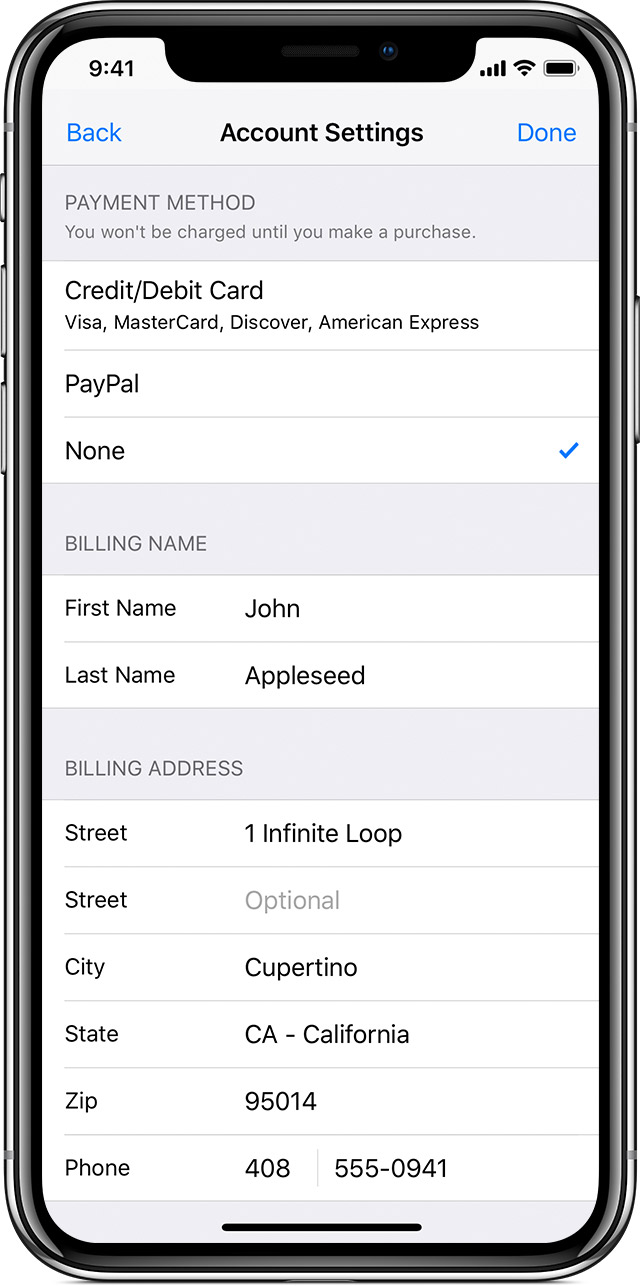
If you change your payment method to a credit or debit card, you might see a temporary authorization hold on your account. You might also see an option to add the new card to Apple Pay.
Change or remove your Apple ID payment information - Apple Support
https://support.apple.com/en-in/HT201266
I can’t remove my card info so I can update 𝙵𝚁𝙴𝙴 apps

 iPhone, iPad, or iPod touch
 On your Mac or PC
 On your Android device