How do I add another phone to find my iPhone

How do I add another phone to find my iPhone

iPhone 7 Plus

Posted on Feb 20, 2019 11:58 PM

Reply
Question marked as Top-ranking reply

Posted on Feb 21, 2019 12:10 AM

Add a device to the list

After you sign in on a device with your Apple ID, that device appears in the list. Here's where you need to sign in:

  • For iOS 9 and later, sign in to iCloud, iMessage, FaceTime, the iTunes and App Store, or Game Center on the device. You can also see your paired Apple Watch.
  • For iOS 8, sign in to iCloud or the iTunes and App Store on the device. You can also see your paired Apple Watch.
  • For OS X Yosemite and later or Windows 10 and later, sign in to iCloud on the device. 
  • For tvOS 7 and later, sign in to the iTunes and App Store on the device.
  • If any of your devices are using earlier versions of iOS, OS X, or tvOS, you won’t see them in your device list.

Check your Apple ID device list to see where you're signed in

Learn which devices appear in your Apple ID device list, how to see your device's details, and how to remove a device, if necessary.


Use your Mac to see where you're signed in
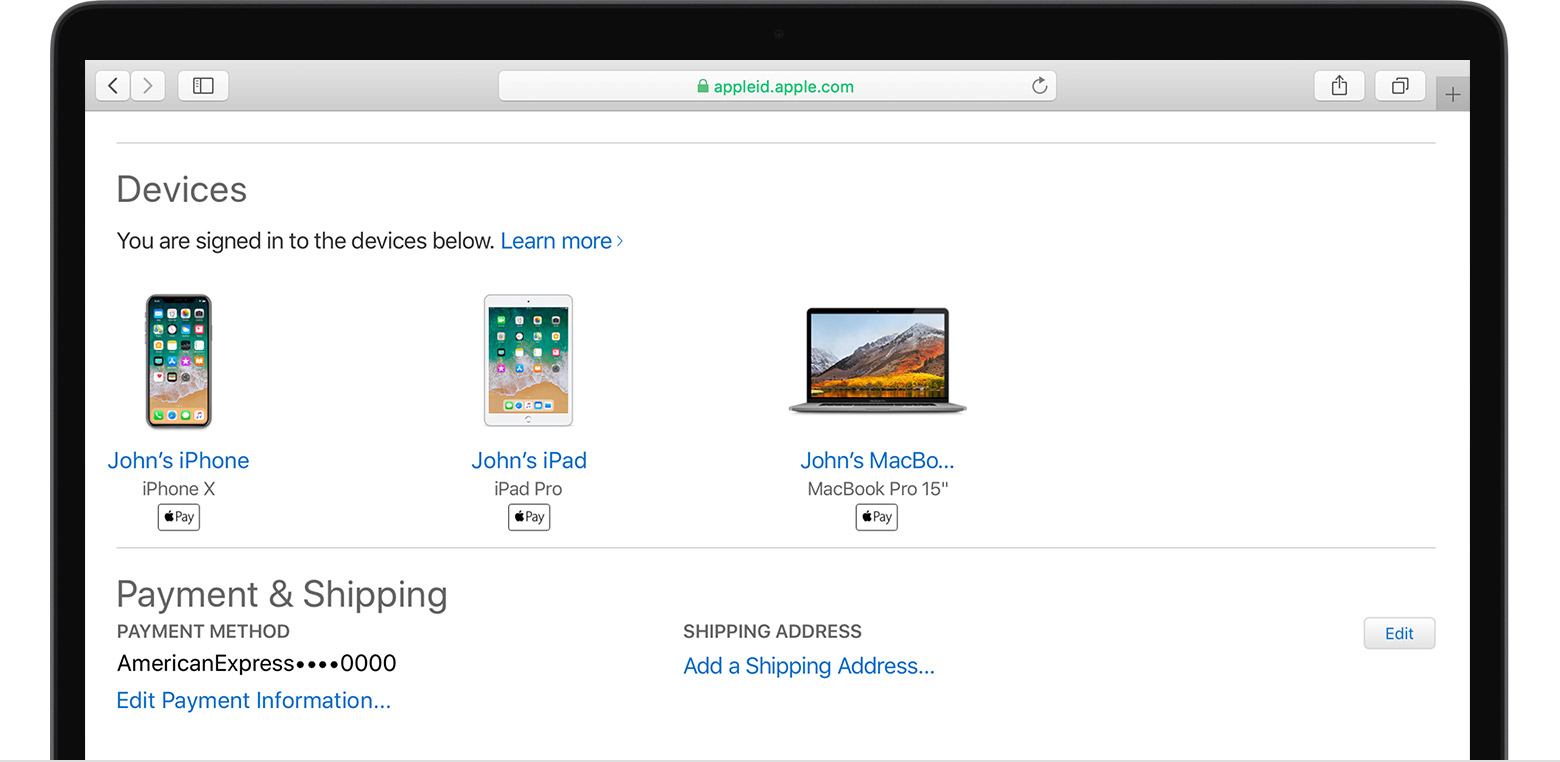


From the Devices section of your Apple ID account page, you can see the devices that you're currently signed in to with your Apple ID: 

  1. Sign in to your Apple ID account page, then scroll to Devices.
  2. If you don’t see your devices right away, click View Details and answer your security questions.
  3. Click any device name to view that device's information, such as the device model, serial number, and OS version. The information might vary depending on the device type.


Use your iPhone, iPad, or iPod touch to see where you're signed in

If you’re using iOS 10.3 or later, you can see the devices that you're currently signed in to with your Apple ID: 

  1. Tap Settings > [your name], then scroll down. 
  2. Tap any device name to view that device's information, such as the device model, serial number, and OS version. The information might vary depending on the device type. You might need to answer your security questions to see device details. 


Check your Apple ID device list to see where you're signed in - Apple ...

https://support.apple.com/en-in/HT205064


1 reply
Question marked as Top-ranking reply

Feb 21, 2019 12:10 AM in response to Trent56

Add a device to the list

After you sign in on a device with your Apple ID, that device appears in the list. Here's where you need to sign in:

  • For iOS 9 and later, sign in to iCloud, iMessage, FaceTime, the iTunes and App Store, or Game Center on the device. You can also see your paired Apple Watch.
  • For iOS 8, sign in to iCloud or the iTunes and App Store on the device. You can also see your paired Apple Watch.
  • For OS X Yosemite and later or Windows 10 and later, sign in to iCloud on the device. 
  • For tvOS 7 and later, sign in to the iTunes and App Store on the device.
  • If any of your devices are using earlier versions of iOS, OS X, or tvOS, you won’t see them in your device list.

Check your Apple ID device list to see where you're signed in

Learn which devices appear in your Apple ID device list, how to see your device's details, and how to remove a device, if necessary.


Use your Mac to see where you're signed in


From the Devices section of your Apple ID account page, you can see the devices that you're currently signed in to with your Apple ID: 
  1. Sign in to your Apple ID account page, then scroll to Devices.
  2. If you don’t see your devices right away, click View Details and answer your security questions.
  3. Click any device name to view that device's information, such as the device model, serial number, and OS version. The information might vary depending on the device type.


Use your iPhone, iPad, or iPod touch to see where you're signed in

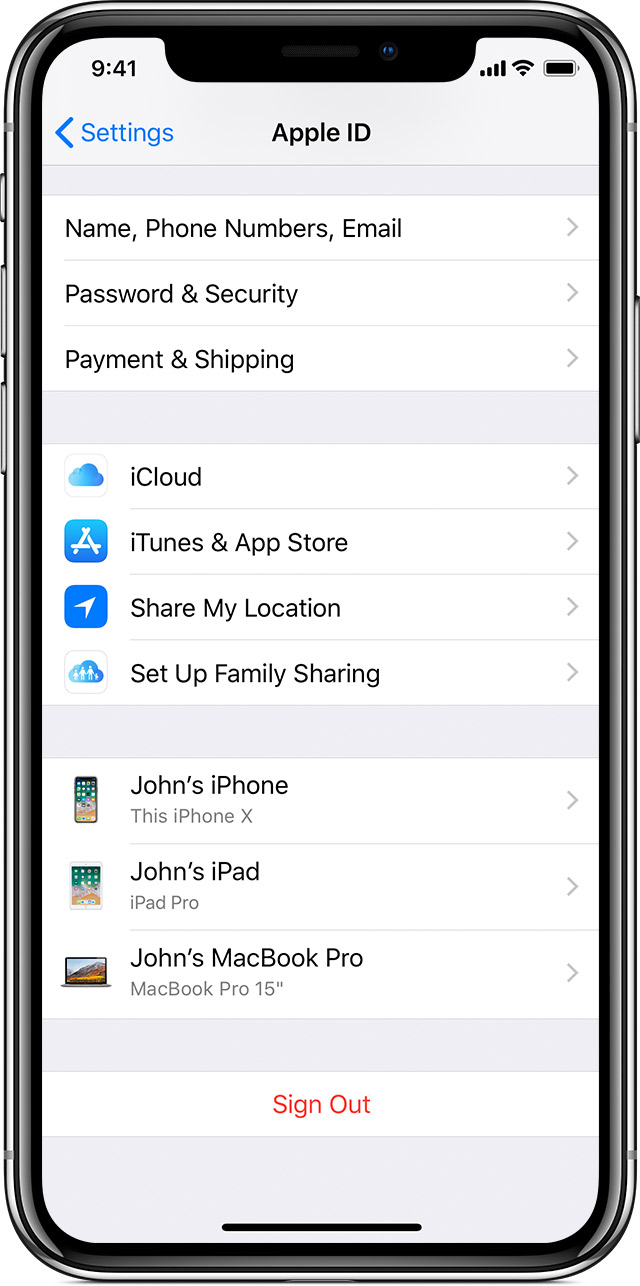
If you’re using iOS 10.3 or later, you can see the devices that you're currently signed in to with your Apple ID: 

  1. Tap Settings > [your name], then scroll down. 
  2. Tap any device name to view that device's information, such as the device model, serial number, and OS version. The information might vary depending on the device type. You might need to answer your security questions to see device details. 


Check your Apple ID device list to see where you're signed in - Apple ...

https://support.apple.com/en-in/HT205064


This thread has been closed by the system or the community team. You may vote for any posts you find helpful, or search the Community for additional answers.

How do I add another phone to find my iPhone

Welcome to Apple Support Community
A forum where Apple customers help each other with their products. Get started with your Apple Account.