
Not able To activate 3D Touch on my iPhone
I tried a lot to activate 3D Touch in my latest iPhone but not done. Please help.
iPhone 8 Plus, iOS 12
I tried a lot to activate 3D Touch in my latest iPhone but not done. Please help.
iPhone 8 Plus, iOS 12
Go to Settings > General > Accessibility > 3D Touch and use the slider to select a sensitivity level. On the same screen, you can turn 3D Touch off and on. * These iOS devices support 3D Touch: iPhone 6s, iPhone 7, iPhone 7 Plus, iPhone 8, iPhone 8 Plus, iPhone X, iPhone XS, iPhone XS Max.
Change 3D Touch sensitivity on your iPhone
You can change the amount of pressure you need to activate 3D Touch.
You can adjust the sensitivity of 3D Touch on devices that support it.*
Go to Settings > General > Accessibility > 3D Touch and use the slider to select a sensitivity level. On the same screen, you can turn 3D Touch off and on.
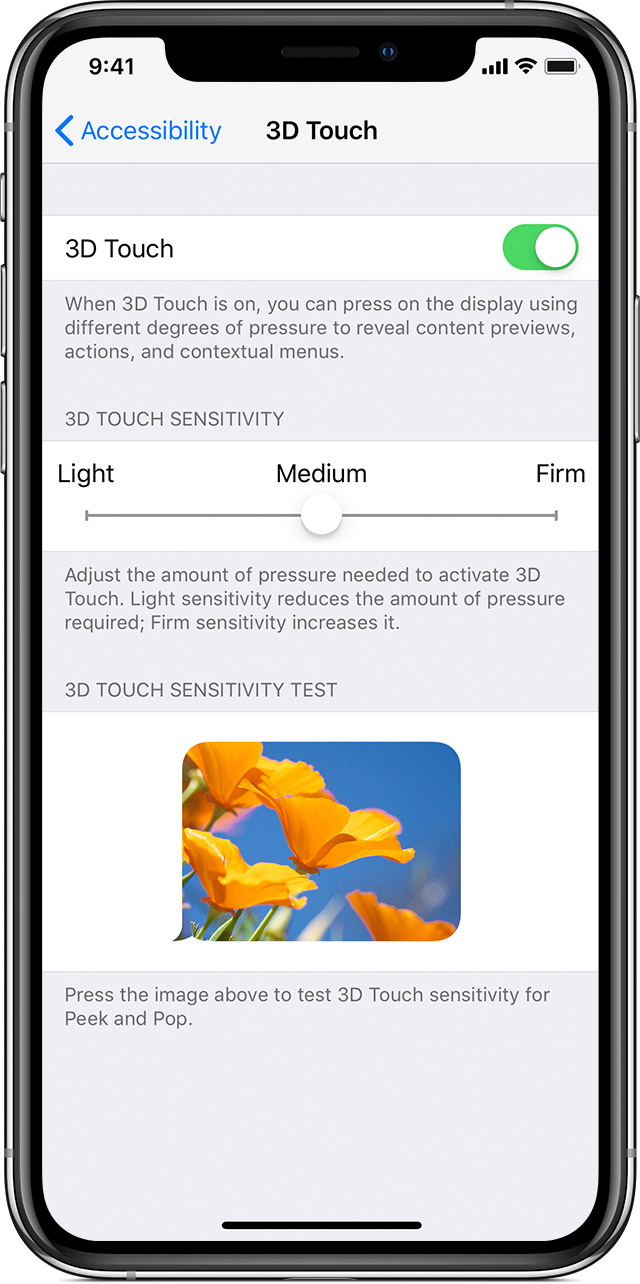
* These iOS devices support 3D Touch: iPhone 6s, iPhone 7, iPhone 7 Plus, iPhone 8, iPhone 8 Plus, iPhone X, iPhone XS, iPhone XS Max.
Go to Settings > General > Accessibility > 3D Touch and use the slider to select a sensitivity level. On the same screen, you can turn 3D Touch off and on. * These iOS devices support 3D Touch: iPhone 6s, iPhone 7, iPhone 7 Plus, iPhone 8, iPhone 8 Plus, iPhone X, iPhone XS, iPhone XS Max.
Change 3D Touch sensitivity on your iPhone
You can change the amount of pressure you need to activate 3D Touch.
You can adjust the sensitivity of 3D Touch on devices that support it.*
Go to Settings > General > Accessibility > 3D Touch and use the slider to select a sensitivity level. On the same screen, you can turn 3D Touch off and on.
* These iOS devices support 3D Touch: iPhone 6s, iPhone 7, iPhone 7 Plus, iPhone 8, iPhone 8 Plus, iPhone X, iPhone XS, iPhone XS Max.
Not able To activate 3D Touch on my iPhone
