
voice mail
I can't find my voicemail settings.
iPhone XS
I can't find my voicemail settings.
iPhone XS
Check your voicemail on iPhone
 , Visual Voicemail (available from select carriers) shows a list of your messages. You can choose which ones to play and delete without listening to all of them. A badge on the Voicemail icon indicates the number of unheard messages.
Voicemail transcription (beta; available only in certain regions) shows your messages transcribed into text. Transcription is limited to voicemails in English received on your iPhone with iOS 10 or later. Transcription depends on the quality of the recording.
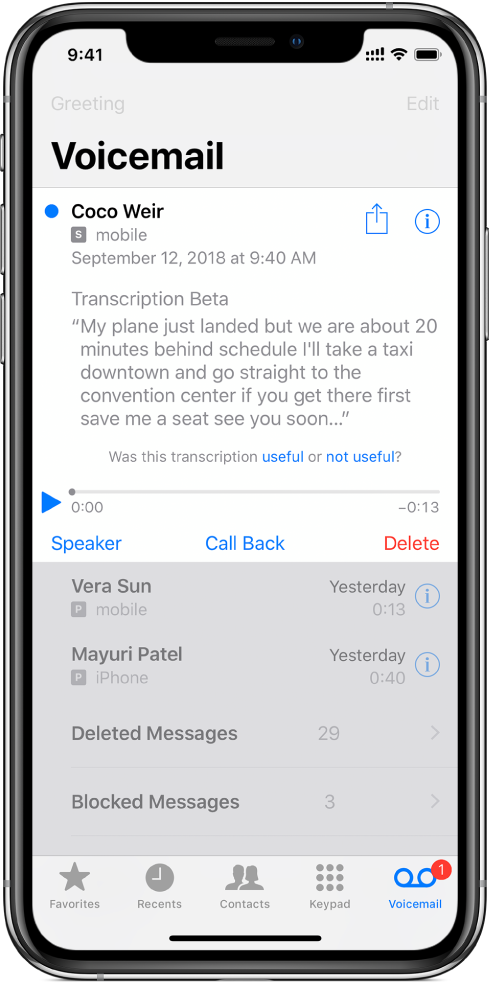
Note: Voicemail, Visual Voicemail, and Voicemail transcription are available from select carriers in select regions.
Set up voicemail
The first time you tap Voicemail, you’re asked to create a voicemail password and record your voicemail greeting.
Play, share, or delete a voicemail message
Ask Siri. Say something like: “Do I have any new voicemail?” or “Play the voicemail from Eliza.” Learn how to ask Siri.
Or do the following:
 .
. .
.To recover a deleted message, tap Deleted Messages, tap the message, then tap Undelete.
Check your messages when Visual Voicemail isn’t available
Change your voicemail settings
 > Phone > Change Voicemail Password, then enter the new password. > Sounds & Haptics or Settings > Sounds.
Check your voicemail on iPhone - Apple Support
https://support.apple.com/guide/iphone/check-voicemail-iph3c99490e/ios
Check your voicemail on iPhone
, Visual Voicemail (available from select carriers) shows a list of your messages. You can choose which ones to play and delete without listening to all of them. A badge on the Voicemail icon indicates the number of unheard messages.Voicemail transcription (beta; available only in certain regions) shows your messages transcribed into text. Transcription is limited to voicemails in English received on your iPhone with iOS 10 or later. Transcription depends on the quality of the recording.
Note: Voicemail, Visual Voicemail, and Voicemail transcription are available from select carriers in select regions.
Set up voicemail
The first time you tap Voicemail, you’re asked to create a voicemail password and record your voicemail greeting.
Play, share, or delete a voicemail message
Ask Siri. Say something like: “Do I have any new voicemail?” or “Play the voicemail from Eliza.” Learn how to ask Siri.
Or do the following:
..To recover a deleted message, tap Deleted Messages, tap the message, then tap Undelete.
Check your messages when Visual Voicemail isn’t available
Change your voicemail settings
> Phone > Change Voicemail Password, then enter the new password. > Sounds & Haptics or Settings > Sounds.Check your voicemail on iPhone - Apple Support
https://support.apple.com/guide/iphone/check-voicemail-iph3c99490e/ios
voice mail
