Looks like no one’s replied in a while. To start the conversation again, simply ask a new question.

How do I delete messages?

I do not want to leave messages on my iphone. How do I delete messages? This is my first iphone, totally new user. thanks


[Re-Titled by Host]

Posted on Mar 22, 2019 8:10 AM

Reply
Question marked as Apple recommended

A standard method to delete your iMessages is to simply delete them on the Message app on your iPhone/iPad. This method to erase iMessages is different than erasing them on Mac.
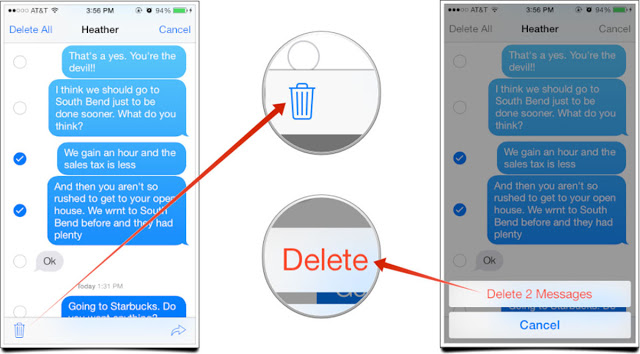
  1. Launch Messages app on your iPhone/iPad.
  2. Now find and tap the conversation that contains the messages that you wish to delete. The list of messages will appear.
  3. Now tap and hold the message that you want to delete until a pop-up menu appears.
  4. Tap more on that pop-up menu.
  5. Now tap on the circle that is shown in front of the message that you wish to delete. Alternatively, you can also tap Delete All if you wish to delete all the messages in the conversation.
  6. After that, select the delete button (it will be shown as a trash can icon).
  7. Now tap Delete Message shown on the pop-up to confirm your action. The message will be deleted.

Posted on Mar 22, 2019 10:06 AM

1 reply
Question marked as Apple recommended

Mar 22, 2019 10:06 AM in response to Christian5619

A standard method to delete your iMessages is to simply delete them on the Message app on your iPhone/iPad. This method to erase iMessages is different than erasing them on Mac.

  1. Launch Messages app on your iPhone/iPad.
  2. Now find and tap the conversation that contains the messages that you wish to delete. The list of messages will appear.
  3. Now tap and hold the message that you want to delete until a pop-up menu appears.
  4. Tap more on that pop-up menu.
  5. Now tap on the circle that is shown in front of the message that you wish to delete. Alternatively, you can also tap Delete All if you wish to delete all the messages in the conversation.
  6. After that, select the delete button (it will be shown as a trash can icon).
  7. Now tap Delete Message shown on the pop-up to confirm your action. The message will be deleted.

How do I delete messages?

Welcome to Apple Support Community
A forum where Apple customers help each other with their products. Get started with your Apple ID.
