Disk0s2 showing up in Disk Utility

My iMac is showing disk0s2 in disk utility under the fusion drive. I'm aware this is the boot drive but I don't know why it is showing up here all of a sudden. I can't resize it/hide it or erase it. I just don't it to show up here. Any help?

iMac 27", macOS 10.14

Posted on Mar 25, 2019 10:09 AM

Reply
6 replies

Mar 26, 2019 10:19 AM in response to antho_h28

Hmm, everything seems normal, except for disk0s2 which is identifying itself as a HFS partition. This shouldn't exist if both drives, that make up the Fusion Drive, are formatted for APFS. Below is a screen capture from my 2014 Mac mini. In my case disk0 is an external WD My Book Pro, do macOS assigned disk1-3 for the Fusion Drive. This partition did not even exist prior to macOS Mojave reformatting my Fusion Drive from HFS to APFS during an upgrade.
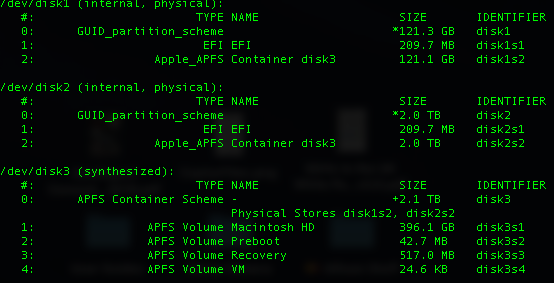


Ref: About Fusion Drive, a storage option for some Mac computers - Apple Support


At the same time, it doesn't appear that you have a "split" Fusion Drive. I am assuming that you cannot separately access each of these drives in Finder ... correct? If you can, then see if the following article can help:


Mar 26, 2019 2:01 PM in response to antho_h28

Honestly, at this point, I don't know as I've never come across something like this before.


I would think you basically have two choices, going forward:

  1. Since everything is working, leave it as is, OR
  2. Continue to troubleshoot/resolve it, if it "bothers" you. With this option, I suspect that you can either make a Genius Bar appointment at your local Apple Store or, maybe, someone here that has come across this will chime in to offer you a solution.


This thread has been closed by the system or the community team. You may vote for any posts you find helpful, or search the Community for additional answers.

Disk0s2 showing up in Disk Utility

Welcome to Apple Support Community
A forum where Apple customers help each other with their products. Get started with your Apple Account.