Aha! I think I know what has happened.
In iTunes, it's possible to set it to Shuffle Albums and this works within Playlists too:
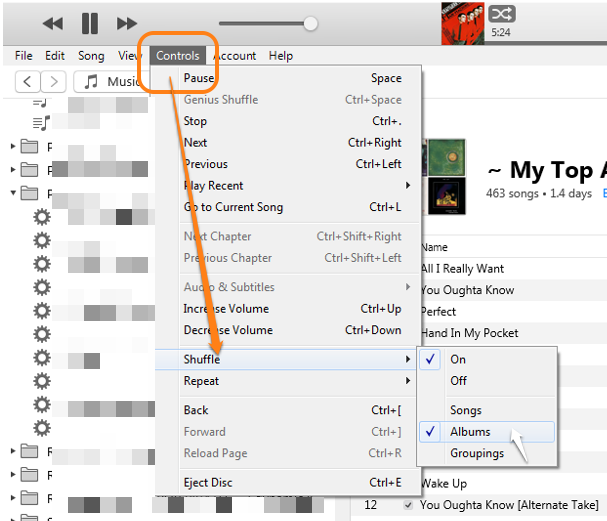
However, on an iPod, it is not possible to set a Playlist to shuffle by album. In an iPod/iPhone Playlist, the only shuffle option is to shuffle songs. Note (in the screenshot above) that that option is available in the Tunes as well. Do you see the difference?
The nearest option on an iPod or iPhone (which will not do what you want) is to go into Albums menu and then tap the shuffle button, but that shuffles all albums, in other words, plays one album, then shuffles to another album. I get the impression that's not quite what you want.
All is not lost, providing you still have the CD of Dark Side Of The Moon.
To achieve what you want, the only method (as far as I know) is to use Join Tracks - and this is only possible when importing from a physical CD. The trick therefore, is to import from the CD a second time.
So, let's go through each of the steps required to achieve what you want.
- With the CD in the draw and seen in the iTunes Import CD window, select the tracks you want to join. Note the difference on the Settings option menu (the gear wheel to the left of the eject CD button) between the following two screenshots:

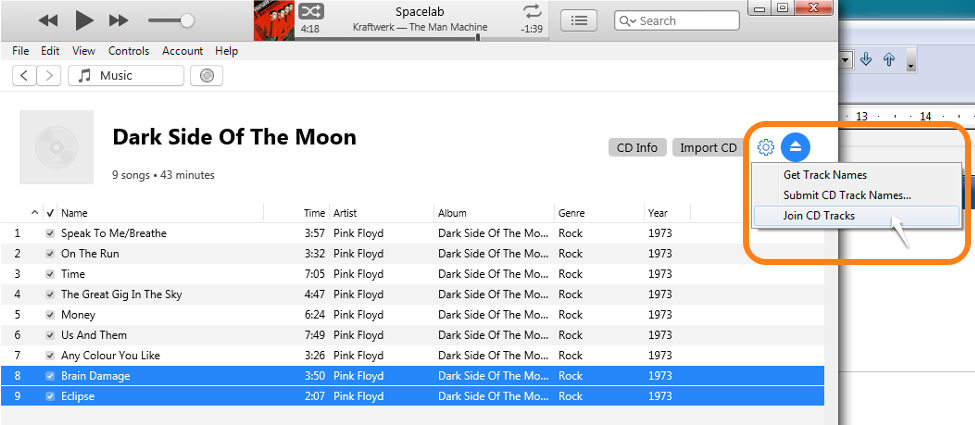
In the second of those two screenshots, notice that the Settings menu now has Join CD Tracks. By selecting adjacent tracks, the "join" command appears on the menu. In the first of the two views, that option is not available because the track Any Colour You Like has not been selected. In other words, you can select as many songs as you want, but they all have to be adjacent. Once you click on Join CD Tracks, the import from CD view looks like this:
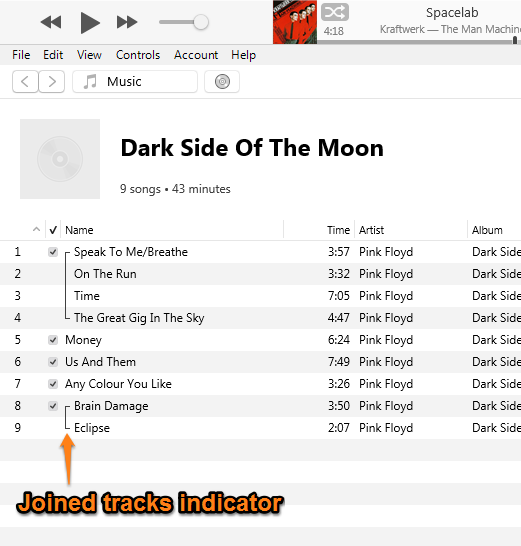
Notice that as well as joining Brain Damage and Eclipse, I have separately joined the first four tracks, which make up side one of the original vinyl LP.
I didn't stop there (when I did this a few years ago). I actually joined the tracks to represent side 1 and side 2 of the vinyl LP. I also named the album Dark Side Of The Moon {joined tracks}, which creates a separate album to the one I originally imported.
- Let the import begin (and complete). This next screenshot shows the Library window, once the album has been imported a second time:
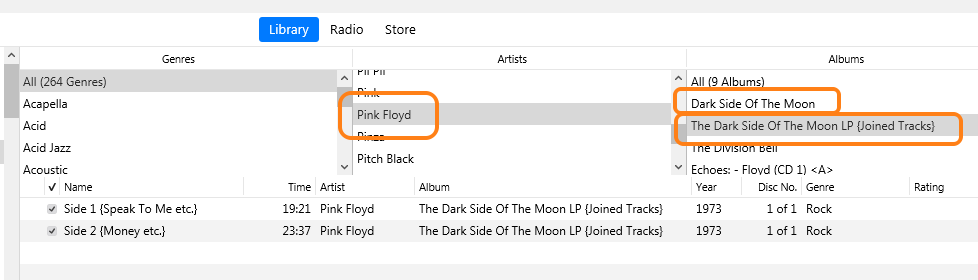
As you can see, I have two copies of Dark Side Of The Moon in my Library. The first one in that list has each track as a separate song (you cannot see them in that picture). The second version, which you can see listed below the artist and album columns, is named Dark Side Of The Moon {joined tracks} and has only two songs:
- Side 1 {Speak To Me etc.}
- Side 2 {Money etc.}
Note though, that the title allocated to joined tracks by iTunes is all the original song titles, one after another. To make it neater and easier to view on my iPod, I renamed the two tracks after importing them into iTunes, to the titles you see above.
As a result, I can choose to either play one song from the album, or one side as I would have done when using the vinyl LP. So you would add only the joined tracks versions to your Playlist*. That way, when shuffling, your iPod might play an Ian Dury track, followed by an Eagles song, followed by side 2 of Dark Side Of The Moon. Then back to individual songs until it chooses the next joined tracks song.
If you really want, you can join every track (on an album) into one giant song, but I personally didn't want to do that.
How's that - any good?
* Edited by author for clarity, after posting.



