Certificate Trust

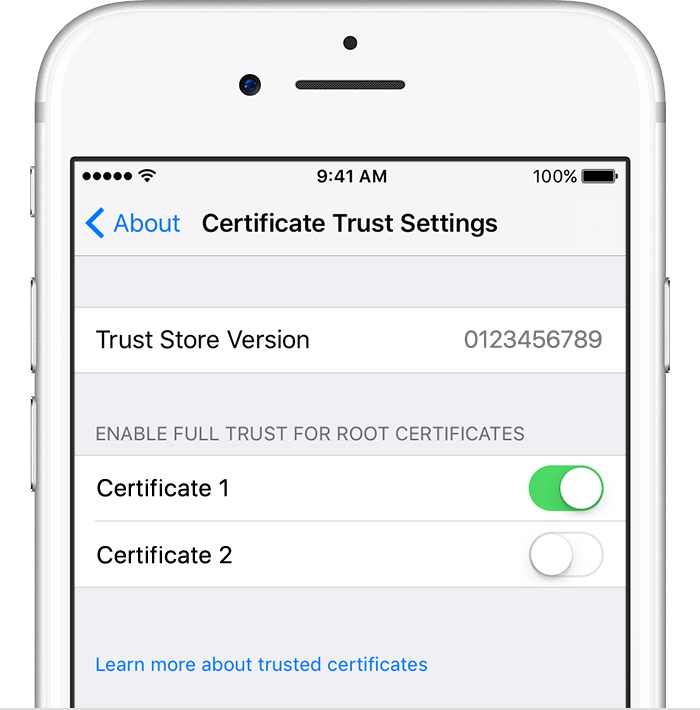
The instructions for manually installing a root certificate are simple and clear. However, it looks like several folks have posted questions asking about the same problem I have today. Manually installing a certificate on iOS 12.2; there is nothing in the General>About>Certificate Trust Settings following installation. No opportunity to finish the approval. There is no certificate listed.


As I wrote, others have posted with the same question, but no solution has been offered on any of the pages I've visited.

iPhone 5s

Posted on Apr 10, 2019 8:17 AM

Reply

Similar questions

4 replies

Apr 10, 2019 9:44 AM in response to EdwinPJr

Your post says "no solution has been offered on any of the pages I've visited." One google search and I found this.


You must manually turn on trust for SSL when you install a profile that is sent to you via email or downloaded from a website.


Trust certificates are usually sent by an employer or the system administrator of your iPhone for securing their data on your iPhone. For individual users SSL certificates is used by app developers and script writers.


Apple recommends deploying certificates via Apple Configurator or Mobile Device Management (MDM). Certificate payloads are automatically trusted for SSL when installed with Configurator, MDM, or as part of an MDM enrolment profile.


Trust manually installed certificate profiles in iOS. ... If you want to turn on SSL trust for that certificate, go to Settings > General > About > Certificate Trust Settings. Under "Enable full trust for root certificates," turn on trust for the certificate.


Trust manually installed certificate profiles in iOS - Apple Support

https://support.apple.com/en-in/HT204477

Apr 11, 2019 1:16 PM in response to EdwinPJr

EdwinPJr wrote:

I had the impression that someone from Apple would be available here since the site is discussions.apple.com

Is this not the case?

No, it's not the case. As explained in the Terms of Use to which we all agreed when we signed up, this is a user-to-user support site. Apple's direct participation here is minimal. If you want to speak to Apple about the issue, start with the Contact Support link at the top right of every page of these forums.


Apr 10, 2019 10:56 AM in response to SravanKrA

Perhaps I did not state my story clearly enough. I have followed these instructions. They are the only instructions available and there are no troubleshooting steps. After installing the certificate, and navigating to General>About>Certificate Trust Settings I do not have the option of Enabling Full Trust for Root Certificates.


The menu on this phone that I am trying to install on looks like the phone in this post: https://apple.stackexchange.com/questions/327386/cant-use-self-signed-certificates-any-more-because-enable-full-trust-for-root

This thread has been closed by the system or the community team. You may vote for any posts you find helpful, or search the Community for additional answers.

Certificate Trust

Welcome to Apple Support Community
A forum where Apple customers help each other with their products. Get started with your Apple Account.