Things are getting totally confusing.
In order to avoid an endless "try this and try that" approach and make things tons easier, my advice would be to reset the TC back to default settings and then use Apple's setup "wizard" to set up the TC again......so that it will automatically pick up the correct settings that it needs to connect to the ATT gateway.
If you decide to do this........
Power up the TC for a few minutes
Hold in the reset button on the back of the TC for 7-8 seconds and release
Allow a full minute for the TC to restart to a slow, blinking amber light status
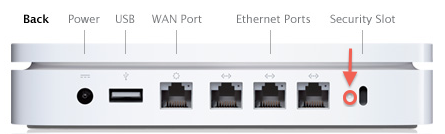
Connect an Ethernet cable from one of the LAN <--> ports on the ATT gateway (there are probably 4 of them, choose any one that you wish) to the WAN "O" port on the TC
Click on the WiFi menu at the top of your Mac's screen
Look for a listing of New AirPort Base Station
Click directly on AirPort Time Capsule

When you click on Time Capsule, that will get the setup "wizard" up and running. It will take a few seconds to analyze the network, then display a screen that looks like the example below, except that you will see a Time Capsule pictured.
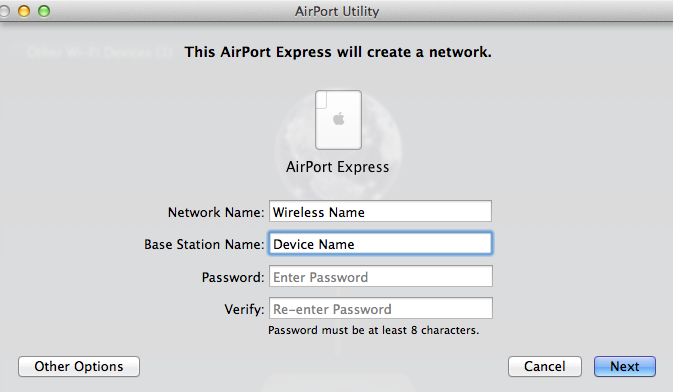
Network Name.......Type in a name for the Time Capsule wireless. Later, we will turn off the WiFi if wish
Base Station Name......Type in a name that you want to call the TC.......Time Capsule......for example
Password.......Type in a password that will be used for the TC wireless and base station
Verify......Type in the same password again to confirm
Click Next
The setup "wizard" will set up everything for you automatically. When you see the message of Setup Complete, click Done
Things will be working now. Post back if you do not need the WiFi function to be active on the TC and you are not sure how to turn off the WiFi on the device.


