The only thing I can tell you is that this problem has been recognised and that the current iPod Touch (the only iPod Apple still sell) does have left/right balance controls.
So, what can you do?
Well, short of buying a new iPod Touch, the alternative is bodging something together (making do) as the only option. For example, buy a headphones amplifier (that is connected to the iPod's headphone jack, amplifies the sound and then feeds that to the headphones, so that you can get a louder sound at the headphones, then muffle the good ear to try and balance the level for your hearing). Or see if you can find an headphones amplifier that has balance controls. I'm not sure that you will, or at least, not at great expense.
As for iTunes; I assume that you were hoping for a setting in iTunes that would affect the balance on the iPod. I'm afraid not. However, if by any chance, you actually meant balancing the sound from your computer (when using iTunes), well again, there is no setting in iTunes for that - but there should be one in your computer's Sound settings.
On my Windows 7 machine, if I open the Control Panel and select Sound, that opens a pane where I can choose the audio output device and change its settings. I would imagine there is something similar on Windows 10 and on Macs. Here's Windows 7:
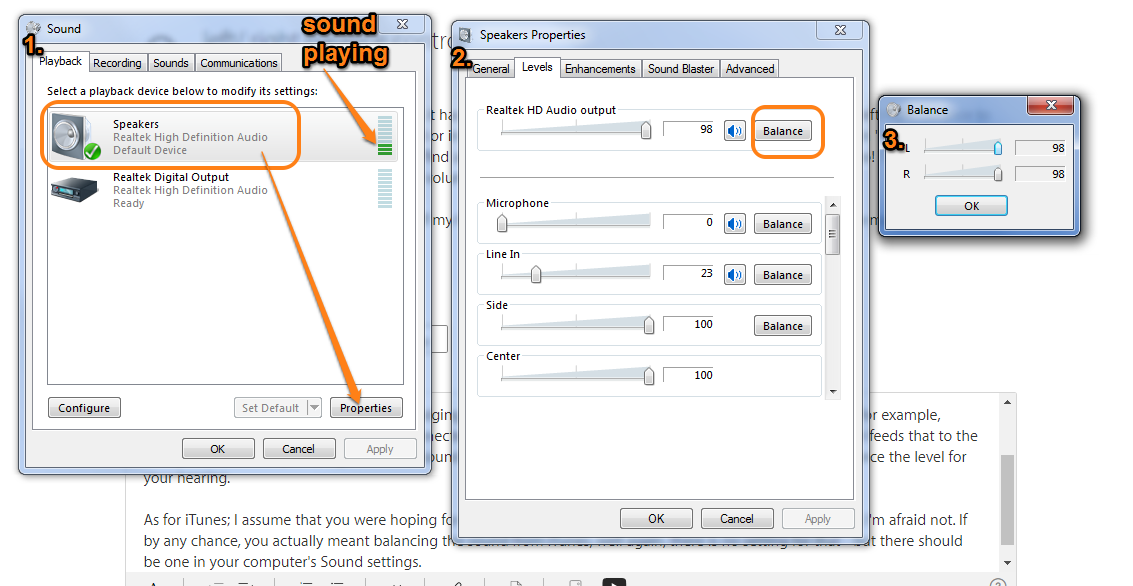
- 1. once in the Sound pane, on the Playback tab, select the default output device. If you're not sure which item to select, play some music in iTunes and look for the "moving" green bars (I've indicated them in the screenshot above).
- tap on the Properties tab
- 2. select the Levels tab
- tap the balance button for the audio output (should indicate the same name as on pane 1.)
- 3. on the balance panel, lower the setting for the right speaker to suit you and click on OK
There are also desktop headphone amplifiers, but that may restrict the portability of the iPod of course. Again, that may work out more expensive than buying a new iPod Touch.

