1600 MHz memory shows as 1867 MHz after upgrade (Macbook Pro 2012)

Hello there!


Just upgrade RAM as per guidelines at apple.com. Spec said DDR3 1600 MHz type RAM. So I've bought and installed: Crucial DDR3L 1600Mhz 8GB (2x4GB) SODIMM.


After installation "About Mac" shows "8 GB 1867 MHz DDR3". Has something gone wrong? Is it a problem?


Jeff

MacBook Pro 13", macOS 10.14

Posted on May 8, 2019 11:07 AM

Reply
8 replies

May 8, 2019 2:49 PM in response to Allan Jones

Hello and thanks for the answer.


It doesn't seem that there are any problems. Not for now at least. Everything seems to work.


It's just odd that the 2012 computer that shouldn't have support for RAM faster than 1600 MHz shows that 1867 MHz modules are installed. That's why I decided to check. Wasn't sure if it's something to worry about or not.


RAM bought from an authorised computer parts reseller (one of the major ones here in the Northern Europe), so I wouldn't suspect anything. According to the packaging both modules are as orderred "DDR3L 1600Mhz 4GB SODIMM".


System Information shows 1867 MHz, as on the "About" page:
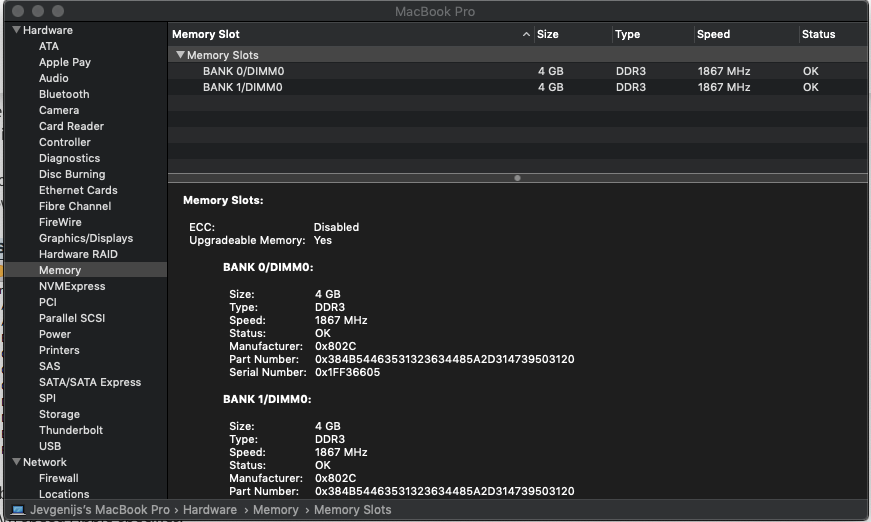

Can it be DDR3L vs specified DD3 that causes this strange indication? Before ordering I've read a little and it seemed to be acceptable to install DDR3L in the DD3 slot.

May 8, 2019 11:30 AM in response to jevgenijs224

Is the computer experiencing any problems with the new RAM?


I'd check with Crucial before doing anything else. The first MacBook Pros that used 1867mhz RAM were the 2015 models and it is not upgradeable in those. That is a big skip in generations.


What does System Information show for the RAM speed when you click the "system Report..." button in the "About.." window? I upgraded RAM in my 2012 MBP with OWC RAM and it shows this:


It has been generally assumed that faster RAM will clock back to match the bus to which it is connected but I'd rather have the RAM speed Apple specifies.

May 8, 2019 6:18 PM in response to jevgenijs224

I wonder if a recent firmware update could have changed this behavior? I'll try to remember and check on one of our laptops tomorrow.


If you contact Crucial tech support, it might be a good idea to take a picture of the label of one of the RAM modules.


In the mean time, create a bootable Memtest86 USB drive using Etcher. Option Boot the Memtest86 drive and select the orange icon labeled "EFI". Memtest86 defaults to four loops, but this can be changed in the Test Options. Once Memtest86 boots, you can safely unplug the Memtest86 USB drive.

This thread has been closed by the system or the community team. You may vote for any posts you find helpful, or search the Community for additional answers.

1600 MHz memory shows as 1867 MHz after upgrade (Macbook Pro 2012)

Welcome to Apple Support Community
A forum where Apple customers help each other with their products. Get started with your Apple Account.

