Macbook Pro Opening Programs

I was working on a project in adobe illustrator and my macbook pro slowly opened snapchat. It slowly expanded the search from the bar at the bottom and then it went into the safari search bar. I have never opened snapchat before, so I closed it quickly. I didn't see if it was logged in or if it was showing anything specific. Is it a virus?

MacBook Pro 13", OS X 10.11

Posted on May 24, 2019 5:21 AM

Reply
Question marked as Top-ranking reply

Posted on May 24, 2019 5:40 AM

More than likely not an attack on your system but a configuration. It's possible you installed something from the web that decided to install some junk along with it or someone else using your computer installed it if that's what you're seeing


go to the spotlight (magnifying glass in the upper right hand corner)

type Activity Monitor
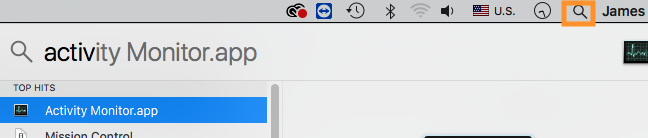

when the Activity Monitor application opens do a search for snapchat and if you find it:

select it from the list and click (X) n the upper left of the Activity Monitor Window and force quit the snapchat or related application

Quit out of Activity Monitor


go to the Apple Menu in the upper left

go to >System Preferences...>Users and Groups

click on your account

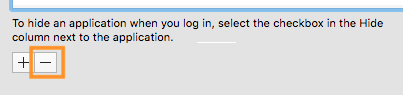
click on Login Items

if Snapchat is listed select it and click - to remove it.

go to Macintosh HD>Library>Launch Agents

select anything relating to snapchat and move it to the trash


go to Go in the menu bar

hold down the Option key

you will see Library added to the list of folders

go to >Launch Agents

select anything relating to snapchat and move it to the trash

btw this is a different "Launch Agents" folder I had you go to in the paragraph above


Reboot the system


For futher analysis you may post an Etrecheck report. The link is http://www.etrecheck.com

1 reply
Question marked as Top-ranking reply

May 24, 2019 5:40 AM in response to gefenmiller

More than likely not an attack on your system but a configuration. It's possible you installed something from the web that decided to install some junk along with it or someone else using your computer installed it if that's what you're seeing


go to the spotlight (magnifying glass in the upper right hand corner)

type Activity Monitor


when the Activity Monitor application opens do a search for snapchat and if you find it:

select it from the list and click (X) n the upper left of the Activity Monitor Window and force quit the snapchat or related application

Quit out of Activity Monitor


go to the Apple Menu in the upper left

go to >System Preferences...>Users and Groups

click on your account

click on Login Items

if Snapchat is listed select it and click - to remove it.


go to Macintosh HD>Library>Launch Agents

select anything relating to snapchat and move it to the trash


go to Go in the menu bar

hold down the Option key

you will see Library added to the list of folders

go to >Launch Agents

select anything relating to snapchat and move it to the trash

btw this is a different "Launch Agents" folder I had you go to in the paragraph above


Reboot the system


For futher analysis you may post an Etrecheck report. The link is http://www.etrecheck.com

This thread has been closed by the system or the community team. You may vote for any posts you find helpful, or search the Community for additional answers.

Macbook Pro Opening Programs

Welcome to Apple Support Community
A forum where Apple customers help each other with their products. Get started with your Apple Account.