Run older macOS in virtualbox?

I currently use a MacBook Pro, 13in 2017 with macOS 10.14.5. I have some older software that I ran on my previous Mac ( a 15in MacBook Pro mid-2009) that I would like to use that won't run on my new machine. Can I set up a VM in VirtualBox to run my older version of macOS X. I was using macOS 9.2.5.

MacBook Pro 13", macOS 10.14

Posted on Jun 4, 2019 10:22 AM

Reply
5 replies

Jun 4, 2019 8:36 PM in response to erich68

Parallels is a money pit. When a new version of macOS comes out, parallels wants you to pay up, $49.95. Should you not pay up and skip parallels versions, you then you need to pay the full price. How do I know? I tried it.


Parallels is definitely easier to install macOS onto. You know how get the installation app? Down load macOS. when you get the prompt to pick a disk. go to the applications folder. Move the file somewhere else like downloads. quit the install app. Now, you have a copy of macOS. You startup parallels. You select create a new virtual machine. Parallels should find the macOS install app.


Parallels is a little confusing at first.
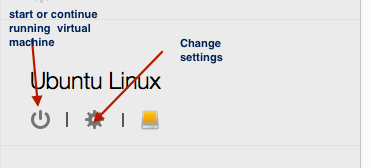

actions is where you will find how to reboot your machine. "Stop" is the "power off".
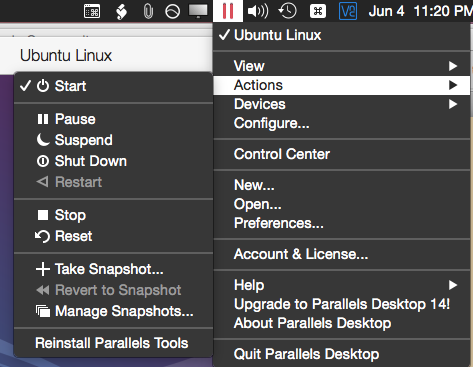


I tend to click on the "red" ball to put parallels in "suspend" mode.


It reads discs and flash drives with no problem.


R

Took me a long while to figure out how to do this stuff.

pss: You should definitely download parallels lite from the app store. I downloaded it today. There was no payment to download. Could be a required in app purchase.


Jun 4, 2019 4:22 PM in response to leroydouglas

leroydouglas.

Thanks for the reply. Mac OS 9? I know, right? I followed the link you provided. It was helpful. I went back through my store of old DVDs and discovered I still have my original Mac OS CDs going all the way back to version 9. I was mistaken about the version I had installed on my old MacBook Pro. It was 10.9.5. I guess I can still use these if I can find a disk drive.

Thanks again for your help.

Kind Regards

erich68

Jun 4, 2019 4:37 PM in response to rccharles

rccharles.

Thanks for your speedy reply. It was comforting to hear that running old mac OSes in a VM can work. I gather from your comments that Parallels is a better choice than VirtualBox. I am very new to this sort of thing and often find the techno-jargon confusing. Is it an easy process to create the guest files in Parallels? I still have my original Mac OS dvds going all the way back to version 9.

Thanks again for your help.

Kind Regards

erich68

Jun 4, 2019 12:30 PM in response to erich68

Virtual Box has a difficulty running any version of macOS. It's an art all it's own. You need to match a particular version of macOS with the "correct" version of Virtual Box. Look on the internet to see what version of macOS work with what version of Virtual Box. You can try the free version of Parallels called Parallels Lite in the app store.


I have a paid version of Parallels that I run macOS 10.6. macOS 10.6 was the last version of macOS to support power pc macOS apps.


for classic, see:

http://www.columbia.edu/~em36/sheepshaverwrapper.html


This thread has been closed by the system or the community team. You may vote for any posts you find helpful, or search the Community for additional answers.

Run older macOS in virtualbox?

Welcome to Apple Support Community
A forum where Apple customers help each other with their products. Get started with your Apple Account.