
How do I turn my ringer back on?
How do I turn my ringer back on?
[Re-Titled by Host]
iPhone XS Max
How do I turn my ringer back on?
[Re-Titled by Host]
iPhone XS Max
How to put your iPhone on vibrate, ring, or silent mode
The Ring/Silent switch is on the left side of your iPhone. You can use it to control which sounds play through your iPhone speaker.
Put your iPhone in Ring/Silent mode
When your iPhone is set to ring, ringtones, alerts, and sounds play through your iPhone speakers.
When your iPhone is set to silent, you won't hear ringtones or alerts, but other sounds will play through your iPhone speakers and your iPhone will vibrate.
These settings affect only your iPhone speaker. If you use a headset, sounds play through your headset, even if your iPhone is on silent.
Ring mode
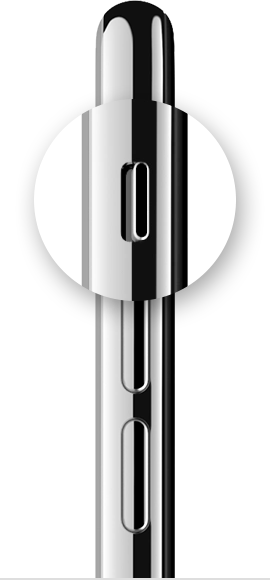
To put your iPhone in Ring mode, move the switch so that orange isn't showing.
Silent mode
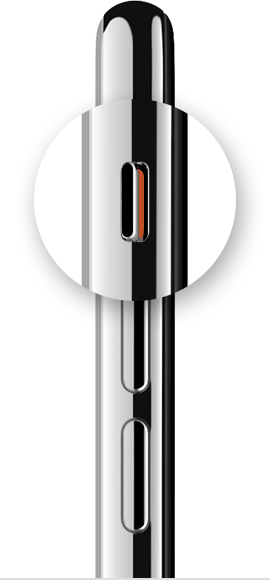
To put your iPhone in Silent mode, move the switch so that orange is showing.
How to put your iPhone on vibrate, ring, or silent mode - Apple Support
How to put your iPhone on vibrate, ring, or silent mode
The Ring/Silent switch is on the left side of your iPhone. You can use it to control which sounds play through your iPhone speaker.
Put your iPhone in Ring/Silent mode
When your iPhone is set to ring, ringtones, alerts, and sounds play through your iPhone speakers.
When your iPhone is set to silent, you won't hear ringtones or alerts, but other sounds will play through your iPhone speakers and your iPhone will vibrate.
These settings affect only your iPhone speaker. If you use a headset, sounds play through your headset, even if your iPhone is on silent.
Ring mode
To put your iPhone in Ring mode, move the switch so that orange isn't showing.
Silent mode
To put your iPhone in Silent mode, move the switch so that orange is showing.
How to put your iPhone on vibrate, ring, or silent mode - Apple Support
How do I turn my ringer back on?

