
I have no FaceTime, no Siri, no sound
how can the sound on my ipone 7plus be fixed .. i have no facetime , no siri , no sound.
[Re-Titled by Moderator]
iPhone 7 Plus
how can the sound on my ipone 7plus be fixed .. i have no facetime , no siri , no sound.
[Re-Titled by Moderator]
iPhone 7 Plus
No faceTime?
If you get an error when trying to activate iMessage or FaceTime
To use iMessage or FaceTime, you need to activate them on your iPhone, iPad, or iPod touch. If you see an error message during activation, follow these steps.
When activating iMessage or FaceTime, you might see one of these messages:

Check your device settings
Turn off and restart iMessage and FaceTime
Still not activated after a day?
It might take up to 24 hours to activate iMessage and FaceTime. If the issue continues after 24 hours, follow these steps:
If you get an error when trying to activate iMessage or FaceTime ...
https://support.apple.com/en-in/HT201422
No Siri?
If Siri or "Hey Siri" isn't working
If Siri doesn't work as expected on your iPhone, iPad, iPod touch, Mac, or AirPods, learn what to do.
Check your network connections
If you aren't connected to the Internet, Siri might say something like "Sorry, I'm having trouble connecting to the network," or "Try again in a little while." Make sure that your devices are connected to the Internet and try again.
Make sure that Siri is on
If you don't see an option for Siri, check that Siri is available in your country or region. Learn which Siri features are supported in which countries and regions on iOS and Mac.
Check that restrictions aren't on for Siri
If you can't turn on Siri on your iOS device or Mac, make sure that you haven't disabled Siri in Restrictions.
Check your microphones
If Siri doesn't hear you correctly or doesn’t respond when you ask a question, make sure your microphones are working:
 next to your AirPods, then tap Microphone and make sure that Automatically Switch AirPods is selected. Also check that there isn't any dirt covering the mircophone on your AirPods. If there is, learn how to clean your AirPods.
If Siri still doesn't work, contact Apple Support.
If Siri doesn't speak responses
Siri might not respond verbally if your device is muted or Voice Feedback is turned off. While you're on the Siri screen, try to increase the volume level on your device. Then check your Voice Feedback settings:
If "Hey Siri" doesn't work
On supported iPhone, iPad, and iPod touch models, you can use “Hey Siri” to talk to Siri without holding down the Home or side button.* If “Hey Siri” isn't working, go to Settings > Siri & Search and make sure that "Hey Siri" is on.
“Hey Siri” won't respond when:
If “Hey Siri” is responding with multiple devices, learn what to do.
No Sound?
If you hear no sound or distorted sound from your iPhone, iPad, or iPod touch speaker
Get help with the speaker on your iOS device.
Before you follow these steps, see if your speaker works: In Settings > Sounds (or Settings > Sounds & Haptics), drag the Ringer And Alerts slider up or down a few times.
Check your sound settings
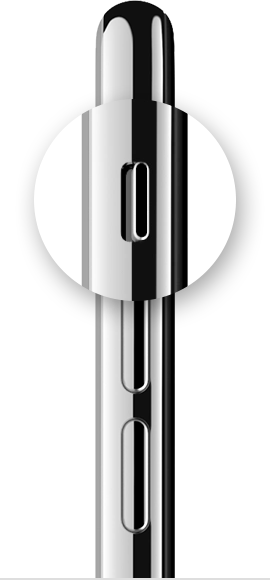
If your device has a Ring/Silent switch, move the switch forward—toward the device's display—so that orange isn't showing.
Open Settings > Do Not Disturb and check that Do Not Disturb is off. If you're using an iPad, you can also swipe down from the top-right corner to view Control Center and make sure the mute button and Do Not Disturb button aren't enabled.
Check sound with an app
Open an app that has music or sound effects, then adjust the volume with your volume buttons or the slider in Control Center.
Plug headphones into your device
If you can hear sound through the headphones but not through your device's speakers, unplug the headphones and clear dust or debris from the headset port on your device.
Turn off Bluetooth
To make sure that your device isn't sending audio to a Bluetooth accessory, go to Settings > Bluetooth and turn off Bluetooth.
Restart your device
Turn off your device, then turn it back on. Check the sound again. If you still don't hear any sound, contact Apple Support.
If you hear no sound or distorted sound from your iPhone, iPad, or ...
I have no FaceTime, no Siri, no sound
