In your iTunes Music folder you should see separate folders for each artist and an additional folder named Compilations. If you used iTunes to add music to your computer, it should all be in these folders.
- For a single-artist album, in the iTunes Music folder, look for (and go into) a folder with that artist's name. In there will be a folder for each album and the songs are in the appropriate folder. Usually, the filename is the song's name, although you often find the track number prefixes the song title.
- For a compilation album (that is, a Various Artists album), in the iTunes Music folder, go into the Compilations folder, where you will find a folder for each album name (note the difference between this folder and the artist's folder). The songs for that album are in the appropriate folder
If you cannot find the album or song you want, possibly because you used another method of adding the song to your Library, you can use iTunes to look for its location.
- In your iTunes Library, highlight the song in question and click on Edit/Song Info
- In the panel that opens up, select the File tab
- On the File tab, look for the location:
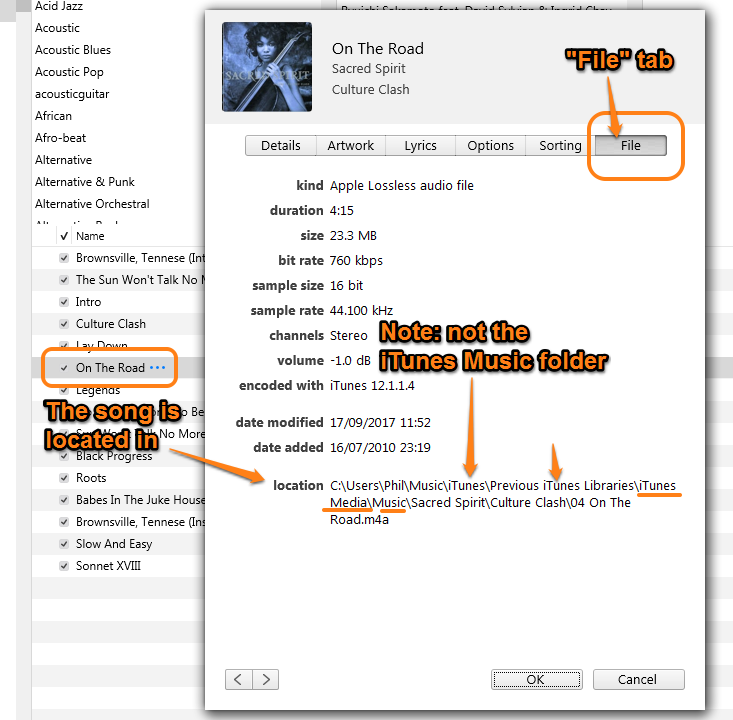
Look carefully at the location for the song in the screenshot. This song is not in the iTunes Music folder, it's in a sub-folder of iTunes/Previous iTunes Libraries and in that folder is yet another, named iTunes Media and a further one named Music. Now we can see the artist (Sacred Spirit) and the file for the song On The Road.
Don't spend time worrying about why it's located there, the fact is that you now know how to find any song's file; by using iTunes to find its location.

