Switching between Mac OS and Windows on Bootcamp...

I have installed Bootcamp and Windows 10 on my newer iMac. Sometimes the Startup Manager window does not come up and the Mac OS automatically starts up instead, even if I am holding down the options key. What could be the issue?

iMac Line (2012 and Later)

Posted on Sep 1, 2019 9:58 AM

Reply
Question marked as Top-ranking reply

Posted on Sep 2, 2019 10:13 AM

What happened last night was that I tried to restart, booted in macOS, holding the options key down and nothing was happening. MacOS would simply start up again, no Apple Bootmanager would appear. When I plugged in my wireless keyboard, however, there was no problem and bootmanager came right up so I could switch between Mac and Windows. So I will just make sure I am plugged in if I want to go to the dark side, I mean, the Windows side. Thanks!


20 replies
Question marked as Top-ranking reply

Sep 2, 2019 10:13 AM in response to Loner T

What happened last night was that I tried to restart, booted in macOS, holding the options key down and nothing was happening. MacOS would simply start up again, no Apple Bootmanager would appear. When I plugged in my wireless keyboard, however, there was no problem and bootmanager came right up so I could switch between Mac and Windows. So I will just make sure I am plugged in if I want to go to the dark side, I mean, the Windows side. Thanks!


Sep 2, 2019 4:24 PM in response to MNAngela7

MNAngela7 wrote:

I have an iMac (Retina 5K, 27-inch, 2017). Does that make any difference?

No.

I was paying particular attention to the timing of pressing the options key. I use the same timing when I have my MK2 plugged in and not plugged in, and I get different results. I tried the unplugged keyboard several times and no bootmanager.

On a 2014 iMac, with a different BT keyboard, I have not run into such issues.

Then when I plug in the keyboard, using the same timing with pressing the options key, bootmanager comes up first time, no problem. So I am narrowing it down to the wireless keyboard not being plugged in.

When plugged-in, your MK2 behaves like a USB Keyboard.

Sep 2, 2019 9:21 PM in response to Loner T

Well I use the same timing, basically when I see the cursor disappear. Strangely, my iMac makes no start up sound to time anything by, so the moment the screen goes black, I press the option key. Works every time when my keyboard is plugged in. So I know I have my timing down, even without the startup sound. The factor that makes it not work is when the keyboard is connected by bluetooth. Then I cannot get the boot manager to come up. I wonder if it is just an issue with BT and Mojave.

Sep 2, 2019 7:15 AM in response to MNAngela7

MNAngela7 wrote:

What specifically is going on with the wireless keyboard? Just so I know.

I have seen a couple of reports that the BT driver is not being loaded correctly when switching from Windows to macOS. This is under Mojave. Older macOS versions are a bit better. The other common fact is the Magic Keyboard 2.


As a test, when booted in macOS, reboot and hold Alt/Option key and check if the Apple Bootmanager shows up correctly.

Sep 3, 2019 6:43 AM in response to MNAngela7

MNAngela7 wrote:

Well I use the same timing, basically when I see the cursor disappear.

My screen is an illuminated black, when I use Option key.

Strangely, my iMac makes no start up sound to time anything by, so the moment the screen goes black, I press the option key. Works every time when my keyboard is plugged in. So I know I have my timing down, even without the startup sound.

Check if your Sound is muted.

The factor that makes it not work is when the keyboard is connected by bluetooth. Then I cannot get the boot manager to come up. I wonder if it is just an issue with BT and Mojave.

I have a 2018 Mini, which allows me to use Alt/Option, but it does not have Windows.

Sep 2, 2019 7:37 PM in response to MNAngela7

Testing Keyboards yields some interesting results.


I have a MM2, a MK and a MK2 paired to a 2014 iMac.


In macOS, both Keyboards work simultaneously, and holding Alt/Option on either (before the audible 'Boing'), shows the Apple Bootmanager.


In Windows, the MK2 showed up correctly when Windows was booted. Windows had never seen the MK2 before. It was setup and worked.


Interesting part is that the MK2 worked, but MK, despite being paired/connected, would not allow any input, only MK2 worked.
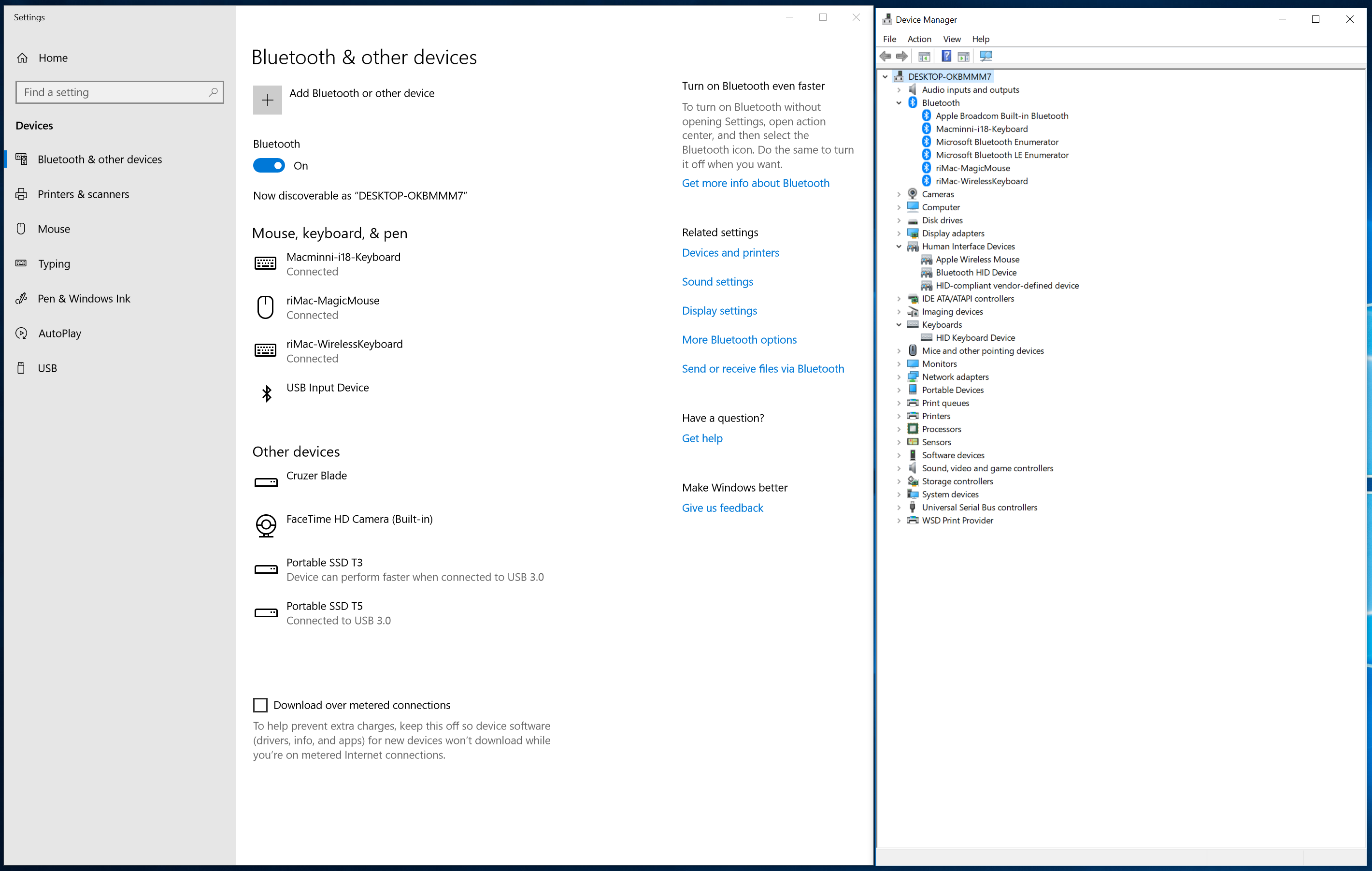


Switching back to macOS, both Keyboards allowed Alt/Option (before the audible 'Boing') and worked simultaneously, while booting.


There are other variations, with/without FileVault and with/without BitLocker, that I will not be able to test.


Sep 2, 2019 2:55 PM in response to Loner T

I have an iMac (Retina 5K, 27-inch, 2017). Does that make any difference?


I was paying particular attention to the timing of pressing the options key. I use the same timing when I have my MK2 plugged in and not plugged in, and I get different results. I tried the unplugged keyboard several times and no bootmanager. Then when I plug in the keyboard, using the same timing with pressing the options key, bootmanager comes up first time, no problem. So I am narrowing it down to the wireless keyboard not being plugged in. Maybe there'll be a fix for it. Thanks for your time. :)

Sep 2, 2019 8:24 PM in response to MNAngela7

MNAngela7 wrote:

Just curious, is your iMac running Mojave?

No. macOS Sierra.

I am actually using a MK not a MK2. It is interesting that the MK was behaving differently. When booting up, is that when no input was allowed by the MK?

MK/MK2 work correctly when booting in macOS. They also work properly when macOS is running.

Were you able to replicate the inability to bring up the boot manager?

Yes, if I miss my timing (holding Alt/Option after the 'Boing'), neither keyboard works.

Sep 3, 2019 7:41 AM in response to Loner T

Yep, my screen is an illuminated black when I use the Option key as well. I have my timing down, I am not worried about that.


And my sound is not muted.


Thanks for getting back to me, I think I have a solution to just plug in the keyboard if I want to use boot manager. It's really not a huge issue. I will wait on a software update for Mojave or eventually upgrade my keyboard. No worries. Thanks again.

This thread has been closed by the system or the community team. You may vote for any posts you find helpful, or search the Community for additional answers.

Switching between Mac OS and Windows on Bootcamp...

Welcome to Apple Support Community
A forum where Apple customers help each other with their products. Get started with your Apple Account.