Switching shared album to private

I inadvertently shared my girlfriends private album and made private my shared album


whats the easiest way to switch them back the way there supposed to be before she finds out, she probably wouldn’t care really but I better fix it back the way it was...... Thanks


[Link Edited by Moderator]

iPhone 6s, iOS 13

Posted on Oct 21, 2019 5:25 PM

Reply
1 reply

Oct 28, 2019 8:23 AM in response to r6redrr

Hello and welcome to Apple Support Communities, r6redrr!


I understand you've accidentally shared a private album. I'd be happy to provide information on how to disable this.


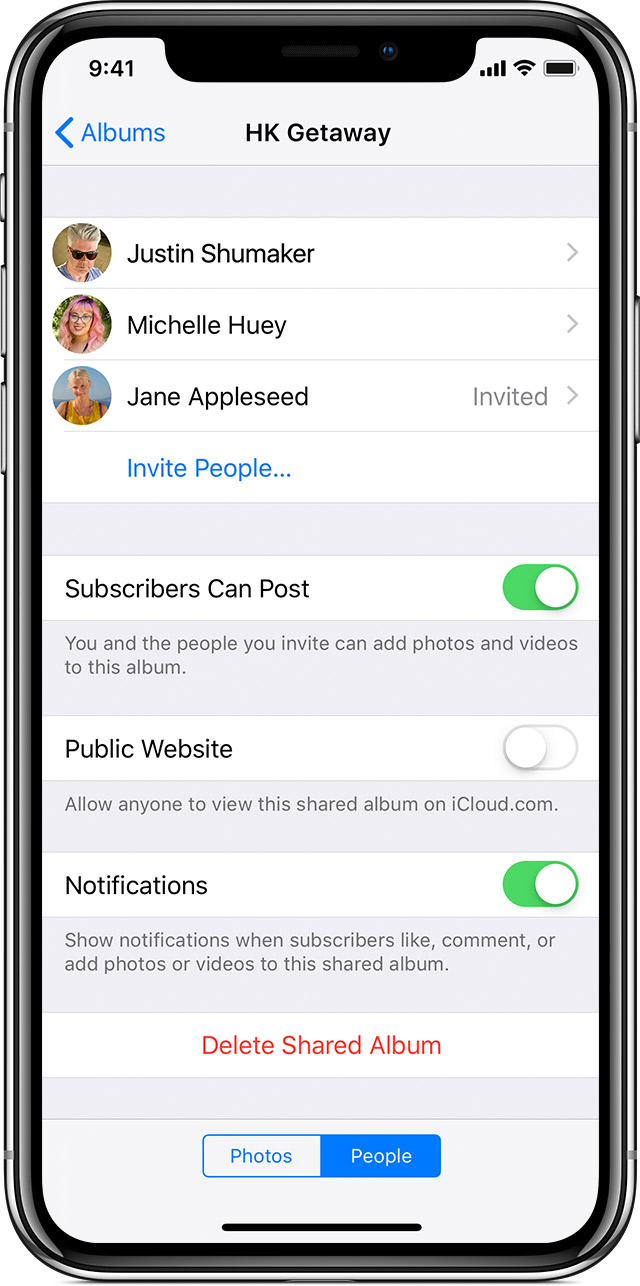
You'll want to turn off the option for public website: Use Shared Albums in Photos

"Invite more people

You can even share albums with friends and family who don't use iCloud. Just open a Shared Album that you created, go to the People tab on your iOS device or click  on your Mac, and turn on Public Website. Your photos publish to a website that anyone can see in an up-to-date web browser."


Thank you for using Apple Support Communities.

Enjoy your day!

This thread has been closed by the system or the community team. You may vote for any posts you find helpful, or search the Community for additional answers.

Switching shared album to private

Welcome to Apple Support Community
A forum where Apple customers help each other with their products. Get started with your Apple Account.