display sleep - can't turn off password request afterward

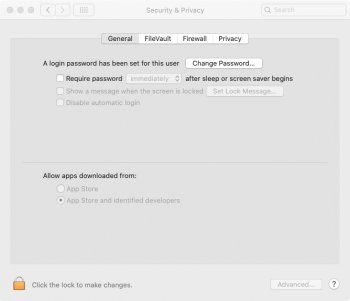
When turning my display off, often when I later press a button to turn the display back on, I get asked for a password. I think maybe a minute or two has to pass for this to occur; otherwise I can get right back in without a password. In Preferences > Security & Privacy I do not have a password requirement:


What is going on here and how can I fix this? This behavior only started in the last month or so, perhaps with the change to Catalina, and I don't believe I changed any settings.


I use shift+control+eject to put the display to sleep.

Posted on Nov 23, 2019 1:19 PM

Reply

Similar questions

4 replies

Nov 26, 2019 12:49 PM in response to eipi

Thanks for reaching out to the Apple Support Communities, eipi!


It sounds like you're having an issue with your computer asking for a password when you put it to sleep, even though you do not have it set up to require a password. I recommend taking a look at this article with steps to follow to Use safe mode to isolate issues with your Mac. This will perform checks and stop certain software from starting up automatically. Once you are in safe mode, test to see if you have the same issue.


Also, check out this article with steps for How to test an issue in another user account on your Mac to create a new user and test the issue in the new account to see if the issue is user specific or system wide. 


Let me know the results and have a great day!

Nov 26, 2019 9:05 PM in response to jeremy_v

Thanks for the reply.


I've been trying to determine if a certain amount of time has to pass before it will require a password. I'm still not sure. I need to check further but, if I'm recalling accurately, sometimes a password is required after say a couple of minutes of display sleep while other much longer periods of display sleep do not require a password.


I did try your two suggestions but with the random nature of things it makes it a little difficult to come to solid conclusions. My brief time in Safe Mode did not result in a password request but I did not stay there long as something didn't seem right - changing from one desktop screen to another resulted in noticeable screen tearing, for example.


Two things I have noticed that are interesting:

  1. Overnight I put my mac to sleep, that is the computer itself and not just the display (I use option+command+eject). In the morning I do NOT need to enter a password.
  2. If on the preference screen shown in my original post I require a password after 8 hours, then I am no longer asked for a password after display sleep. Note that during the day I am rarely away from my mac for more than an hour and I'm currently not sure if it will indeed ask for a password after 8 hours. Importantly, with it set to 8 hours, I am no longer getting a password request after short display sleeps.

Dec 1, 2019 12:08 AM in response to jeremy_v

I've being doing some more testing and keeping a log of the results. With the settings as shown in my original post, I am getting random behavior. For example, a password was required after 18 minutes of display sleep and another time after 1 hour 26 minutes and yet a password was not required after 12 minutes or another time after 2 hours 30 minutes.


What could be the cause of this?


I also tried Safe Mode again but my mac is very slow in that mode and too much of what I need does not work and hence I don't think I will be using that for further testing unless someone has a particular idea to test out. Similarly working from an alternate account is not practical (I work all day from my mac).

This thread has been closed by the system or the community team. You may vote for any posts you find helpful, or search the Community for additional answers.

display sleep - can't turn off password request afterward

Welcome to Apple Support Community
A forum where Apple customers help each other with their products. Get started with your Apple Account.
