
Hi apple , im babo from iraq kurdistan how to change apple id for usa

Please my apple id change to usa 😭

iPhone X, iOS 13

Posted on Nov 26, 2019 8:44 AM

Reply
Question marked as Top-ranking reply

Posted on Nov 26, 2019 8:49 AM

Change your Apple ID country or region

If you move to a new country or region, you can update the country or region that's associated with your Apple ID. Before you update your information, you need to spend your store credit, cancel your subscriptions, and get a payment method for your new country or region.


When you follow the steps below, your Apple ID country or region updates for all of your Apple services on all of your Apple products.

If you're a part of a Family Sharing group, you might not be able to change your country or region. Learn how to leave a Family Sharing group.


What to do before you change your country or region


On your iPhone, iPad, or iPod touch
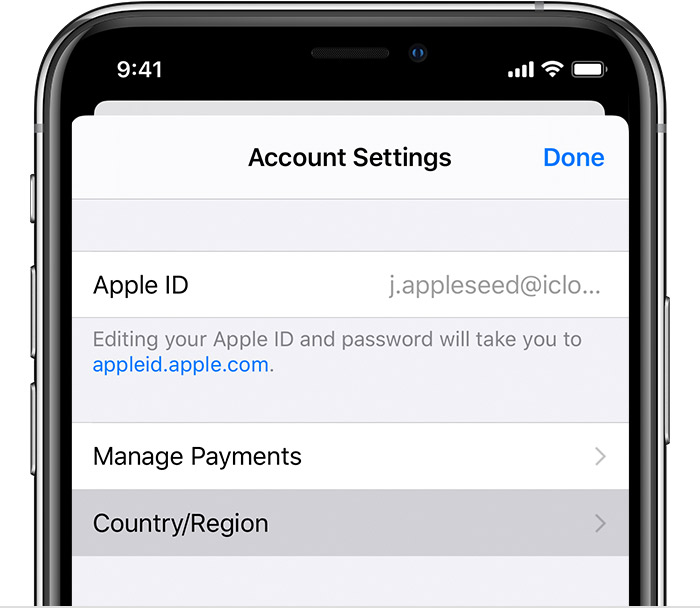
  1. Open the Settings app. 
  2. Tap your name, then tap iTunes & App Store.
  3. Tap your Apple ID, then tap View Apple ID. You might be asked to sign in.
  4. Tap Country/Region.

  5. Tap "Change Country or Region." If you don't see "Change Country or Region," contact Apple Support.
  6. Tap your new country or region, then review the Terms & Conditions.
  7. Tap Agree in the upper-right corner, then tap Agree again to confirm.
  8. Select a payment method and enter your new payment information and billing address, then tap Next. You must enter a valid payment method for your new country or region.1 Learn more about how to change or remove your Apple ID payment information


1 reply
Question marked as Top-ranking reply

Nov 26, 2019 8:49 AM in response to Babo.rwandzy

Change your Apple ID country or region

If you move to a new country or region, you can update the country or region that's associated with your Apple ID. Before you update your information, you need to spend your store credit, cancel your subscriptions, and get a payment method for your new country or region.


When you follow the steps below, your Apple ID country or region updates for all of your Apple services on all of your Apple products.

If you're a part of a Family Sharing group, you might not be able to change your country or region. Learn how to leave a Family Sharing group.


What to do before you change your country or region


On your iPhone, iPad, or iPod touch

  1. Open the Settings app. 
  2. Tap your name, then tap iTunes & App Store.
  3. Tap your Apple ID, then tap View Apple ID. You might be asked to sign in.
  4. Tap Country/Region.

  5. Tap "Change Country or Region." If you don't see "Change Country or Region," contact Apple Support.
  6. Tap your new country or region, then review the Terms & Conditions.
  7. Tap Agree in the upper-right corner, then tap Agree again to confirm.
  8. Select a payment method and enter your new payment information and billing address, then tap Next. You must enter a valid payment method for your new country or region.1 Learn more about how to change or remove your Apple ID payment information


This thread has been closed by the system or the community team. You may vote for any posts you find helpful, or search the Community for additional answers.

Hi apple , im babo from iraq kurdistan how to change apple id for usa

Welcome to Apple Support Community
A forum where Apple customers help each other with their products. Get started with your Apple Account.