how to disable face id on 11

i had a 11 pro and exchanged for an 11 because of severe eye strain. I've tested repeatedly with different phone settings. Now i'm absolutely sure it is the face id causing my problems. Is there a way to completely disable face id?

Posted on Dec 30, 2019 7:16 AM

Reply
Question marked as Top-ranking reply

Posted on Dec 30, 2019 7:38 AM


Check your Face ID settings

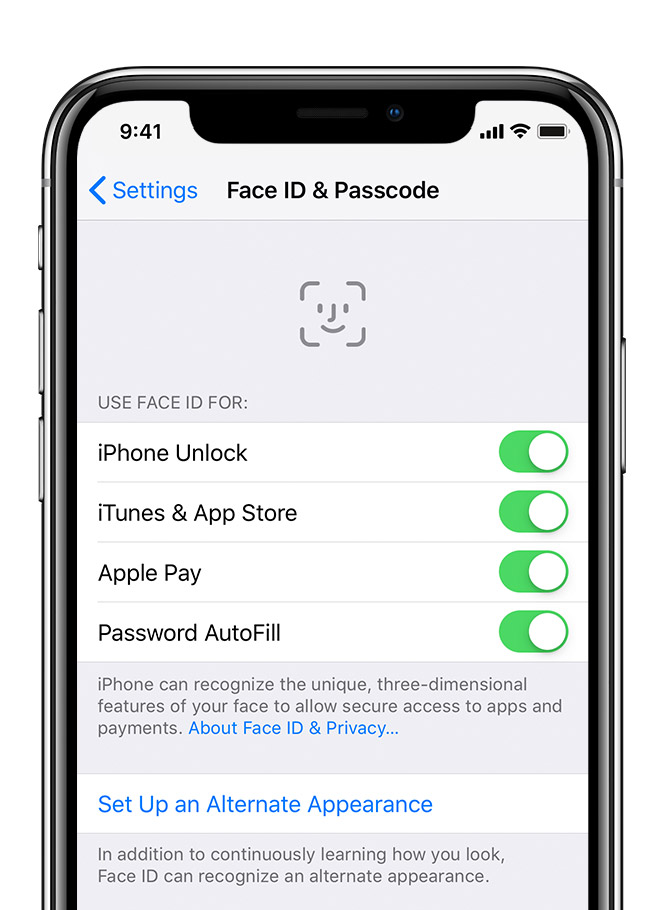
To check your Face ID settings, go to Settings > Face ID & Passcode. Turn Off all Four

  1. iPhone Unlock
  2. iTunes and App Store
  3. Apple Pay
  4. Password Fill


Scroll down and tap Reset Face ID. You'll find this red-text option in the middle of the page. Tapping it will delete your Face ID, DO Not setup a new one thus ensuring that you'll use your passcode to unlock your iPhone from now on


6 replies
Question marked as Top-ranking reply

Dec 30, 2019 7:38 AM in response to 1guru


Check your Face ID settings

To check your Face ID settings, go to Settings > Face ID & Passcode. Turn Off all Four

  1. iPhone Unlock
  2. iTunes and App Store
  3. Apple Pay
  4. Password Fill


Scroll down and tap Reset Face ID. You'll find this red-text option in the middle of the page. Tapping it will delete your Face ID, DO Not setup a new one thus ensuring that you'll use your passcode to unlock your iPhone from now on


This thread has been closed by the system or the community team. You may vote for any posts you find helpful, or search the Community for additional answers.

how to disable face id on 11

Welcome to Apple Support Community
A forum where Apple customers help each other with their products. Get started with your Apple Account.

