Hello, livfriesen!
Thank you for using the Apple Support Communities! I understand your new iPhone isn't allowing you to select your phone number in Messages and/or FaceTime, and you're also getting a FaceTime activation error.. I FaceTime my family very often so I understand how important it is to get that activated. I am here to help.
Follow the steps here for assistance with iMessage and FaceTime not activating: If you get an error when trying to activate iMessage or FaceTime.
If at once you're able to get it activated, and if your phone number still cannot be enabled, then follow the steps here:
"If you can't see or select your number in Messages or FaceTime
- Make sure that you're using the latest software for your Mac or iOS device.
- Make sure that you correctly followed the iPhone steps to set up your phone number. You should be using the same Apple ID on all of your devices.
- In the “You can be reached” section of Messages and FaceTime settings, make sure that there are checkmarks beside your phone number and Apple ID:
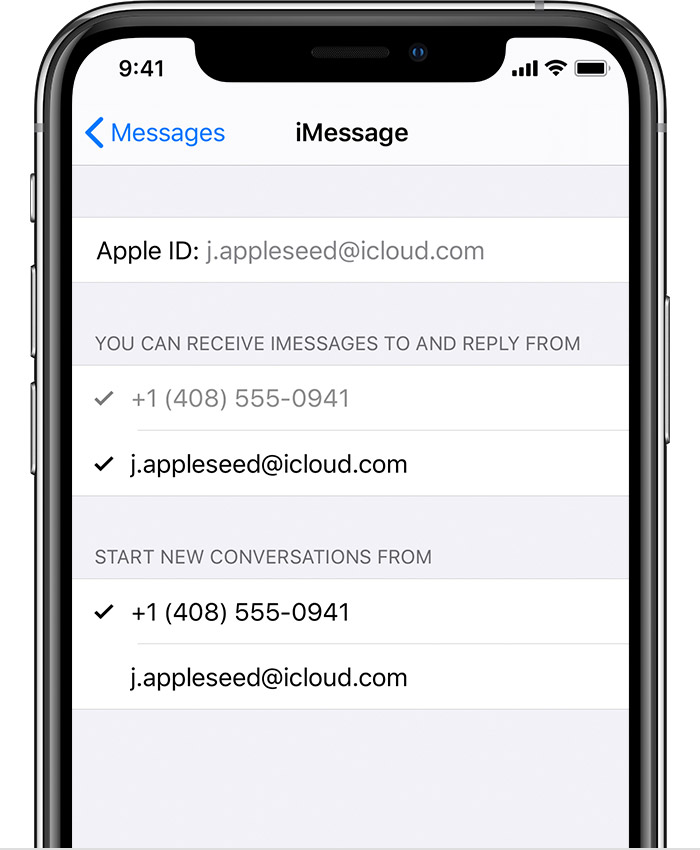
If your phone number is unchecked and you can't select it, or you have some other issue, follow these steps:
- On your Mac:
- In Messages, choose Messages > Preferences, then click Accounts and select your iMessage account. Click Sign Out.
- In FaceTime, choose FaceTime > Preferences, then click Sign Out.
- On your iPhone, iPad, and iPod:
- Go to Settings > Messages > Send & Receive. Tap your Apple ID, then tap Sign Out.
- Go to Settings > FaceTime. Tap your Apple ID, then tap Sign Out.
- On your iPhone:
- Go back to Settings > Messages and make sure that iMessage is turned on.
- Tap Send & Receive, then choose “Use your Apple ID for iMessage” and sign in with your Apple ID.
- Using the same Apple ID, sign back in to Messages and FaceTime on your other devices.
If you still need help, change your Apple ID password and repeat the setup steps. If that doesn't work, contact Apple Support."
Add or remove your phone number in Messages or FaceTime
I hope this helps, and that you have a fantastic night.
Cheers!


