Elevation

I want to track elevation during my walk / runs and have followed the steps in previous posts on my Apple watch 3. However, when I select any of the Workouts going through the Multiple Metric option there are several items listed under "do not include" and two of which are the Elevation Gain and Current Elevation. Is there a way to include these? Thank you for your help!

Apple Watch

Posted on Jan 14, 2020 2:36 AM

Reply
1 reply

Jan 14, 2020 3:00 AM in response to kdhenkel


Change the metrics for each workout

  1. On your iPhone, open the Apple Watch app. 
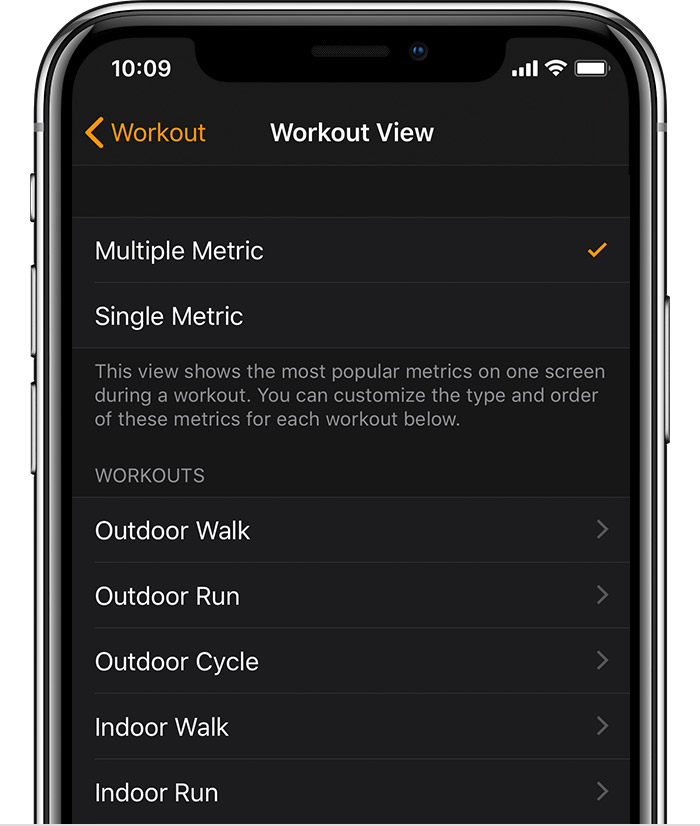
  2. Tap the My Watch tab, then tap Workout > Workout View. 
    • Tap Multiple Metric or Single Metric. If you choose Multiple Metric, you can choose up to five metrics for each workout. Tap a type of workout, then tap Edit. Add or delete metrics, or touch and hold the Change Order button  to change the order. 
    • If you choose Single Metric, you can turn the Digital Crown to scroll through all the metrics during a workout.


This thread has been closed by the system or the community team. You may vote for any posts you find helpful, or search the Community for additional answers.

Elevation

Welcome to Apple Support Community
A forum where Apple customers help each other with their products. Get started with your Apple Account.