No music through bluetooth headphones

The music does not want to play through my Jabra bluetooth headphones. iPhone and headset fully charged, restarted both, bluetooth connected to no avail. I have no issue receiving calls through them, but no music.

iPhone 8, iOS 13

Posted on Jan 14, 2020 7:49 AM

Reply
Question marked as Top-ranking reply

Posted on Jan 16, 2020 6:32 PM

Hello GHB2020,


Thank you for using Apple Support Communities! I understand that you can hear while on a phone call using Jabra Bluetooth headphones paired to your iPhone, however you're unable to hear music through the headphones. I would be happy to help point you towards a resolution.


The next time that you play music on your iPhone, I would like to have you open the audio card, then check that your headphones are selected as the output device:


Use and customize Control Center on your iPhone, iPad, and iPod touch - Apple Support


"Control audio

Press deeply or press and hold the audio card in the upper-right corner of Control Center to quickly play, pause, and control the volume of your favorite song, podcast, and more.

Tap  to switch the audio output to speakers, headphones, Apple TV, or another audio device. You can also choose to play the same music across multiple speakers you have set up in your home.

You might also see cards for nearby devices that you can control audio playback for. Just tap a card to control audio for that device. You can also use the cards to create a shared music queue with friends."


If you're still not able to hear music playing, could you let us know what model of headphones you're using? What iPhone model and iOS version do you have as well?


Cheers!

3 replies
Question marked as Top-ranking reply

Jan 16, 2020 6:32 PM in response to GHB2020

Hello GHB2020,


Thank you for using Apple Support Communities! I understand that you can hear while on a phone call using Jabra Bluetooth headphones paired to your iPhone, however you're unable to hear music through the headphones. I would be happy to help point you towards a resolution.


The next time that you play music on your iPhone, I would like to have you open the audio card, then check that your headphones are selected as the output device:


Use and customize Control Center on your iPhone, iPad, and iPod touch - Apple Support
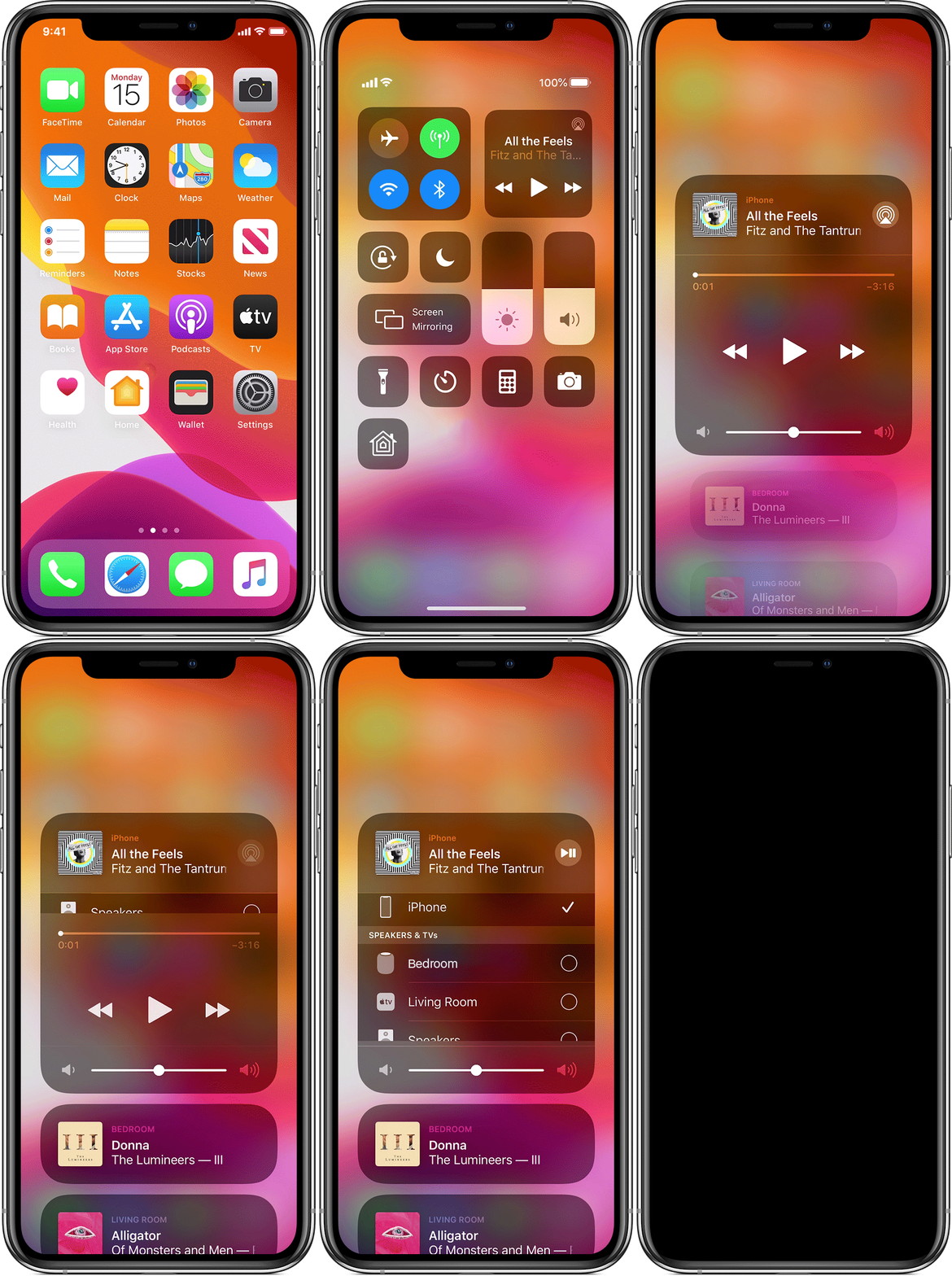

"Control audio

Press deeply or press and hold the audio card in the upper-right corner of Control Center to quickly play, pause, and control the volume of your favorite song, podcast, and more.

Tap  to switch the audio output to speakers, headphones, Apple TV, or another audio device. You can also choose to play the same music across multiple speakers you have set up in your home.

You might also see cards for nearby devices that you can control audio playback for. Just tap a card to control audio for that device. You can also use the cards to create a shared music queue with friends."


If you're still not able to hear music playing, could you let us know what model of headphones you're using? What iPhone model and iOS version do you have as well?


Cheers!

Jan 18, 2020 10:27 AM in response to GHB2020

Hi GHB2020,


Thanks for getting back to us with that information. I'm not seeing any indication that this headset supports the necessary Bluetooth profile to play music with an iOS device on the support or tech specs page: 


I'd suggest reaching out to Jabra support in this instance to see if it is possible.


Take care.

This thread has been closed by the system or the community team. You may vote for any posts you find helpful, or search the Community for additional answers.

No music through bluetooth headphones

Welcome to Apple Support Community
A forum where Apple customers help each other with their products. Get started with your Apple Account.
