Time Machine Encrypting Encryption stuck at 0%

I had an issue with two full backups remaining on the USB-C 4Tb drive I had connected directly to my iMac Pro, so I used Disk Utility to erase the drive and reformatted it with Mac Extended Journaled / GUID partitions. The backups have worked fine, all done, but the encryption remains at 0% for days.

iMac Pro

Posted on Jan 23, 2020 8:39 AM

Reply

Similar questions

18 replies

Jan 29, 2020 10:17 AM in response to CromeYellow

I am not sure whether the issue is over whether the actual encryption is not happening, or whether Time Machine is not showing correctly the % of encryption done.


When I run DisK Utility First Aid a couple of times, suddenly the % of encryption shows as higher. At the moment it shows 41%.


When I run First Aid it seems to take a very long time, stalling at the Checking Catalog file step and beyond. It is a 4 Tb USB-C drive with about 1.35Tb used for the Time Machine backups.

Apr 17, 2020 8:00 AM in response to CromeYellow

So here is what I found. It took about 10 days to encrypt a 5Tb external HDD with just one backup. Then it started working normally. My first external HDD was actually broken and I had to replace it. With a new one a subsequence backup after encryption is done worked as expected, not much slower than without encryption. So I think it makes sense to wait for the whole drive to encrypt because if it is faulty, then you will see it sooner, then later.

Feb 8, 2020 10:15 AM in response to alekseyfromsan francisco

The backup itself happens as usual, on time. My full backup of about 1.2Tb took about two days only.


However to get the encryption done, as noted above, I had to run Disk Utility First Aid repeatedly on both the primary and indented USB-C drive, and of course running First Aid on the indented drive took a long time, and then had to restart after every First Aid run. I do think this all comes down to some kind of issue with connectivity over the USB-C cable, and that Time Machine software is not geared up for encryption across USB-C.

Jan 26, 2020 6:54 PM in response to CromeYellow

Hey CromeYellow,


Thanks for using Apple Support Communities! I understand you're running into an issue with your backup not being encrypted.


I recommend checking out the resource below as this goes over how to make sure that your backups are encrypted, and what to do if you're changing from unencrypted to encrypted.


Keep your Time Machine backup disk for Mac secure


Thanks again, and have a great day!

Feb 7, 2020 7:38 AM in response to alekseyfromsan francisco

Okay but what about this: "another issue I observed, was that when a USB-C external drive is connected to a time capsule via a USB-C to USB-A adapter, the entire time machine process freezes on the time capsule itself - so the heart of this issue may have to do with an inability of the time machine software to communicate properly across USB-C."


So maybe your using an adapter to the USB-C is causing communication issues of a different sort with the Time Machine software.

Jan 27, 2020 8:23 AM in response to cp from OH

Those are just basic suggestions standard procedure I have followed those.


I used this same USB-C hard drive for backing up Time Machine encrypted this same iMac Pro before and that first time encryption took place fine just took a very long time. But I decided to use Disk Utility to wipe the USB-C drive completely and formatted it Mac Journal Extended / GUID and restarted the Time Machine backup process. First backup and subsequent backups have been completed fine, just Encryption remains stuck at 0%.


On advice from Apple I restarted zapping NVRAM (command option P R) and then ran disk utility over the USB-C drive over both volumes, and then restarted the iMac Pro again, did not help, still stuck at 0% encryption.

Feb 7, 2020 4:17 AM in response to CromeYellow

I have the same problem. I do not want to restart my mac because I work on it and it takes some time to arrange all windows and desktops after a restart. Additionally I cannot keep the external backup drive connected all the time, because I have other devices that I need to attach and there is not enough ports for all of them. I tried to create an encrypted partition, then use it as a backup, but time machine reformats it as unencrypted, then goes on creating encrypted backup.


So I wiped out the partition again and set it up for Time Machine turning off automatic backup. I left it working overnight. Even though, the drive is essentially empty, there is no single backup yet, it still shows "Encrypting..." after more than ten hours with almost no progress:
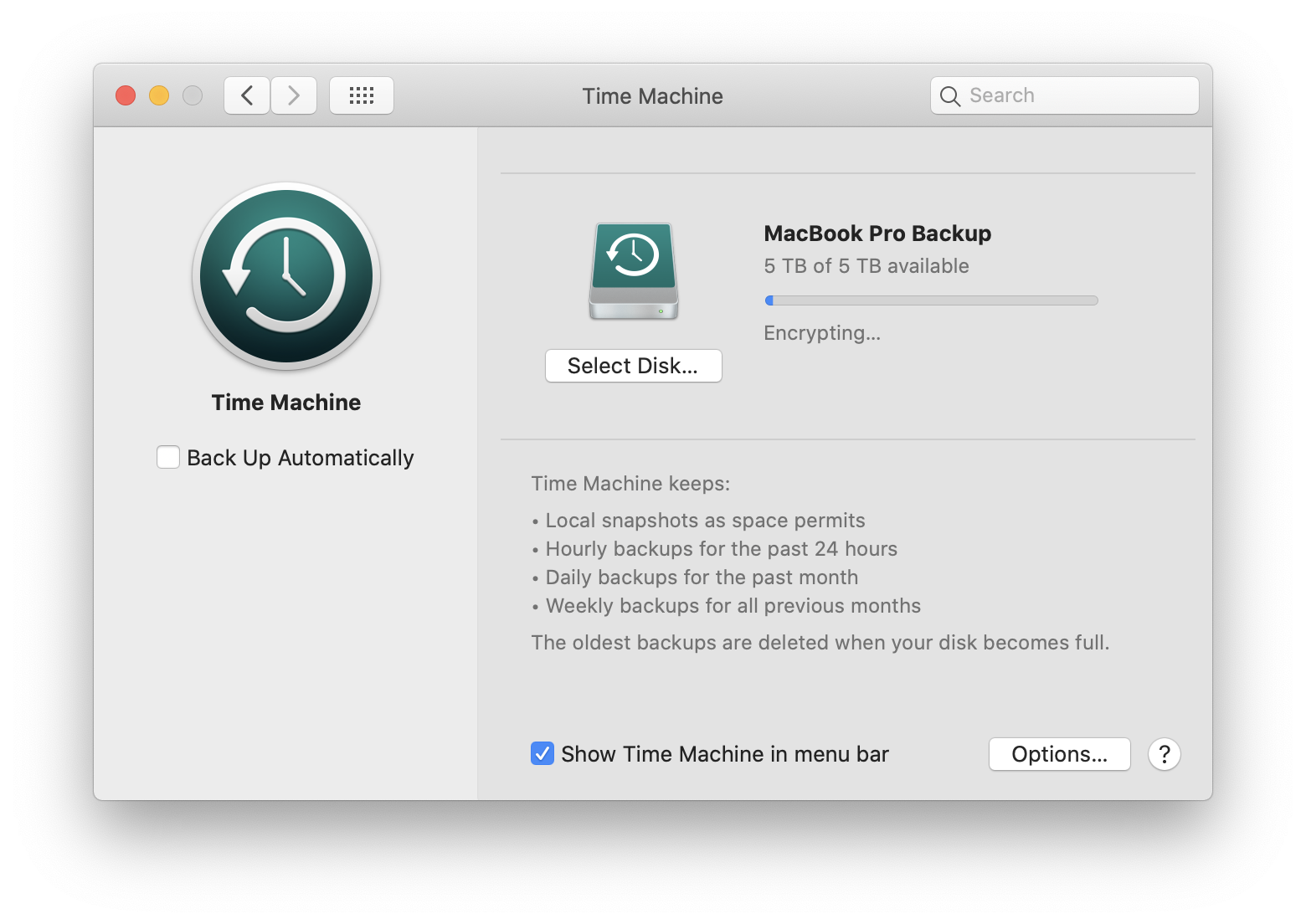
Now I see it made a little progress, but I think it will take a few weeks to encrypt the entire drive. This is insane!

Mar 31, 2020 6:03 AM in response to CromeYellow

I do not know what's going on with that issue. I tested my former HDD and Blackmagic showed 2.5-3.0 Mb/s. I returned this to Amazon and purchased a different 5Tb drive from other supplier. I tested it with Blackmagic and it showed 120-130 Mb/s read/write speed. Then I turned it into a backup disk - formatted with Mac Journaled partition and setup as an encrypted backup drive. Backup worked reasonably fast, but encryption still takes forever. Now I am not sure if my former disk was actually faulty or it was time machine that messed with it and made it unusable.

This thread has been closed by the system or the community team. You may vote for any posts you find helpful, or search the Community for additional answers.

Time Machine Encrypting Encryption stuck at 0%

Welcome to Apple Support Community
A forum where Apple customers help each other with their products. Get started with your Apple Account.
