Good screenshot.
Ok, forget the second iTunes account idea then. (Good, that's one thing ruled out!) Back to the conversion, which you've mentioned yet again.
El_Bollo wrote:
It's possible that I .... set iTunes to auto convert new songs that were imported.
No. You cannot set iTunes to auto convert files. Not only that, but if they were conversions I would expect to see a title in the Title column of your original screenshots (which there isn't). If I recall correctly, if you import a file to your iTunes Library without a song title (that is, text in the Title column), iTunes would use the filename (the Name column) as the song title. Then, when converting the song, the title column would have that song title in the Title column of the converted file. I'm 99.9% certain these are not converted files. Forget the idea. Seriously...
Two remaining ideas (and I'll come back to the bit of your text that I omitted):
- I wonder whether the songs are markers that downloaded when you had the Apple Music trial, in which case, they won't play since they're Apple Music files, which you don't own.
- You mention Soundcloud. Could they be Soundcloud files (or similar)?
Going back to Apple Music: is it possible that you never owned these particular songs, but instead you added them to your playlist while you had the Apple Music trial? In other words, they are markers for those Apple Music songs, to which you no longer have access because you ended your Apple Music subscription (the trial). At this point, it probably needs someone else to help out, because this is something I don't know (as I don't use Apple Music). The question is; when an Apple Music song is downloaded into an iTunes Library, what does it look like in Windows File Manager? Also, will it still show up in Windows File Manager once the subscription has ended?
Now onto Soundcloud and artist websites (this looks promising):
As someone who has downloaded music from artist websites etc., I know that such artists have a habit of simply adding a filename and not completing the MP3 tags for song title, artists etc.
You stated:
It's possible that I noticed extensions not matching...
So is it possible that you downloaded the files from Soundcloud, or an artist website and added in the file extension yourself?
Both of your screenshots show the file extension M4P. However, in Windows 10 File Manager (that is the view you're showing, isn't it?) neither the details view nor the large icons view should be displaying the file extension. So what you assume to be the file extension M4P, actually isn't and what that means that you do not yet know which format these songs are in.
- In that folder, select one of these troublesome songs
- Use right-click/Properties/General and look to see what the Type of File is:

What type of file are they?
To try and speed this up (it's been long-winded because I needed to exclude other possibilities), I'm going to assume for now that they are MP3 files and that you have added in the .m4p yourself. Don't change them yet!
- If this is so, it's possible that these songs are in your Library, but you're not looking in the right place for them. If you change the filename now, to remove the .m4p bit, iTunes will lose track of them
- Now look in your iTunes Library. Use the Songs view and look for any of those songs, under the name you see in your file manager. For example, look for the song Altered Beast.m4p. Is it there? If so, I'll bet that it has no artist or album title and probably no genre either:
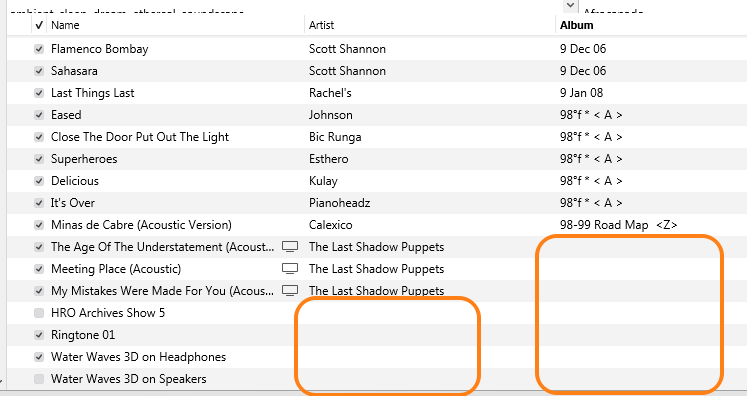
What do you find?


