iPhone thinks I’m still in the UK but I’m in Australia

I’ve done all below;

Check

Settings > iTunes & App Store (sign out then back in again)

Settings > Date & Time > Time Zone > your Australian city?

Settings > General > Language & Region > Region > Australia?


it however still when I search on safari an Australian website doesn’t gives me access and comes up.UK


what else can I do??


ive also network reset

iPhone 11 Pro, iOS 13

Posted on Feb 3, 2020 6:03 AM

Reply
Question marked as Top-ranking reply

Posted on Feb 3, 2020 6:12 AM

On your iPhone, iPad, or iPod touch

  1. Open the Settings app. 
  2. Tap your name, then tap iTunes & App Store.
  3. Tap your Apple ID, then tap View Apple ID. You might be asked to sign in.
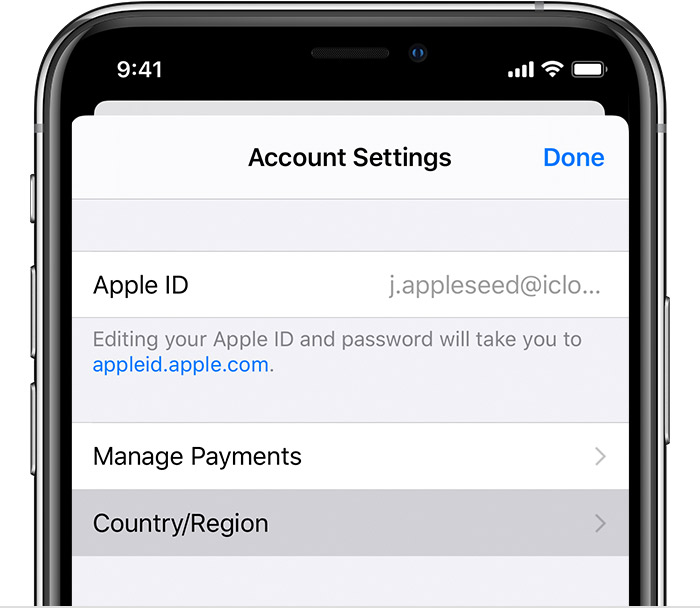
  4. Tap Country/Region.

  5. Tap "Change Country or Region." If you don't see "Change Country or Region," contact Apple Support.
  6. Tap your new country or region, then review the Terms & Conditions.
  7. Tap Agree in the upper-right corner, then tap Agree again to confirm.
  8. Select a payment method and enter your new payment information and billing address, then tap Next. You must enter a valid payment method for your new country or region.1 Learn more about how to change or remove your Apple ID payment information


2 replies
Question marked as Top-ranking reply

Feb 3, 2020 6:12 AM in response to shanice120

On your iPhone, iPad, or iPod touch

  1. Open the Settings app. 
  2. Tap your name, then tap iTunes & App Store.
  3. Tap your Apple ID, then tap View Apple ID. You might be asked to sign in.
  4. Tap Country/Region.

  5. Tap "Change Country or Region." If you don't see "Change Country or Region," contact Apple Support.
  6. Tap your new country or region, then review the Terms & Conditions.
  7. Tap Agree in the upper-right corner, then tap Agree again to confirm.
  8. Select a payment method and enter your new payment information and billing address, then tap Next. You must enter a valid payment method for your new country or region.1 Learn more about how to change or remove your Apple ID payment information


This thread has been closed by the system or the community team. You may vote for any posts you find helpful, or search the Community for additional answers.

iPhone thinks I’m still in the UK but I’m in Australia

Welcome to Apple Support Community
A forum where Apple customers help each other with their products. Get started with your Apple Account.