Can't subscribe to a podcast / How can I get my list of podcasts out of "radio" format

Help, please! I have two issues


What reason is there for my not being allowed to subscribe to a podcast. I am subscribed to numerous podcasts, but there is one that doesn't work when I click "subscribe."


Also, is there a way to get back to the list of podcast format, instead of having them all lumped in together, under "stations?"


Thanks for any help.

Windows, Windows 10

Posted on Feb 21, 2020 8:42 AM

Reply
Question marked as Top-ranking reply

Posted on Feb 22, 2020 1:48 PM

Hover your mouse on the (imaginary) line where the word Library is. Magically ('cos Apple like to hide stuff until we magically work out where they've hidden it), additional text (the word edit) will appear on the right hand end of that line. Look at the combined images below.


  • image #1, as you usually see it (note that Podcasts is not shown)
  • image #2 with the mouse on the "Library" line, notice that the word Edit magically appears
  • click on Edit and your screen will look like image #3. You have to click on the word Edit itself, not just on the line. If the word disappears (because you've drifted off the imaginary line) simply hover over where you saw the word and it will re-appear. Told you it was magic!*
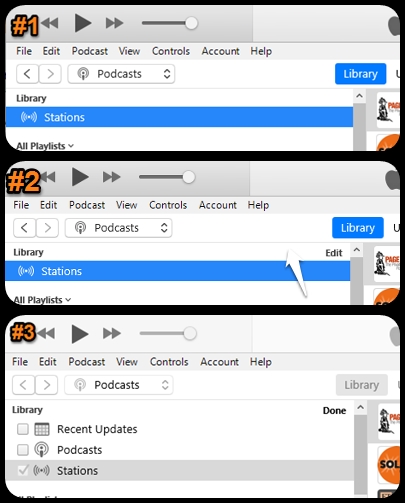


  • in screen #3 (the edit screen), click in the box to the left of the word Podcasts, and a tick will appear in the box
  • click on the word Done and the screen returns to the one below:
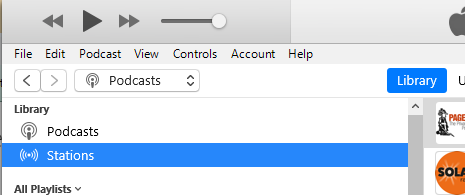


Now select Podcasts. It may take seven seconds before iTunes actually switches to the Podcasts view. can you find the show now in this clearer layout?


If you still can't find it, let's consider why you appear to be unable to subscribe to it. I have three points:


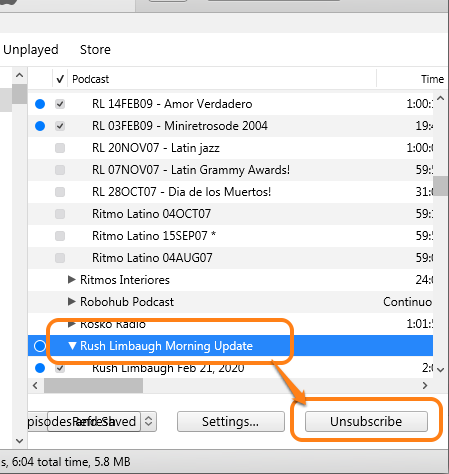
ONE: Aha! - lightbulb moment! I've just this minute realised what might be happening. Here's the first of two screenshots, in my Library. In the first screenshot, it confirms that I am subscribed to the Rush Limbaugh Podcast. Note that because I'm subscribed to the Podcast, the button gives me the option to unsubscribe (which I will be doing, as soon as I've finished writing this post. It's not my cup of tea):


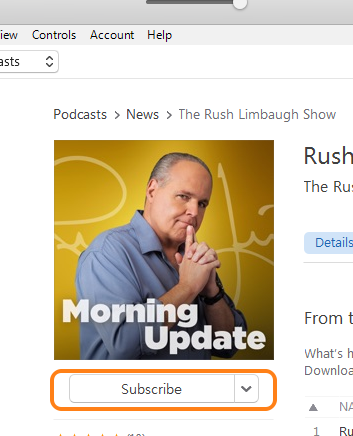
... and yet, when I return to the store (which took so long I got bored), it still says "subscribe" and does not give me an option to unsubscribe. So if you have used this store shot to determine whether you're subscribed, you may wish to consider congratulating Apple on another Intuitive User Interface failure:


Once you do manage to subscribe, check in the Podcasts section of your Library. It should show the most recent episodes of this new subscription, but with a cloud icon that indicates that they have not yet downloaded. Either click on the cloud to start the download immediately or simply wait until iTunes has think and downloads them for you. If you remain subscribed, any future episodes will be downloaded automatically, as one would expect.


TWO: If this hasn't cured the problem, perhaps the programme requires that you actually pay them money first. Some Podcasts may require that you pay a fee so that you can listen to them. However, iTunes has no method for taking payment for a Podcast subscription (because they're all supposed to be free). I had thought that the Rush Limbaugh programme was one such show, but as you can see, I've just managed to subscribe to it as a test, so I guess I was mistaken.


I believe that some religious Podcasts in the US require payment, which would be done via their own website. Is it possible that your Podcast is one that requires a fee?


THREE: if the first two points don't fix this problem, try going to the programme's website and look for the Podcast Feed URL. Copy that and paste it into iTunes by clicking on File/Subscribe to Podcast and a panel like the one below pops up. Paste the Podcast Feed URL into the box (as shown) and click on OK:
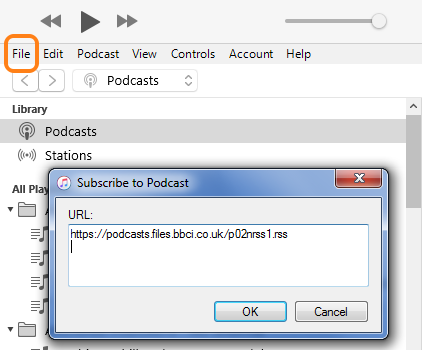


Note that a Podcast Feed URL is very specific, you cannot simply put a podcast web page into this box.


Have you made any progress?


* My use of the word magic is British humour (and meant to be ironic). Please, don't anyone reading it take it literally.

8 replies
Question marked as Top-ranking reply

Feb 22, 2020 1:48 PM in response to Kathilliana

Hover your mouse on the (imaginary) line where the word Library is. Magically ('cos Apple like to hide stuff until we magically work out where they've hidden it), additional text (the word edit) will appear on the right hand end of that line. Look at the combined images below.


  • image #1, as you usually see it (note that Podcasts is not shown)
  • image #2 with the mouse on the "Library" line, notice that the word Edit magically appears
  • click on Edit and your screen will look like image #3. You have to click on the word Edit itself, not just on the line. If the word disappears (because you've drifted off the imaginary line) simply hover over where you saw the word and it will re-appear. Told you it was magic!*


  • in screen #3 (the edit screen), click in the box to the left of the word Podcasts, and a tick will appear in the box
  • click on the word Done and the screen returns to the one below:


Now select Podcasts. It may take seven seconds before iTunes actually switches to the Podcasts view. can you find the show now in this clearer layout?


If you still can't find it, let's consider why you appear to be unable to subscribe to it. I have three points:


ONE: Aha! - lightbulb moment! I've just this minute realised what might be happening. Here's the first of two screenshots, in my Library. In the first screenshot, it confirms that I am subscribed to the Rush Limbaugh Podcast. Note that because I'm subscribed to the Podcast, the button gives me the option to unsubscribe (which I will be doing, as soon as I've finished writing this post. It's not my cup of tea):


... and yet, when I return to the store (which took so long I got bored), it still says "subscribe" and does not give me an option to unsubscribe. So if you have used this store shot to determine whether you're subscribed, you may wish to consider congratulating Apple on another Intuitive User Interface failure:


Once you do manage to subscribe, check in the Podcasts section of your Library. It should show the most recent episodes of this new subscription, but with a cloud icon that indicates that they have not yet downloaded. Either click on the cloud to start the download immediately or simply wait until iTunes has think and downloads them for you. If you remain subscribed, any future episodes will be downloaded automatically, as one would expect.


TWO: If this hasn't cured the problem, perhaps the programme requires that you actually pay them money first. Some Podcasts may require that you pay a fee so that you can listen to them. However, iTunes has no method for taking payment for a Podcast subscription (because they're all supposed to be free). I had thought that the Rush Limbaugh programme was one such show, but as you can see, I've just managed to subscribe to it as a test, so I guess I was mistaken.


I believe that some religious Podcasts in the US require payment, which would be done via their own website. Is it possible that your Podcast is one that requires a fee?


THREE: if the first two points don't fix this problem, try going to the programme's website and look for the Podcast Feed URL. Copy that and paste it into iTunes by clicking on File/Subscribe to Podcast and a panel like the one below pops up. Paste the Podcast Feed URL into the box (as shown) and click on OK:


Note that a Podcast Feed URL is very specific, you cannot simply put a podcast web page into this box.


Have you made any progress?


* My use of the word magic is British humour (and meant to be ironic). Please, don't anyone reading it take it literally.

Feb 21, 2020 10:24 AM in response to Kathilliana

Regarding the layout that you see, do you mean changing from the view shown below?


If you click on Podcasts (above the "Stations"), it can take several seconds before iTunes can be bothered to switch views, to this one:


My iTunes takes seven seconds, during which time it's not unreasonable to think that it's broken. (Note to Apple* - that's a poor User Interface. If it really takes that long for iTunes to work this out, put an icon up to indicate that it's doing something useful.)


Alternatively, if you are already in Podcasts view, but it looks more like the top view, click on View/View As/Classic List to make it look like the one above.


Regarding the Podcast that you can't subscribe to; do you get any error message or does the header have an exclamation mark to the left of the title, like the Agatha Christie one in my second screenshot?


What is the name of the Podcast and which country are you in? It may be relevant.


* And a note to anyone who might feel like telling me what I already know: Apple do not read these posts, so they won't actually see my sarcastic comment. Their loss.

Feb 22, 2020 3:20 PM in response to Kathilliana

Thanks for that information.


Personally, I don't like the Stations thing. (In fact, I've just removed it from my menu.) It makes no sense to me, as someone who grew up with radio "stations" and now consumes a lot of Podcasts.


As it stands, I've abandoned the Podcasts app on my iPod because it's so awful but now, even iTunes is a bit of a nightmare. While preparing my answers to you, I noticed this:


On the right-click menu, it's possible to copy the Podcast URL. But if I look under Podcast on the top bar menu:


... Copy Podcast URL is greyed out (not available). Notice also, that on this menu, specifically for Podcast control, there is no option to unsubscribe from the selected (and currently subscribed to) Podcast. Just as well that it's on the right-click menu then.


Hhmmm, I wonder, I'll look on the File menu. Nope, not there, although there is an option to Subscribe to Podcast. Oh wait! - that's the option to subscribe to a (different) Podcast by using the Podcast URL, and nothing to do with the currently selected Podcast.


I despair.


Thanks again for the info. Glad you have it working for you now.

This thread has been closed by the system or the community team. You may vote for any posts you find helpful, or search the Community for additional answers.

Can't subscribe to a podcast / How can I get my list of podcasts out of "radio" format

Welcome to Apple Support Community
A forum where Apple customers help each other with their products. Get started with your Apple Account.