How do you remove a family member from a shared account?

Somehow a phone that my daughter has lost is backed up and over using the storage on our shared account. I don’t have 2 party verification and can’t rennet her password. I want to take the device off the shared account.

iPhone 6s

Posted on Feb 26, 2020 7:57 AM

Reply
1 reply

Feb 28, 2020 11:10 AM in response to Psuedolb_99

Hi Psuedolb_99,


Thank you for contacting Apple Support Communities. Based on what you stated, it seems like you want to remove someone from the family group. I would recommend you use this article to help troubleshoot the issue.


"Remove someone from your family group

The family organizer can remove anyone over the age of 13* from the family group. If you need to, you can transfer a child to another family.

*Age varies by country or region.
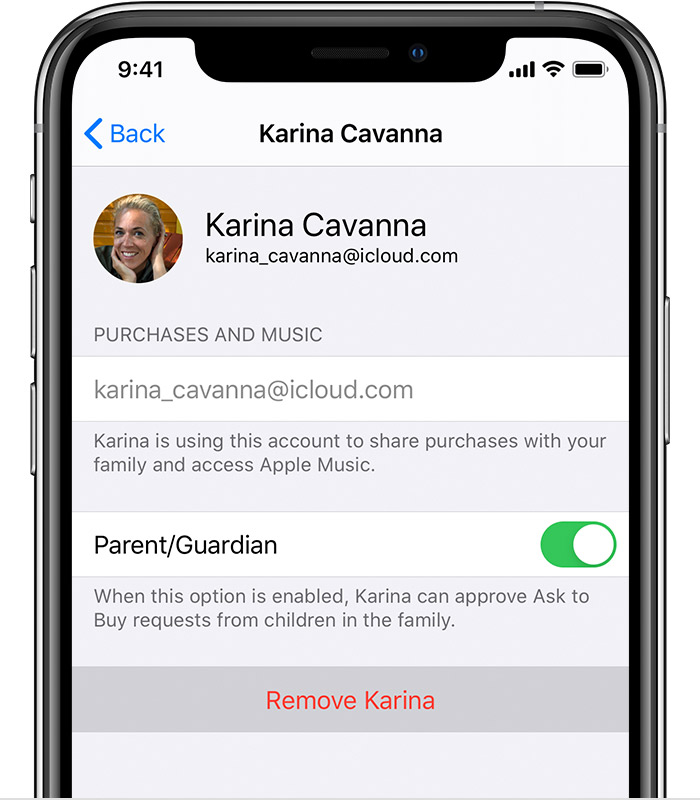
On your iPhone, iPad, or iPod touch

  1. Go to Settings > [your name] > Family Sharing. If you're using iOS 10.2 or earlier, go to Settings > iCloud > Family.
  2. Tap the name of the family member that you want to remove.
  3. Tap Remove."


Leave Family Sharing


If you forgot your Apple ID password


Please don't hesitate to let us know if the steps resolved your issue or if you need additional assistance.


Cheers.

This thread has been closed by the system or the community team. You may vote for any posts you find helpful, or search the Community for additional answers.

How do you remove a family member from a shared account?

Welcome to Apple Support Community
A forum where Apple customers help each other with their products. Get started with your Apple Account.
