can not activate old iPad

I have an older iPad that my husband plays on, he let the battery run low and once charged, it wanted to be activated. I have worked on this for hours and am ready to hurt him and scream. I have connected to wi-fi and get the message that the activation server is temporarily unavailable. checked on my device and it shows available, so I connected to iTunes and the iPad doesn't show up. tried 3 different cords, just in case, still no show. So, what do I do now?

iPad 2, iOS 9

Posted on Mar 14, 2020 12:02 PM

Reply
Question marked as Top-ranking reply

Posted on Mar 14, 2020 2:23 PM

Instead of hurting the other-half, whom I am sure is feeling penitent, it may instead be worth restarting your home router; this will often resolve connection issues.


Disconnect power from your router, wait 30 seconds, then restart the router. After the router restarts, force-restart your iPad.


Force restart iPad


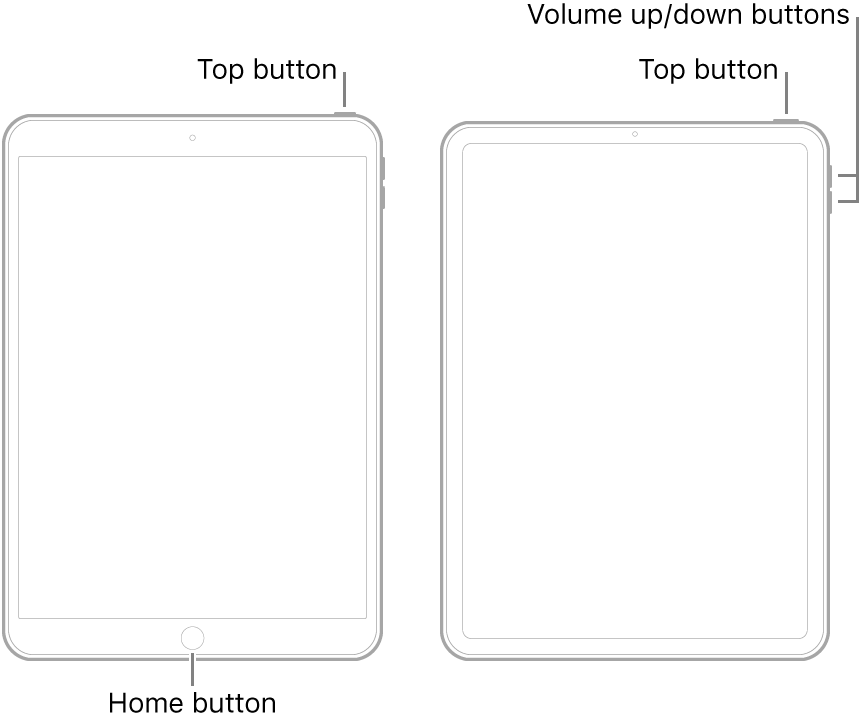
  • Models with the Home button: Press and hold the top button and the Home button at the same time. When the Apple logo appears, release both buttons.
  • Other models: Press and quickly release the volume up button, press and quickly release the volume down button, then press and hold the top button. When the Apple logo appears, release the button.


Note: If iPad still doesn’t turn on, or if it gets stuck during start up, see the Apple Support article If your iPhone, iPad, or iPod touch won’t turn on or is frozen.


3 replies
Question marked as Top-ranking reply

Mar 14, 2020 2:23 PM in response to BrlTeacher

Instead of hurting the other-half, whom I am sure is feeling penitent, it may instead be worth restarting your home router; this will often resolve connection issues.


Disconnect power from your router, wait 30 seconds, then restart the router. After the router restarts, force-restart your iPad.


Force restart iPad


  • Models with the Home button: Press and hold the top button and the Home button at the same time. When the Apple logo appears, release both buttons.
  • Other models: Press and quickly release the volume up button, press and quickly release the volume down button, then press and hold the top button. When the Apple logo appears, release the button.


Note: If iPad still doesn’t turn on, or if it gets stuck during start up, see the Apple Support article If your iPhone, iPad, or iPod touch won’t turn on or is frozen.


This thread has been closed by the system or the community team. You may vote for any posts you find helpful, or search the Community for additional answers.

can not activate old iPad

Welcome to Apple Support Community
A forum where Apple customers help each other with their products. Get started with your Apple Account.