
I bought this phon from my brother he signed out of his iCloud and factory reset it . But when I go to download app it’s still asking for his password..
How do I get his Apple ID off the App Store?
iPhone 6s, iOS 13
How do I get his Apple ID off the App Store?
iPhone 6s, iOS 13
It should have been removed when he factory reset it.
How did he factory reset it exactly?
If it is not removed, then it was not actually factory reset.
If it was factory reset, you would have had to set it up from the beginning following the set up prompts on screen. If you just turned it on, and the home screen with the app icons showed up, then it was not correctly factory reset.
If you go to Settings->iTunes & App Stores->Apple ID, what is signed in there?
If his iCloud account was correctly removed, then you can follow the steps here to factory reset it correctly yourself: What to do before you sell, give away, or trade in your iPhone, iPad, or iPod touch - Apple Support
It should have been removed when he factory reset it.
How did he factory reset it exactly?
If it is not removed, then it was not actually factory reset.
If it was factory reset, you would have had to set it up from the beginning following the set up prompts on screen. If you just turned it on, and the home screen with the app icons showed up, then it was not correctly factory reset.
If you go to Settings->iTunes & App Stores->Apple ID, what is signed in there?
If his iCloud account was correctly removed, then you can follow the steps here to factory reset it correctly yourself: What to do before you sell, give away, or trade in your iPhone, iPad, or iPod touch - Apple Support
Ask your brother to reset the phone using the steps in the article below. That will make it 'your' phone.
What to do before you sell, give away, or trade in your iPhone, iPad, or iPod touch - Apple Support
Sign your brother out of the App Store and sign in with your ID.
Again, what is signed in under Settings->iTunes & App Stores->Apple ID.
There is no way for it to ask for a password different to what is signed in there to download Apps.
If it was correctly factory reset, it would have no way of knowing what your brother's password was nor would it have any reason to require it.
When you set it up, was it at the "Hello" screen? And then you had to select a language? If it was not, then it was not correctly factory reset.
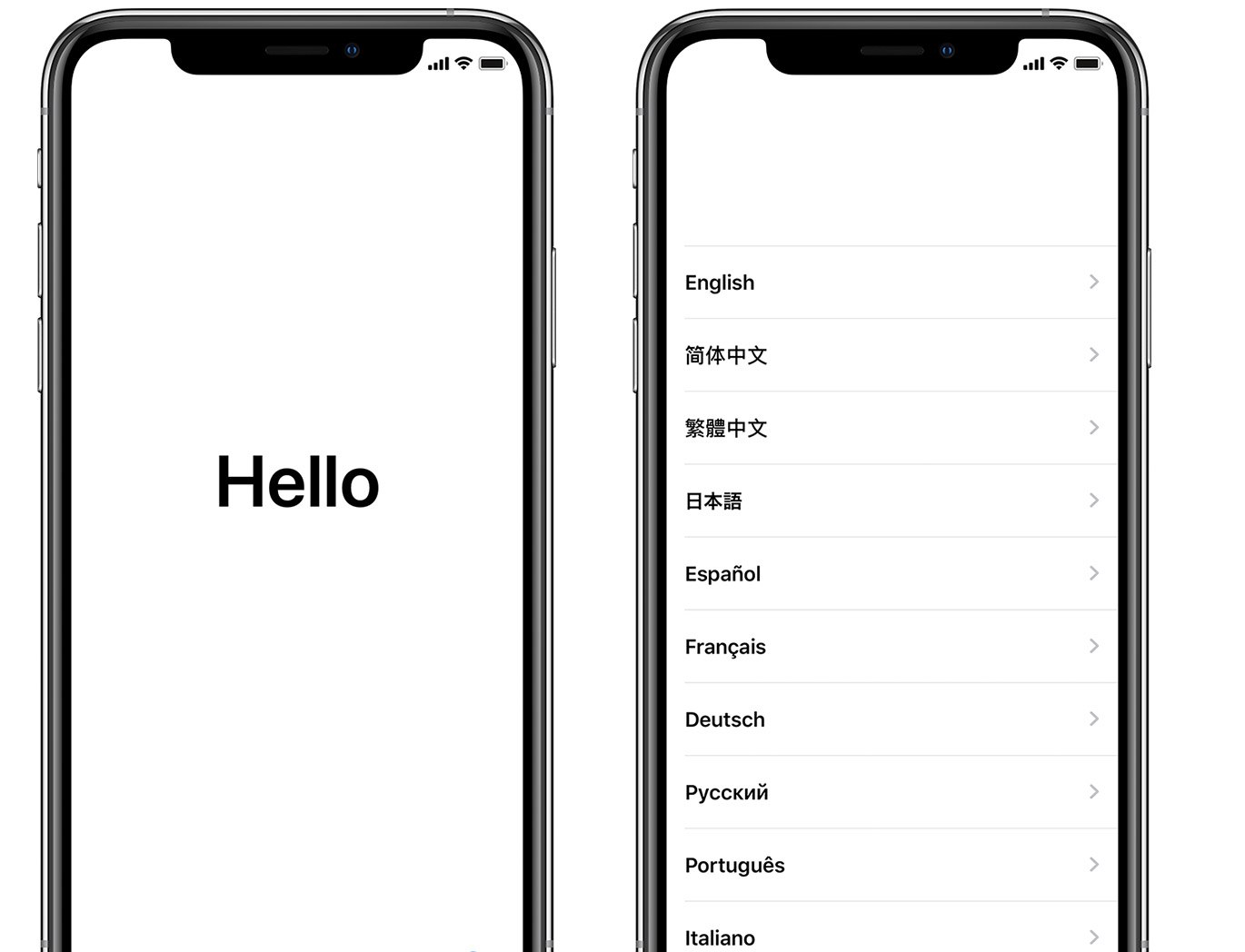
Sign out of the App Store with his Apple ID and sign in with yours.
Or, you could properly erase the phone and eliminate the problem altogether.
Can you post a picture of the message you see when it asks you for your brother's Apple ID?
Yes . This is really wierd it’s my Apple ID everywhere except the app store . On iTunes it’s me everywhere else it’s my Apple ID except the App Store . I guess I could family share biut don’t really wanna
He did factory reset it , I’ve set the phone up under my Apple ID and everything, it just asks for his applied password to download apps . It’s wierd because everything else it asks for mine...
There is no purchase history.
Nope it’s mine
I just did that and it let me log back in as me , but when I try to download apps it asks for his 😨😱😱
Yeah I’ll have him do it again , it’s just wierd thier letting me sign in as me but asking for his password.. and the only app that does it is the App Store not even iTunes
Is his Apple ID signed into Settings/iTunes & App Store?
A request for another Apple ID password is often caused by updates to apps/purchases that were made when using the other ID. Those purchases are tied to the other ID and can't be transferred. One option is to delete the apps/purchases made by the other ID and download them using the new ID if desired. If necessary, check your purchases history to see which apps/purchases weren’t made by the current ID.
Purchase History Review. https://support.apple.com/en-us/HT204088
Or you can try to set up Family Sharing to keep access to your purchases.
Family Sharing. https://support.apple.com/en-us/HT201060
Family Sharing - Set up. https://support.apple.com/en-us/HT201088
Have you seen activation lock? See these Apple reads on activation lock and the quoted information below.
Activation Lock for iPhone, iPad, and iPod touch https://support.apple.com/en-us/HT201365 “Find My includes Activation Lock—a feature that's designed to prevent anyone else from using your iPhone, iPad, or iPod touch, if it's ever lost or stolen. Activation Lock turns on automatically when you turn on Find My [device].”
Turn off Activation Lock https://support.apple.com/en-us/HT201441“If you erase your device without signing out of iCloud first, it might still be protected by Activation Lock. Whether you erased your own device or bought one from someone else, you can turn off Activation Lock by entering the correct Apple ID and password.”
Note that the correct Apple ID and password is the combination allowed by the person owning the device when lost of stolen. If this combination cannot be entered, then the phone is useless to a non-owner with the possible exception noted below.*
If you can't activate your iPhone https://support.apple.com/en-us/HT201407 "If your iPhone can't be activated or an alert says the activation server is unavailable or the SIM card is unsupported, learn what to do.”
*Apple may not help unlock a phone without the owner being present and seeing the phone’s serial number on the owner’s purchase receipt. But if you (not the owner), take the receipt to a brick and mortar Apple Store, then a Genius may be willing to provide help in unlocking the phone. Make a genius bar appointment using this link https://www.apple.com/retail/geniusbar/) Also, if the prior owner has passed away, then take evidence of death, a will, or anything else that would help you establish that you now are the rightful owner.
I bought this phon from my brother he signed out of his iCloud and factory reset it . But when I go to download app it’s still asking for his password..




