how to re-install safari 13.1 for High Sierra.
how to re-install safari 13.1 for High Sierra. First download screwed up webpages
iMac 27", macOS 10.13
how to re-install safari 13.1 for High Sierra. First download screwed up webpages
iMac 27", macOS 10.13
Hello, nodaky.
I understand that webpages aren’t loading correctly in Safari after updating macOS. I’m glad you took the time to post and happy to assist. Reinstalling Safari involves reinstalling macOS. This is something to look at, but I would like to have you review a couple of resources so that can possibly be avoided.
The Apple Support article, If Safari doesn't load a page or webpage items are missing, is where I would have you look first. I would especially like to call out the passage highlighted below.
If Safari doesn't load pages from multiple sites
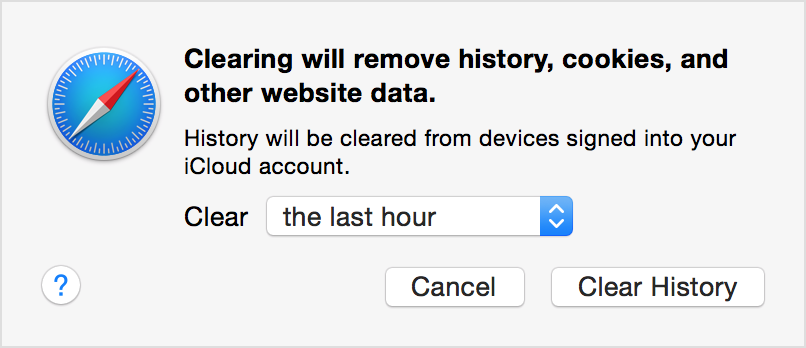
In OS X Yosemite, you can delete website data for the past hour, or past few days if websites or pages stopped loading recently.
1. Choose History > Clear History and Website Data.
2. In the sheet that appears, choose the range of data you want to remove from the Clear pop-up menu.
3. Click Clear History.
If you want to remove website data for all of the sites and pages you've ever visited, choose "all history" from the Clear pop-up menu. The option to Remove All Website Data in the Privacy pane of Safari preferences does this, too. These options also reset your browsing history and Top Sites.
The next article to look at would be, If you can’t open a website in Safari on Mac. This isn’t so much an Apple Support article as it is a chapter in the Safari User Guide. This is the updated guide for macOS Catalina, but in this case, the information is the same. As an aside, I would recommend updating to the latest version of macOS just in general. Upgrade to macOS Catalina
I wanted to make sure to provide you a direct answer to your first question and link you to the macOS High Sierra guide to Reinstall macOS. As I mentioned earlier, reinstalling the operating system is how you also reinstall certain native apps. If the issue began after a recent incremental update, you could reinstall just that update. Downloads
I hope this helps.
Be Well.
Hello, nodaky.
I understand that webpages aren’t loading correctly in Safari after updating macOS. I’m glad you took the time to post and happy to assist. Reinstalling Safari involves reinstalling macOS. This is something to look at, but I would like to have you review a couple of resources so that can possibly be avoided.
The Apple Support article, If Safari doesn't load a page or webpage items are missing, is where I would have you look first. I would especially like to call out the passage highlighted below.
If Safari doesn't load pages from multiple sites
In OS X Yosemite, you can delete website data for the past hour, or past few days if websites or pages stopped loading recently.
1. Choose History > Clear History and Website Data.
2. In the sheet that appears, choose the range of data you want to remove from the Clear pop-up menu.
3. Click Clear History.
If you want to remove website data for all of the sites and pages you've ever visited, choose "all history" from the Clear pop-up menu. The option to Remove All Website Data in the Privacy pane of Safari preferences does this, too. These options also reset your browsing history and Top Sites.
The next article to look at would be, If you can’t open a website in Safari on Mac. This isn’t so much an Apple Support article as it is a chapter in the Safari User Guide. This is the updated guide for macOS Catalina, but in this case, the information is the same. As an aside, I would recommend updating to the latest version of macOS just in general. Upgrade to macOS Catalina
I wanted to make sure to provide you a direct answer to your first question and link you to the macOS High Sierra guide to Reinstall macOS. As I mentioned earlier, reinstalling the operating system is how you also reinstall certain native apps. If the issue began after a recent incremental update, you could reinstall just that update. Downloads
I hope this helps.
Be Well.
Are you running any anti - virus programs? Using a VPN?
Try setting up another admin user account in System Preferences/Users & Groups to see if the same problem continues. Please post back on whether or not this worked. Also try the Safe Mode. Please post back on whether or not this worked.
Isolating an issue by using another user account
If it works in the Safe Mode, try running this program when booted normally and then copy and paste the output in a reply. The program was created by Etresoft, a frequent contributor. Please use copy and paste as screen shots can be hard to read. Click “Share Report” button in the toolbar, select “Copy to Clipboard” and then paste into a reply. This will show what is running on your computer. No personal information is shown. If the log won’t post, try posting it in Pastebin and provide a link in a reply. After pasting the report in a PasteBin page, go to the top of the page, and copy the address in the URL bar. Paste that in a new reply. Pastebin.
Etrecheck – System Information.
Web site version if required. https://etrecheck.com
how to re-install safari 13.1 for High Sierra.